services  .  Accomplishments Completed

Accomplishments Completed

Pro Salesforce Header

Congratulations! You’ve made it through!​

This has surely been a long journey, filled with something new to learn about Salesforce, but we’re glad that you were there with us throughout it.
And if you’re through with every topic, you can proudly call yourself a Salesforce PRO.
If you need any refresher, you can always go back through the milestones that got you to SALESFORCE KUNG-FU BLACK BELT.
We’re sure that was a fun yet knowledgeable expedition for you.

We hope you’ll keep learning and growing in this Salesforce ecosystem. Of course, our Salesforce consulting services always have your back if you get stuck anywhere, so feel free to reach out to us for any doubts or assistance when implementing what you’ve learned. 

Have a Message For Us?

Please fillup the form and send your message.

Loading......

Captcha

Refresh

Click on submit to be contacted for a demo of our products or Salesforce Services.

Pat your back and Enjoy what you have achieved!

Congratulations! You’ve made it.

It was a long informational journey, and we’re happy you walked beside us. 

You’re already a Salesforce pro if you are through everything we’ve got for you. But if you’ve missed anything, here’s a refresher on what we’ve recently covered.

Have a Message For Us?

Please fillup the form and send your message.

Loading......

Captcha

Refresh

Click on submit to be contacted for a demo of our products or Salesforce Services.

Process Builder on Deathbed, let's learn Flows

It has been some time since the news has swelled about Salesforce retiring Process Builder and Workflow Automation rules. And this isn’t just news anymore; it’s actually happening.  

Salesforce will deprecate Process Builder and Workflow Rules starting from Winter ‘23. Initially, you’ll be able to run Process Builder, but you won’t be able to use these tools to create any new automation. 

That’s where you’ll be using Flow.

Why Salesforce is Retiring Process Builder and Workflow Rules

The real value of Salesforce lies in its ability to automate manual tasks. 

Salesforce has been widely adopted in organizations to automate manual, repetitive, and time-consuming tasks to free employees to focus on tasks that can generate more sales and enhance customer retention. And as a Salesforce consulting service, we know that’s where the true ROI lies for businesses working with Salesforce.

This is why Salesforce always prioritized using automation and offered multiple tools. With each major release, Salesforce brings new tools that are better than the previous generation, making it easier for users to work with complex process automation without any code.

The CRM also supports several automation tools with overlapping capabilities – the main three being Workflow Rules, Process Builder, and Flow.

That being said, using multiple tools at once for automation has its share of problems:

It’s challenging to get an overall picture of your automation and your automation’s health when they are spread across several products.
The automation requirements of businesses keep becoming more complicated, thus increasing the need for more sophisticated tools to resolve issues.

It can become very costly and time consuming for companies to maintain and enhance multiple tools. That’s why it makes sense to have just one tool to handle everything. This enabled Salesforce to future-proof Flow and enhance its capabilities.

What makes Flow the best option to replace Workflow Rules and Automation Builder

Most Salesforce users need to know that Flows are capable of much more than both Workflow Rules and Process Builders.
In particular, Flows offers:
Better overall performance
Functionality like Fast Field Updates to improve high-volume automation ntegrated system.
Powerful error handling and debugging
Reusable functionality, such as the use of Sub-Flows
Additional features, such as Screen Flows
And this only scratches the surface of what Flow has to offer.

What you should expect next

It has been some time since the news hasAlthough there’s no need to get nervous or panic about the Workflow Rule and Process Builder retirement, there’s certainly a level of momentum needed that you need to focus on.  

You can only ignore this once Salesforce decides to switch Workflow Rules and Process Builder off!  

Depending on the age and complexity of your org, you could have hundreds if not thousands of automation.

We always considered the migration tools from Salesforce a great resource, but the truth is that they are only sometimes the answer to your migration needs.

The current Salesforce migration tool can be considered as 1-1.
This means that 100 Workflow Rules allow users to create 100 Flows. This can be considered a problem. The current recommended best practice number of Flows per object is given as three by Salesforce.

As part of your migration project, a ‘rebuild and enhance’ strategy is advised – you should map out all existing automation and work out how they can be combined into an optimal Flow strategy.

Need Help with Flow?

You’ve been using Workflow Rules and Process Builder for a long time, but it’s time for you to upgrade. When you have the right support, the transition won’t be daunting at all. We’ve helped many of our clients to switch smoothly to Flows, which ultimately added ease and efficiency to their operations.

So, get the assistance you need with certified Salesforce developers and smoothly migrate your processes over Flow.

Have a Message For Us?

Please fillup the form and send your message.

Loading......

Captcha

Refresh

Click on submit to be contacted for a demo of our products or Salesforce Services.

Time to Automate the Payment Process in your Salesforce

Organizations should be excited about the day when they have to collect payments, but usually, this isn’t the case. Instead, the team dreads evaluating all those information and managing recurring payments and debts. Managing all of it manually while avoiding errors can be a challenge.
But collecting and managing payments doesn’t need to be this hard. The good thing is Salesforce allows you to automate your payment process by enabling integration with different payment gateways.
Integrating Salesforce with the most popular and secure payment gateways has become a standard deal, especially for e-commerce businesses.

As a trusted Salesforce consulting service, we’ve helped our clients and their finance teams from different industry segments and e-commerce to benefit from an automated payment process while using Salesforce.

Automating your payment process in Salesforce is something you can do by considering the choice of your payment gateway.
This article will cover a few of the most common payment gateway integration with Salesforce to simplify and streamline your payment process. But let’s start by determining the ways you can address challenges faced in the payment process.

Ways to Address Challenges to the Payment Process

Fast-growing organizations seek ways to ensure seamless transactions that support security, speed, and compliance. You can automate and manage these payment processes using the following methods.

1. Conducting Reusable API Integrations

It can be complex for companies to manage secure online payments, and building entirely new systems can make the process even more complicated.
Lost transactions and payment delays can become common challenges.
In such a case, you can work with reusable API integrations rather than building an entirely new system to make the process easier, even for non-technical users.

2. Digital Payments Platforms

With increasing regulations around online payments, aligning with compliance and security standards has become essential.
Compliance failure can not just lead to insecure transactions but can also bring along penalties.
You must consider using trusted and compliant digital payment methods and gateways for utmost data protection.

3. Tokenization and P2PE

Fraud and malware attacks are usually connected to financial transactions.
This makes it essential to give crucial importance to online payment security. You can consider using point-to-point encryption (P2PE), fraud management filters, and tokenization to protect your payment gateways.

Now, let’s discuss your top options for payment gateways that you can integrate with Salesforce to automate your payment process while ensuring secure transactions.

PayPal Integration

One of the most common payment gateway organizations for international payments is PayPal, which is used as a Payflow Pro setup. With PayPal Payflow Pro, users can conduct automatic and seamless online payments and track it all within Salesforce.
Achieving a robust integration will help you look for or create Salesforce Contacts, and construct opportunities right from PayPal sales, thus eliminating the hassle of managing contacts from different platforms.
Here are some features you can access with Salesforce PayPal integration:
Enable quick and easy online payment with PayPal Express Checkout and track it all with Instant Payment Notification.
The integration enables companies to use a glitch-free and risk-free payment method for secure payments, protecting them from malware.
Being available in over 200 markets globally and accepting 100 currencies, PayPal is the best choice for managing international business transactions.
PayPal saves you from duplicate payments, using APIs for every transaction.

Stripe Integration

Another effective solution to manage invoicing, payment and finances in a better way is by using Stripe. Salesforce integration with Stripe enables you to automate your critical processes and helps you save valuable resources and time while maintaining secure transactions.

The tools and APIs of Stripe are tailored to help businesses to manage business transactions, issue refunds, easily manage processing orders, and keep multiple subscriptions on track.
The Stripe API is REST organized and uses HTTP response codes to indicate any API errors. It uses built-in HTTP authentication to return all API responses to ensure secure transactions.
Here are some features you can access with Salesforce Stripe integration:
You can synchronize Stripe customers with Salesforce and make direct payments from the CRM without switching to Stripe.
The integration enables automatic recognition of customer data, thus making it easier to manage recurring payments.
You can maintain a coupon or subscription model to make your marketing process more engaging with an integrated system.
As Stripe supports WebHooks, it makes it easier for organizations to work on building real-time systems for better productivity.

There are many other payment gateways that you opt to integrate with Salesforce. All you need is the best Salesforce consultants to guide you through the steps.

Wrapping Up

Secure transactions are the key to running a business and making profits. There are better ways to handle complex transactions than manually handling everything, especially when dealing with hundreds of clients and vendors.

Considering our Salesforce integration services is your way to bring automation to your payment management, giving your team the ease they seek to maintain error-free transactions.

Have a Message For Us?

Please fillup the form and send your message.

Loading......

Captcha

Refresh

Click on submit to be contacted for a demo of our products or Salesforce Services.

Implement Advanced Functionalities for Service Cloud - Knowledge Base

People these days are becoming impatient. They always have a lot going on; thus, the customer service team must be on their toes to catch up with customers.

The faster your team gives a resolution, the higher the chances of growing brand loyalty. To make it easier, Salesforce Service Cloud supports a feature of Knowledge Base to enable customers to resolve their issues faster. As a Salesforce consulting firm, we have helped many clients from different industries set up their knowledge base to facilitate self-service capabilities.

Salesforce Knowledge or Knowledge Base is a collection of documentation, articles, and other resources that have information about the services and products you offer. It is a self-service model to help customers find answers to their queries, assisting in case deflection.
As the name suggests, Salesforce Knowledge is a comprehensive knowledge base in Salesforce Service Cloud to enable your customers, internal agents, and partners to find answers through self-service.

What is Salesforce Knowledge?

Salesforce Knowledge gives Salesforce users the ability to create a knowledge base to store articles and documentation that will help service your partners, website visitors, internal agents, and customers. You can include articles and details about your product or service or add answers to frequently asked questions to your knowledge base.
The feature allows you to set up a self-service model that will enable your customers to get the relevant content that could resolve their queries and increase satisfaction.

Salesforce Knowledge Base Features

Now that we know what Salesforce Knowledge is, let’s learn about its unique features.

1. Ratings

Salesforce Knowledge allows users to rate any content or article. Lightning Knowledge supports a thumbs-up or down rating system for the users. You can add or remove these voting buttons to control who can rate what kind of articles.

2. Data Categories

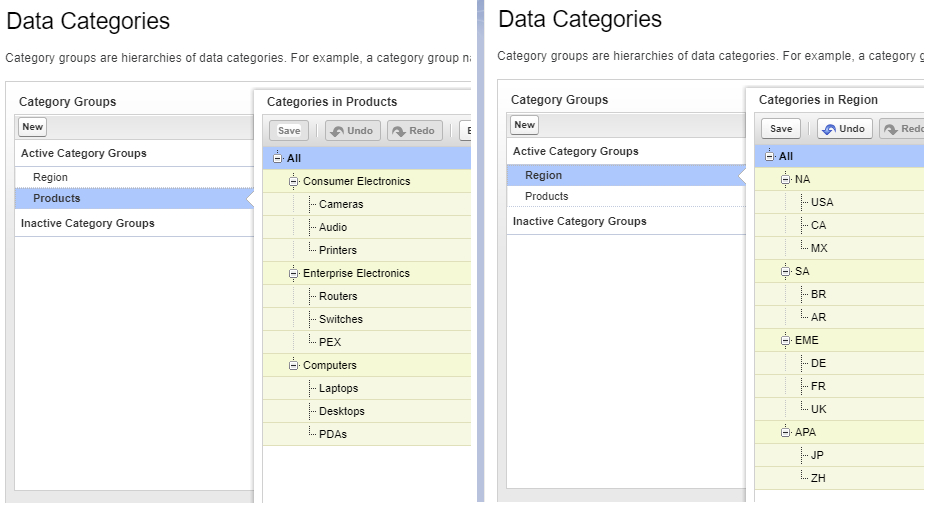
Data Categories and Data Category Groups help users with article access and organization. It enables you to organize or group your content into different Data Category Groups.
We’ve shown an example where articles are listed under several categories and subcategories to enable users to find the article they are looking for quickly.
You’ll also be able to access another capability, Data Category Visibility, which will help you control data visibility according to permission sets and profiles so that users can access knowledge relevant to them.

3. Topics

You can add relevant topics and classify articles based on different content types. You can consider it to work like keywords. An article can have many topics assigned to it, depending on its content. Also, make sure not to over-assign topics as it could lead to returning irrelevant results on searching.
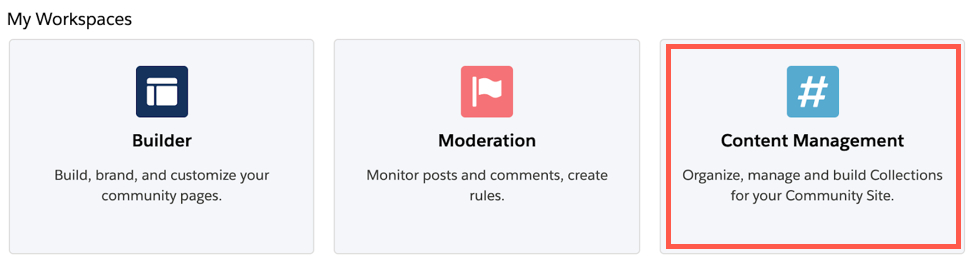
To assign topics to articles, go to Content Management > Topics in the Salesforce community workspaces.

4. Case Deflection

Salesforce can also help customer support teams to manage a high volume of cases, saving them from feeling overwhelmed. Providing knowledge articles to customers helps to deflect support cases from customer service representatives.
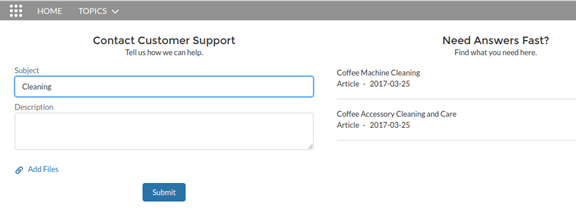
Salesforce makes it easier by enabling the Case Deflection component for users. Using this feature, Salesforce users can submit cases while having a right-hand panel to provide recommended knowledge articles based on what the user types into the case.

Content Management for Knowledge Base

Salesforce Knowledge allows its users to give feedback through comments, ratings, or chatter to enable direct editing of the draft and polishing the articles for customers. The knowledge lifecycle focuses on the continuous improvement of the content for the knowledge base.
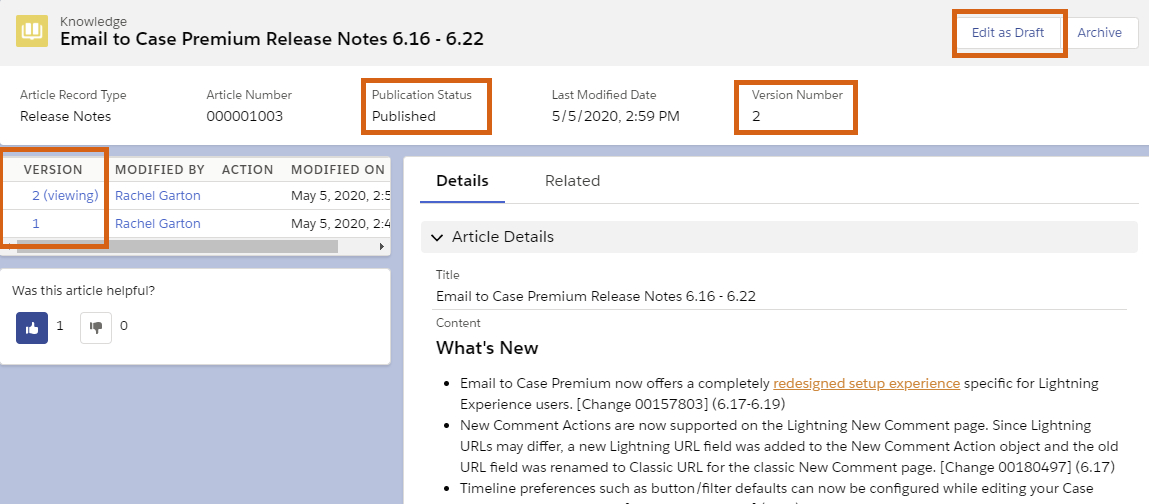
Each article in the knowledge base has been assigned a respective Version number. Whenever a user has to make changes to an article, they will have to edit it to a new version and publish it. This enables users to publish content without impacting the existing versions.

Winding Up

When the idea is to keep customers at the center of the business, it is essential to cater to their queries as quickly as possible. While customer service agents might not be available every second to assist them, the knowledge base can be a great way to enable self-service for customers.

Boost your Service Cloud capabilities by extending information to the knowledge base. You can contact our Salesforce consultancy services and get the best Salesforce experts to assist you.

Have a Message For Us?

Please fillup the form and send your message.

Loading......

Captcha

Refresh

Click on submit to be contacted for a demo of our products or Salesforce Services.

Our Top 10 Feature picks from Winter'23 Release

It can be ‘winters’ for the people, but for Salesforce users, it is ‘Winter ‘23’.
It’s time for Salesforce users and enthusiasts to fasten their seatbelts as we’ll start the ride through the top features of the Salesforce Winter ‘23 release that gained our attention.

As a Salesforce consulting agency, we always walk parallel to the new Salesforce releases and updates to implement the same for our customers. After all, we won’t want our customers to miss anything trending.

We took some time and looked at what this release brought with it.
After a thorough evaluation, we picked out the top 10 features of Winter ‘23 that no Salesforce user should miss out on.
Let’s start with our top picks from the latest release.

1. Analytics Home

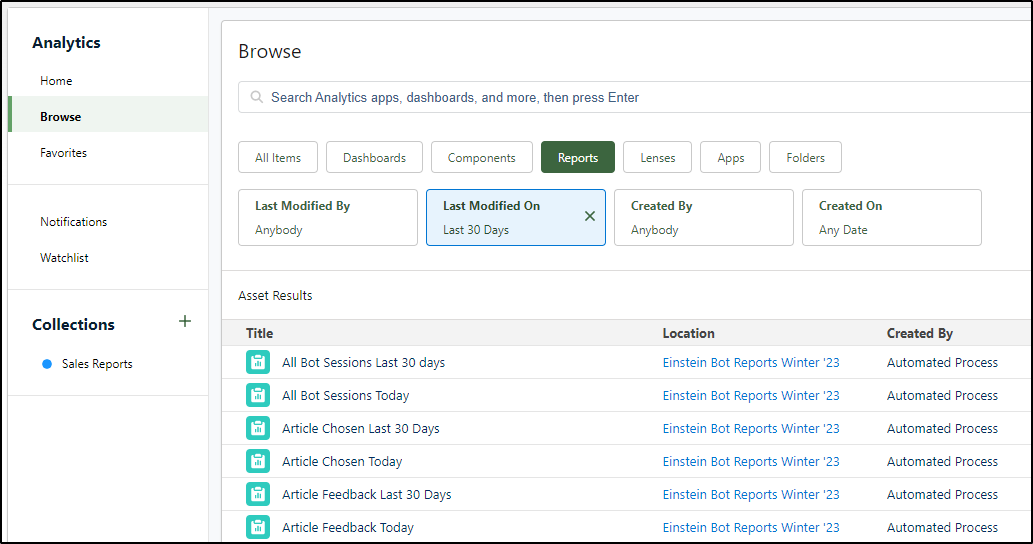
This brand-new feature by Salesforce enables users to aggregate dashboards, reports, and various other analytics in a single place for better evaluation and tracking.

2. Retirement of Workflow Rules

With the latest Salesforce release, you cannot create new Workflow Rules.
You’ll still be able to edit your existing workflows as they will keep running. Salesforce just eliminated the capability to create new ones.

3. Dynamic Forms

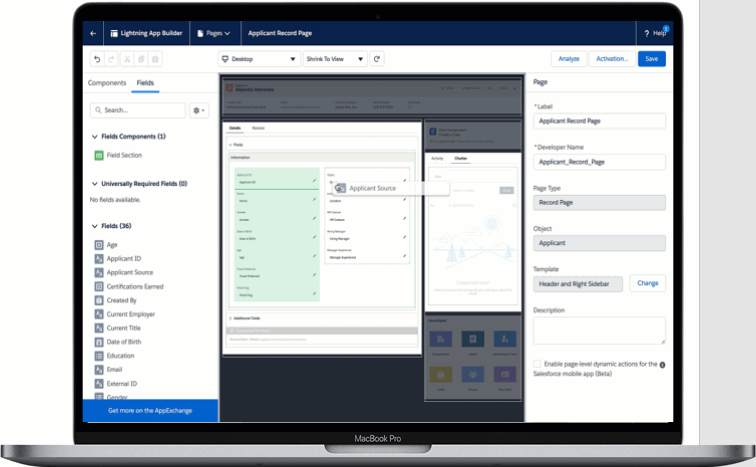
The long wait of Salesforce users is finally over as they can access dynamic forms for Contact, Account, and Opportunity record pages.
The dynamic forms will allow you to:
Access progressive page rendering to open a page with improved load time
Easily use the drag-and-drop feature to move individual fields into the page.
Quickly view sections and fields to access the needed data at the right time
Build dynamic pages without working with multiple page layouts.

4. Cut and Paste Elements in Flow

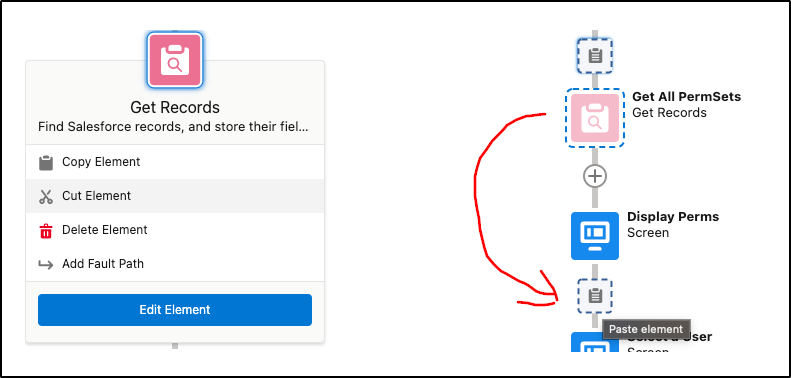
The new release allows users to cut and paste Flow elements.
They no longer have to keep copying and pasting and deleting the elements that have been copied. It is not necessary to rename the element being pasted.
This will help in saving time for flow builders.

5. Custom Address Fields

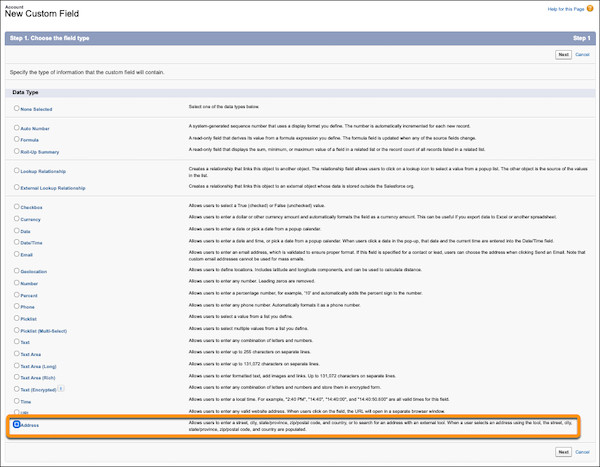
For years, Salesforce users have been waiting for custom address fields that could work the same way as a standard address field.

Winter ‘23 ended this long wait by making this feature Generally Available now.

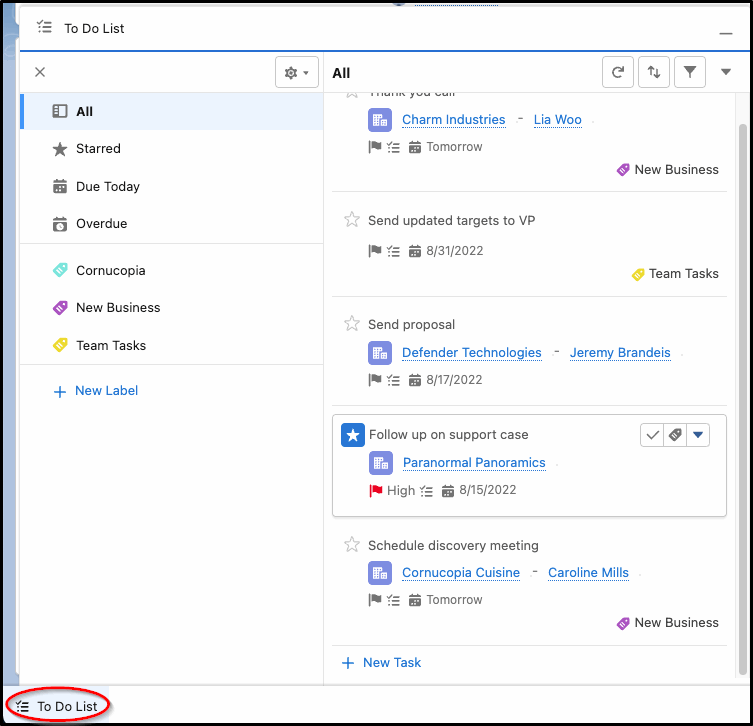
6. Access To Do List in Apps

Users can now find all the tasks assigned in one component that will be available throughout the Salesforce environment.
You can access the To Do List available in the Utility Bar and manage your tasks by organizing them in a single view.
This feature is available for Lightning Experience in Performance, Enterprise, and Unlimited editions of Salesforce Sales Cloud.

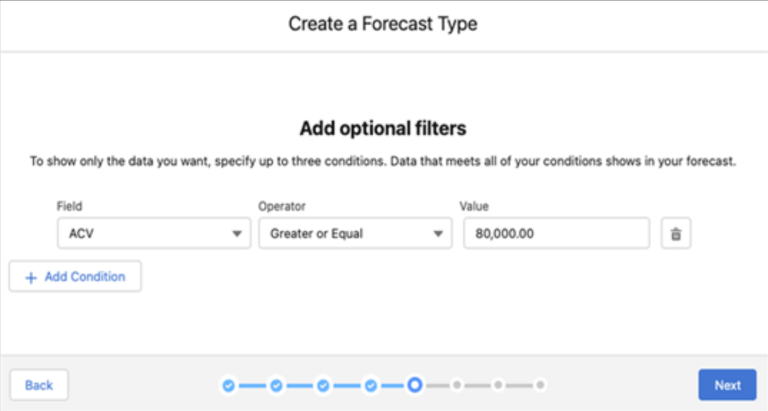
7. Forecasting Updates

Earlier Salesforce provided the feature to filter the forecast using standard Picklist, standard Number, and Record Type.

The new release will allow you to filter your forecasting using the customer Picklist fields or Opportunity Numbers, thus enabling you to get better and more accurate forecasts for your business.

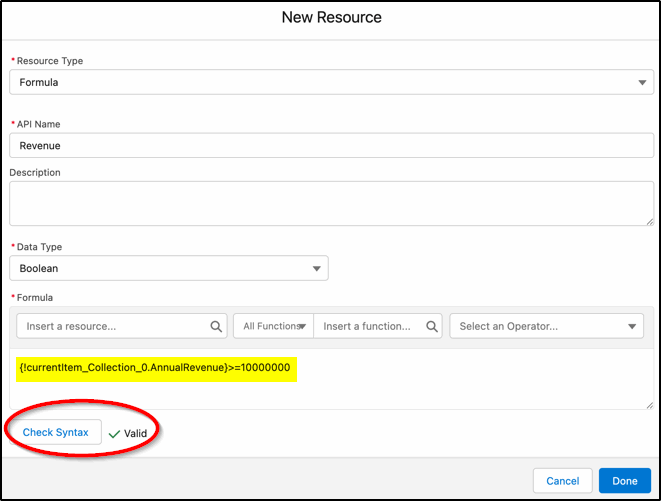
8. Checking Formula in Flow

You can now access the syntax checking feature with the enhanced formula builder to check the formula created from within the formula builder.
Previously, Salesforce users had to save the flow and then look for syntax errors.

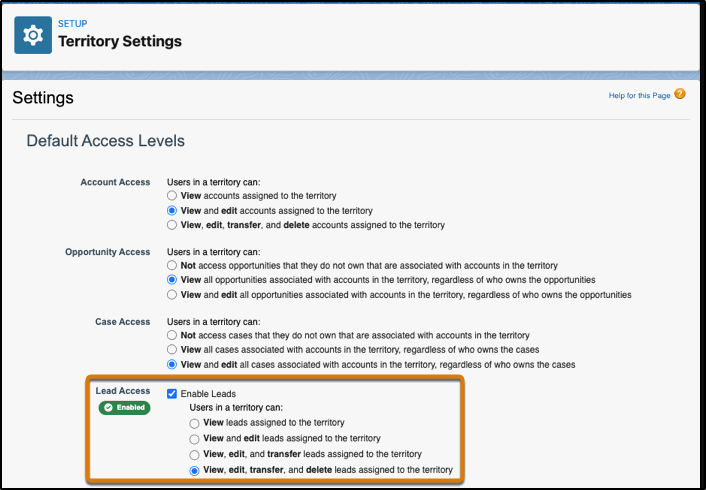
9. Assigning Leads to Territories

Users can now enable access to Leads on the basis of their territories while distributing leads manually among the respective territories.

10. Flow Datatable available in Beta

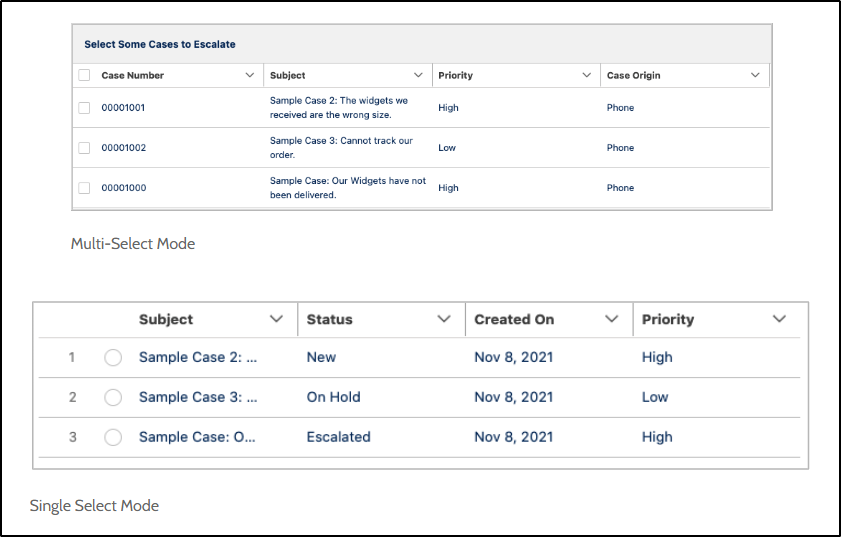
Winter ‘23 is bringing another new beta feature, the native datatable element.
The feature will allow you to create tables, allowing users to select or view records. It will allow them to create more informative and richer pages that can show hundreds of records to the user.

Wrapping Up

We’re very much impressed with everything that the new release got us.
Try all these new features from the Winter ‘23 release and uncover new enhanced productivity levels.

And if you need assistance with these new features, our Salesforce consultants are always ready to help you.

Have a Message For Us?

Please fillup the form and send your message.

Loading......

Captcha

Refresh

Click on submit to be contacted for a demo of our products or Salesforce Services.

Let's take the Backup of Data and plan for Next Year

Nothing could be more critical for a company than its data, which makes it crucial to keep it secure at all times. With New Year around the corner, you might have new plans for your business. But before you make any big moves, start backing up your data correctly.
We all know that the world of Salesforce CRM changes fast. Thousands of new records are being added or altered by Salesforce users. This makes it imperative to maintain your backup, so you don’t lose any essential information.
Although preventing the loss of vital data is a good enough reason, there are other reasons to find a Salesforce backup solution. There are even chances of losing data due to any of the following reasons:
Mass Data Import: Tools like Data Loader allow admins to modify records within a few seconds. If users end up making any mistake, they can wipe off records and field values of the CRM.
Rogue Automation: There are chances that a user deploys a buggy Process Builder or Apex Trigger. It ends up in overwriting data could end up in data corruption or data loss.
User Error: There is also another possibility of making general mistakes by any user that could lead to data loss.
Let’s move ahead and understand the different ways a user can safely back up the data for better planning and decision-making.

Backup Data Using Data Export

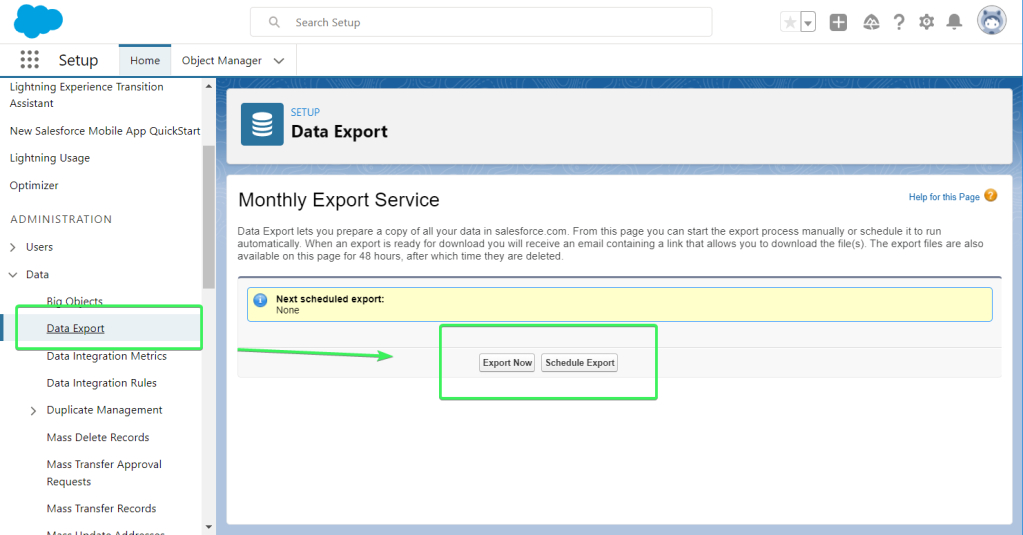
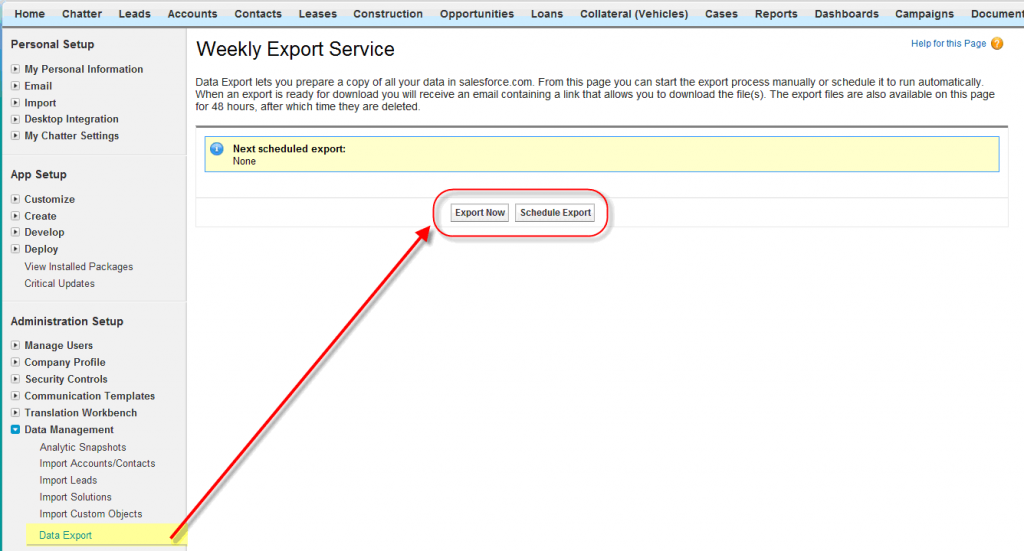
One of the most common ways of backing up Salesforce data is by using Salesforce Data Export. It is a function by Salesforce that enables users to export data for the org to create a backup safely.
Data Export allows you to export data manually or automatically by scheduling an export. Depending on your Salesforce edition, you can back up your files monthly or weekly.
The monthly export using Data Export is available and free for all Salesforce editions, but it’s not available for Database.com. On the other hand, the feature of weekly export is available only for Performance, Enterprise, and Unlimited Salesforce Editions.
The Data Export Service allows you to export your organization’s data into a set of 150MB CSV files. These files are included in .zip files of around 512MB. Multiple .zip files are created by data export.
You can use Data Export for three main reasons:
To back up your data
To import data to another system
To conduct accurate reporting

Backup Data Using S-Drive

Another way to back up your data is by using the S-Drive application.
It works by successfully combining the capabilities of Salesforce with the secure file storage features of Amazon. It allows users unlimited space for files, which your team can upload, share, or download.
With S-Drive, you can have a user-friendly experience while ensuring that your sensitive files on Salesforce are secure and easily accessible when required.
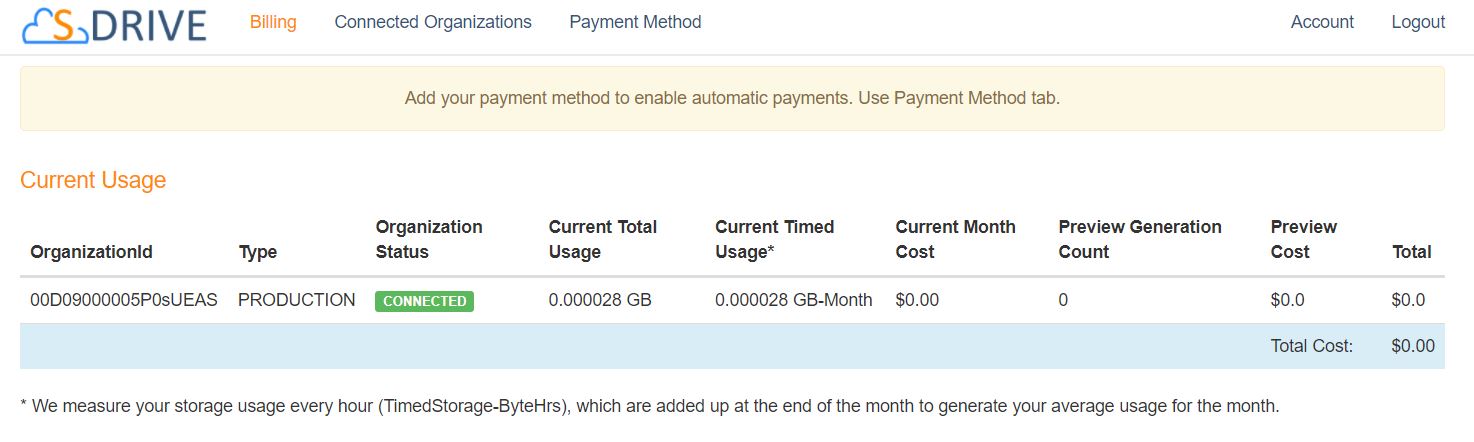
You can start by installing the S-Drive app and connecting your Salesforce org, for which you can back up data. Also, you’ll be able to track usage metrics and billing details so you can always have an idea about the cost.
After successfully installing the managed package within Salesforce, you’ll also be able to access the S-Drive Lightning App.
You can manage or access any functionalities from here. You can also include Lightning Web Components on the record pages if you seek easier access.

Whichever way of backing up Salesforce data you choose, you need an expert hand, as you cannot afford to lose any information due to any error. Having Salesforce consulting services will always help you successfully create your data backup.

Winding Up

The importance of regularly backing up your data can never be underrated.
From your customer details to sensitive company information, there can be a lot that you want to keep within your firm.
We’ve discussed ways to back up your data in Salesforce, but we will recommend you talk to a Salesforce expert to plan your backup strategy right.

Talk to our team of Salesforce consultants and prepare your backup strategy while ensuring no data gets lost during the process.

Have a Message For Us?

Please fillup the form and send your message.

Loading......

Captcha

Refresh

Click on submit to be contacted for a demo of our products or Salesforce Services.

It’s Christmas, and we have your present ready!

Get a better view of your leads and track insights with our free Similar Contact and Lead package.
Your leads are the bread and butter of your business, so don’t miss out on any detail about them.
With our free package, you can eliminate the guesswork out of the picture and keep your leads and contact information at your fingertips.
Install the free Similar Contact and Lead package to keep better track of your leads and stay on point with your lead conversion game.
Get in touch with our experienced Salesforce consultants to get your hands on this free package and leverage it for your business growth.
Have a Message For Us?

Please fillup the form and send your message.

Loading......

Captcha

Refresh

Click on submit to be contacted for a demo of our products or Salesforce Services.

Let's bring your leads from the Website into Salesforce directly

According to a study, 91% of marketers believe lead generation to be their prime goal when building marketing campaigns. This is quite obvious, as generating leads is the bread and butter for the marketing team for any B2B business.
When you want to excel in your marketing, getting your prospects to visit your website and make them stay on it for a long time is essential. When new opportunities come to your website, the last thing you’d want is for them to leave without being your leads. That’s where the Salesforce Web-to-Lead form is helpful.
Turning your website visitors into leads doesn’t always have to be complicated. It can be as simple as getting them to fill out a form on your website with their information and the services they need.
You can use a well-designed form to ask demographics and specifics of the visitors and what products and services they’re interested in. That’s something web-to-lead makes possible.

As a Salesforce consulting agency, we’ve helped many clients construct web-to-lead forms to collect details from their website visitors.

We’ve assisted them in automatically saving information from forms on their website to new lead records in their Salesforce instance. This enabled them to route users to other pages on the website, send quick and automatic email follow-ups, and begin the customer journey.

What is Web-To-Lead in Salesforce?

Web-to-Lead is a process in Salesforce to use a website form to collect the visitor’s information and store it as a new lead in Salesforce. The feature enables you to create a lead record in Salesforce, extracting data from a form that a visitor has filled to your website.
Companies highly use the feature of Web-to-Lead in Salesforce to generate customer feedback on their products and services.
A web-to-lead form is essential to enable sales and marketing automation for companies. It helps to capture data submitted by website visitors who could be your potential leads and then save it as a Lead record in Salesforce. The information could include anything like lead contact information and their preferred products.
Using Web-to-Lead in Salesforce can help you to:
Generate leads directly from your official business website
Boom the sales by achieving more prospects
Easily integrate forms with a website
Improve lead qualification without any hard-core programming

How to Setup Web-to-Lead Forms in Salesforce

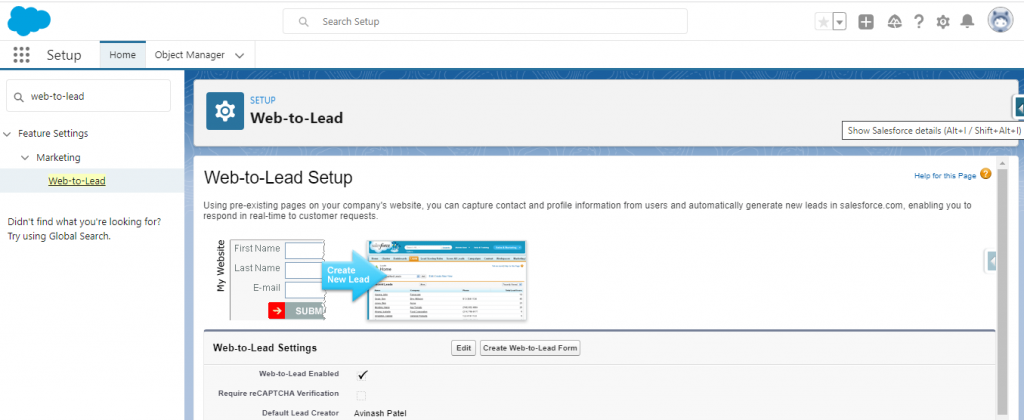
Step 1: Use your credential to login into Salesforce.
Step 2: Go to Setup.
Then select Customize -> Leads -> Web-to-Lead.

You will see that the checkbox Web-to-Lead Enabled is selected by default. Also, Salesforce will show the System Administrator as the default lead creator.

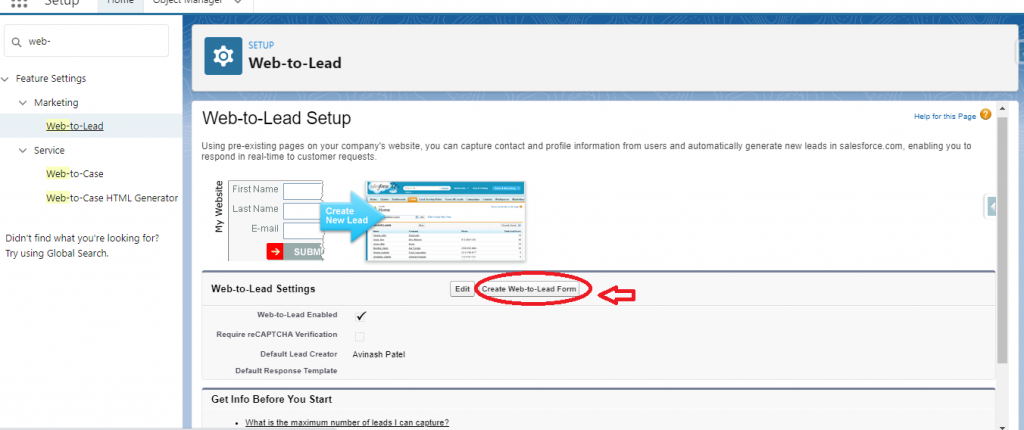
Step 3: Click Create Web-to-Lead Form.

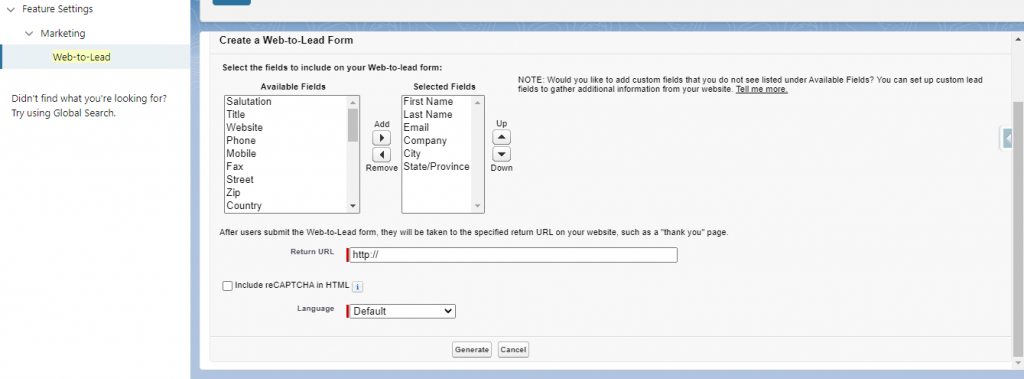
Step 4: You’ll be navigated to the following screen after clicking the button.

Select the fields you want in your form from the Available Fields section. You’ll have fields selected in the Selected Fields section. Enter your preferred URL in the Return URL. Then click Generate.

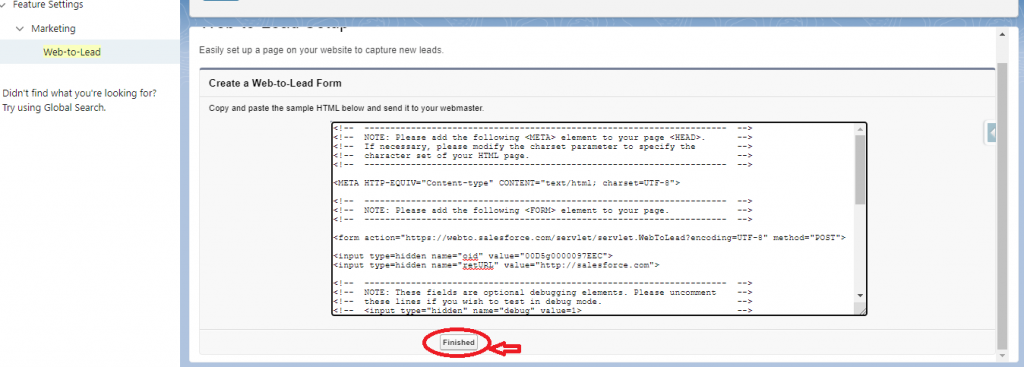
Step 5: You’ll get an HTML code generated that can be changed as per your requirements. You can add this code to your website after changing it accordingly. Click Finished once done.
Step 6: You’ll see you have constructed the form with the fields you selected. Complete the form and check if a new lead has been created.
You can directly set up your web-to-lead form in Salesforce using this PDF on
How to Setup Web-to-Lead Forms in Salesforce. → 

Wrapping Up

Capturing lead information from your website was never this easy.
Web-to-Lead forms allow you to save lead information and create new records effortlessly. It saves your team from all the trouble they had to go through to track and record lead data manually.

The PDF attached will help you to create your web-to-lead form easily. But if you still need assistance and want to know more about the feature, our Salesforce consultants will provide the guidance you seek.

Have a Message For Us?

Please fillup the form and send your message.

Loading......

Captcha

Refresh

Click on submit to be contacted for a demo of our products or Salesforce Services.