
With AI-based content generation tools making a strong hold on the market, how can Salesforce stay behind the trend!
Salesforce officially announced the launch of Einstein GPT, which will help users to generate auto-generated AI content within their Salesforce org. Salesforce Einstein GPT is a new cutting-edge AI-powered tool that has the power to improve your sales multifold.
Let’s find out more about the tool and how it can be revolutionary for Salesforce users.
The tool Einstein GPT has the capability to bring the public and private AI models together with CRM, enabling users to get answers through prompts running on natural language with Salesforce. It gives out AI-generated content that could be used by different professionals across the organization, thus saving a lot of research time.
All of this has become possible with the Salesforce and OpenAI partnership, enabling users to access AI-generated content within the Salesforce instance.
Before you jump onto using Einstein GPT, consider going through these use cases to understand how the tool works in different aspects.
The sales team probably faces the most difficulty in adopting Salesforce. And the irony is Salesforce it’s the sales team that can benefit the most from it. It’s justified for sales reps to face a lot of friction, leaving Salesforce to research and prepare relevant content for customer engagement, thus spending a lot of time finding the right information. These tasks include:
1. Tracking down external news to do proper research when needed.
2. Generate email content, plan meetings and events, and prepare for the next customer interaction.
3. Adding contacts that are not already recorded in Salesforce.
All of this can easily be simplified with Einstein GPT. The tool lets sales reps get visibility into real-time insights related to customers and prospects, which ultimately means a better chance to close deals faster.
Consider a situation — a prospect account is being transferred to a sales representative. The rep can easily open a sidebar with the Einstein Assistant and ask questions like, “Write an overview about [company name] along with some recent news about it.”
Einstein GPT will then use the combination of data available in the CRM along with the external data and will provide the needed information. It will even open a view of the Account record and will suggest the next-best action, like “update Account description”.
Not only this, but a sales rep can also ask Einstein to create a personalized email, which can easily be copied straight to the email builder, thus saving a lot of brainstorming and typing time for the rep.
Service agents of any company usually remain on their toes, attending to customers and ensuring first-call resolution every time. Needless to say, they are usually very much occupied with work. Using Einstein GPT can work as an additional hand to them.
The team can consider using Einstein GPT for the following:
1. Automatically generate a summary for a case completion using natural language.
2. Get knowledge articles after being evaluated from the notes related to past cases.
3. Automatically generate personalized chat replies.
Consider an example; a customer asks a question in chat about the specific of where they’ll be able to use a specific product. GPT will generate a ready-to-use response, including the product specifications and usage. The widget will also provide the next best actions that help to reduce the legwork out of the day of a service agent.
There would hardly be any marketer now who’s not using Chat GPT at its best, whether it is for writing emails or creating content for landing pages. But now marketers can access the power of GPT in their Salesforce interface as well.
With the help of Einstein GPT, marketing reps can now generate personalized content that would help engage prospects and customers across the web, email, and mobile. Not just for engagement, but the tool can also help create landing pages.
For example, a Marketing Manager can ask Einstein GPT to create a template for a landing page and campaign messages. These elements can easily be added to the landing page with a single click.
Einstein can even help enhance collaboration on Slack with the power of AI among teams. It can help you to:
1. Access research tools and insights that could provide needed material like a summary of sales opportunities, etc.
2. Get writing assistance within Slack.
3. Service conversation summaries instantly.
As an example, while conversing in a team meeting channel, Einstein GPT can help you to identify top Opportunities by evaluating your current CRM data and also the latest external news.
No wonder Chat GPT got the quick attention of developers, who acquired a creative and easy way to acquire AI-generated code to boost their productivity. Now, Einstein GPT will take that productivity boost to the next level.
Einstein would work on Salesforce Research’s proprietary Large Language Model that would help developers to ask questions related to Apex language and generate code.
For example, in an Apex class, a developer can ask Einstein by beginning to write a comment describing what a method would do. Einstein would generate a smart comment, thus recommending how that comment would be completed.
It’s time to redefine your CRM game with AI generation within your Salesforce, powered by Einstein GPT. The tool can greatly contribute to boosting the work lives of Salesforce users across the organization, whether for the sales, development, or service team. Start using the tool, and you’d be fascinated by how it can support different Salesforce users’ day-to-day activities.
If there’s more that you need to know about the tool before you can start using it, contact us and get all your queries resolved by experts at our trusted Salesforce implementation company. Whatever your Salesforce woes are, we’ve got you covered.
Salesforce has recently announced its Spring ’23 Release, packed with exciting new features and enhancements to help businesses boost their productivity, improve customer engagement, and drive growth. To make the most of these top features from Spring ‘23 release, companies need to work with the best Salesforce consultants with deep expertise in implementing and customizing Salesforce solutions.
In this blog, we will explore some of the top features from the Spring ’23 Release and discuss how businesses can work with Salesforce consulting service to implement these features and make your Salesforce investment worthwhile.
Whether you want to have streamlined workflows or improve your customer experience, Spring ‘23 release has features to set everything right. So, let’s identify the top features you can implement with the help of the Salesforce CRM consulting service and keep your system updated with the new release.
Earlier, Salesforce users were only able to use dynamic forms for standard objects such as Contact, Account, and Opportunity. But the new release will now enable them to use forms for leads and cases too. This feature will help to add flexibility for users in designing screens and applying conditional formatting that will help to eliminate the need to create multiple page layouts.
For example, when creating a new opportunity record, you’ll be able to display only a limited number of fields while in the early stages, adding ease and flexibility. This approach creates a less cluttered page that is easier to navigate, loads faster and is more likely to be completed accurately.
As the opportunity moves to the next stage, you can reveal another section with relevant fields for that stage. This way, you can customize the page layout and provide the right information at the right time, improving user experience and overall productivity.
The latest Salesforce update allows users to group related reports and dashboards into collections. This feature enables users to organize and consolidate Salesforce reports and dashboards, regardless of their folder locations, into a single collection. Users can then pin these collections to their home page and share them with others for easy access.
To enable this feature, navigate to Setup and enter “Reports” in the Quick Find box. Then select Reports and Dashboards Settings and choose “Enable the Unified Experience for Analytics Home”. Next, go to the Analytics app in the App Launcher and click the + button in the Collections panel on Unified Home. This opens the New Collection window, where users can enter the collection name and an optional description.
This feature saves users time and effort in locating and accessing related reports and dashboards. This feature also makes sharing collections with other users easier, allowing for improved collaboration and knowledge sharing within the organization.
Prior to the latest update, users did not have the capability to monitor the past records of fields related to tasks and events. This resulted in challenges in keeping track of modifications and determining the individual responsible for such changes. However, with the recent release, users can now utilize this feature to effortlessly trace the history of alterations, including information about the person who executed them and the corresponding timestamps.
You can now apply dynamic filtering to reports for your team by using the relative value of a user field such as Opportunity Owner or Created by. This allows you to use a single report that will adjust its filter dynamically based on the currently logged-in user, eliminating the need for multiple reports.
In this release, adding text and graphics to dashboards is currently in beta testing. This feature will enable you to explain charts, describe metrics and KPIs, and add rich text to clarify tables, all within the dashboard context.
You can also add company logos and branding, flow diagrams, and embedded images to enhance the visual representation of data. If you want to access this feature quickly, consider getting the desired help from trusted Salesforce consulting services.
This feature can now enable you to easily execute a screen flow from Slack without input parameters. This can be done by either using shortcuts or by clicking on a button within Slack.
You need to define an app or a view in Slack that triggers a flow with the “Make Available in Slack” advanced setting selected to access this feature. You can also build an app to provide users with global shortcuts, message shortcuts, or slash commands that can invoke flows from within Slack.
These are just a few features that could give you enhanced usability and productivity with Salesforce. Although you have these features in your knowledge now, to understand and implement them, having the support of reliable Salesforce development services is necessary.
Being an experienced Salesforce development company, we know how important it is to keep your Salesforce solution updated. Thus, we can help you do the same, keeping your solution scalable for your growing business. Contact us if you want to know more about the latest release.
If you are a Salesforce enthusiast like us, you’d also spend your night before the new release in excitement. This year, Salesforce Summer ‘22 has brought lots of new features and enhancements to be excited about.
With each release, Salesforce brings forward some enhancements, community ideas, and brand-new features that could simplify the usability of Salesforce while improving the user experience. This year too, there are many such features that you should be excited about.
We’ve gone through many new features and enhancements from the new Salesforce release. We’ve listed here some of the top features that you must try out.
With the new release, you’ll be able to get quick access to the data that is important without having to spend unnecessary time processing it. You can now limit the rows to be returned in the tabular report, so you can instantly get exactly what you’re looking for.
It’s the time when all the Salesforce users are required to use MFA, as Salesforce mentioned in Winter ’22 release, With the summer release, MFA automatic enablement will come with some exceptions. Users who are still not using MFA would be getting a notice of six months. But, you shouldn’t wait for it and implement it right away to achieve outstanding security.
Salesforce users were always in the need of custom address fields that could work in the same way as the standard address field. That’s now possible as Summer ‘22 has brought the feature, Address as a Custom Field in beta.
The release has brought up many new features to enable picklist management. Following are some of the best of these features:
There are a few updates to Einstein as well. Some of these are:
The new release has enabled Campaign Owners to share individual campaigns manual with other users. Earlier the feature was only available in Classic. Now you can do it in Lightning as well.
You can now access a new feature, Dynamic Related Lists, to create custom related lists that you can filter to view, considering when any specific criteria are met.
The new release has brought a guided setup that will help to self-enable Person Accounts. Earlier users had to reach out to Salesforce Support to do that but now you can do this on your own.
All these new features and enhancements can take your Salesforce productivity a level up. Make sure you know and understand these features well before you start using them.
The best way to get started is by talking to our experienced Salesforce consultants who can guide you well on these features.
Salesforce never fails to amaze its users and it did it once again with some new and exciting features it brought with Salesforce Winter ‘22 release. The release has got something for both Admins and developers, ensuring UI improvements on the frontend too.
Among all the best features of the new release, there are some that caught our attention the most. In this article, we have covered these amazing features that can get you excited too.
Here are some of our favorite features from the Winter ‘22 release that could enhance the development process along with user experience.
Salesforce had made the announcement for this feature a few months ago and fortunately, they had included it in the release.
The feature allows developers to build lightning components that can react to user activity dynamically.
With every release, we always expect some updates for Flow. Here are some exciting Flow updates with Winter ‘22 release.
There are many more updates related to flow elements and scheduled paths too.
The release enables all Salesforce Einstein features without any extra cost. This update help users to benefit in different ways like:
All these features help users to deliver a personalized user experience while speeding up productivity.
The feature allows teams to easily track progress towards specific business goals. You can test this feature by enabling dynamic gauge charts in Reports and Dashboard settings. You can switch from Standard to Dynamic mode to compare a report metric easily with a numeric field from any particular record.
Salesforce users who had been working on Collaborative forecasting would know that there were used to be four categories: Best Case, Pipeline, Commit, and Closed.
With the new release, Salesforce has added a 5th category called Most Likely. This category allows splitting the opportunity groups of sales users.
The new Salesforce release has brought numerous features that can boost your productivity and upgrade your Salesforce org. Use these features to the full potential with vetted Salesforce experts.
Know more about the release and how it could be helpful to you. Talk to us and get the right Salesforce consulting you need.
Last year, Dreamforce conducted an all-virtual event, bringing the Salesforce community together despite the difficult pandemic situation. This year Dreamforce 2021 came not just virtually, but as a hybrid in-person/digital conference, with all its events streaming on Salesforce+, the new streaming services by Salesforce.
Dreamforce 2021 kicked off with the keynote speech by Mark Benioff, CEO of Salesforce, and Bret Taylor, COO of Salesforce. The event was started with a lot of enthusiasm, inspirational stories, musical guests, and a powerful discussion on how we can create more inclusive workplaces to deliver engaging customer experiences.
Benioff introduced everyone to the idea of Trusted Enterprise, presenting the responsibility each organization has towards its customers, employees, and the world at large, making it important to respond to the crisis of COVID-19 in a responsible way.
Salesforce wants to help companies find the solution to problems related to the pandemic, a struggling workforce, environmental sustainability, or inequality around sexual orientation or gender. Benioff mentioned the importance of digital headquarters with the recent Salesforce acquisition of Slack, which will be the building block of setting up a Trusted Enterprise.
Also, with Dreamforce 2021, a new Health Cloud 2.0 is introduced for the safety of everyone in the surrounding community with the Dreampass, enabling safety protocols against COVID-19 for in-person attendees.
Day 1 of the event continued with Bret Taylor sharing client stories about how companies are using Salesforce to make a change. The story of IBM was spotlighted, showing how the company is using Slack to migrate 350,000 employees from office to work from home setups. It was followed by the story of Mercedes-Benz building a customer-centric marketing experience with Customer 360 to gain more attention on their new range of electric vehicles.
Day 2 of Dreamforce 2021 started with a conversation between Soledad O’Brien and Salesforce Co-founder and CTO, Parker Harris. The conversation focused on the insights related to Salesforce’s past and future.
Moving forward, Accenture took over the main stage with Bryan Beruman and John Carney talking about the state of B2B sales and the changes observed with the pandemic. Carney shared the story of John Patterson of NCR related to the growth of B2B sales in the 20th century with all his principles. But all of that is changed now. With buyers changing and sellers increasing the need to respond, Carney mentioned the current B2B market as the “the new new.”
Dreamforce 2021 majorly focused on social justice and racial equality. In this context, Soledad O’Brien introduced 3 female Trailblazers black leaders: the award-winner Minda Harts, San Francisco Mayor London Breed, and the award-winner journalist Elaine Welteroth. They talked about the meaning of black excellence and how this state of mind is opening new doors to opportunities for black people to thrive in their community.
With the effort of tackling COVID-19, LaShonda Anderson-Williams, SVP of Healthcare and Life Science at Salesforce, talked about how technology is contributing to improving global health. It was mentioned that the world needs connected health for which a platform is required that would integrate providers, payers, pharma, MedTech, and public health organizations. The idea of a connected health ecosystem is to deliver a modern health experience. The emphasis would be on personalization to provide people with safe and accurate treatments.
Day 3 kicked off with Stewart Butterfield, CEO & Co-Founder of Slack, and Jennifer Tejada, Chairperson & CEO of PagerDuty, discussing how today’s leaders are driving more flexible, inclusive, productive cultures. Slack, in partnership with Salesforce, is enabling companies to connect with their teams easily in the work-from-home culture, maintaining one digital source of truth. Jennifer talked about Slack not only as a way to connect with her employees but also to democratize and flatten the overall organization.
Sustainable future and sustainability have been the trending topics during Dreamforce 2021 event. Salesforce utilized 100% renewable energy and achieved net zero emissions across its value chain, and purchasing carbon offsets when either of them was not a possible approach. Salesforce also scaled up its Sustainability Cloud to support better collaboration with suppliers while achieving industry-specific climate action plans.
Moving forwards, Rob Garf, VP & GM of Retail at Salesforce, talked about how people have switched to e-commerce during the last year. With customers at the center of businesses, retailers need to accelerate digital transformation to successfully meet the highly increasing demands. Salesforce Customer 360 helps to reduce friction across multiple channels, allowing retailers to analyze customers. Rob also gave an introduction on a Slack-First Customer 360 for retail demo in action.
And that’s it, folks! Dreamforce 2021 came to an end with amazing sessions, a fun-filled celebration, with many more advancements to help organizations grow digitally.
Salesforce scaled up its Service Cloud capabilities with its next-generation version that brings out all the new features that will improve the productivity of support agents. The customer support agents work on the frontline of your business, and it counts how efficiently they work, and this is something new Service Cloud features will improve.
From automation to video and voice capabilities to self-service capabilities, Service Cloud has now got everything that could improve the efficiency of support agents, while ensuring to deliver excellent service.
Your customer support agents are the front face of your business. They are the ones who’ll be interacting with your customers and present an image of the business. That’s why Salesforce is taking every measure to uplift the working mechanism of support agents. Check out these new features of Service Cloud that will change the way your support agents have been working.
With this feature, the support agents can automatically connect different cases according to the similarity of incidents and issues. It will allow teams to classify and prioritize cases on urgency and impact and speed up case resolution.
Customer service agents can now benefit from two-way audio and video with customers that can create personalized experiences and stronger relationships. The feature will improve consultations processes for everyone, whether it is in the financial industry, mechanics, or doctors.
This feature centers on closing the gap between the actual staffing needs and the forecasted work. The feature will allow companies to adjust employee schedules when things don’t go according to plan, thus maintaining customer experience while keeping the agent morale up. Such a feature will play a great role in issues like call volume spikes or severe weather incidents.
Salesforce has brought new voice, video, and text capabilities, and Einstein Conversation Mining is one of them. The feature uses Natural Language Processes and helps to evaluate the general interactions with customers, recommending how support agents can optimize their processes. This provides agents with guidance on where they need to work more on the knowledge base and self-service channels.
Support teams can now enjoy a deeper level of automation, so admins can easily connect across external systems and service channels. Here’s everything new in extended flow automation:
All these features would help support agents to speed up their productivity while managing less work manually.
These new messaging features allow customers to communicate over WhatsApp, SMS, or the website, picking up the conversation from where it was last left off.
Your customer support team is the bridge between your business and your customers. Thus, you always need to make sure your support agents are delivering excellence in their work and productivity. With all these new Service Cloud features, you can empower your agents with new capabilities that will simplify their work and increase work efficiency.
You can contact us to know more about Service Cloud and how it could help your internal departments.
After ruling the global industry sector with its CRM, Salesforce has now taken another big leap, entering the industry of streaming services. Salesforce has made its debut in the streaming market by launching Salesforce+, a live and on-demand content platform that aims majorly at business professionals.
Unlike Disney+ and Netflix, Salesforce’s streaming platform will be a business-focused streaming platform that will only feature on-demand content aiming at what professionals want to gain industry insights and learn new and helpful skills.
Salesforce+ will include original series, live event programming, podcasts, and a lot of content based on professional development. Its access is currently available through free subscriptions to the global audience. The company has no plans of charging for it as of now. Soon the streaming service will be launched as an app too.
Sarah Franklin, President & CMO of Salesforce, mentioned in a press release that it took them more than 18 months to reimage the way they could excel in the digital-first world to create all-digital brand experiences.
“We’re not going back, we’re creating the future now. Just as brands like Disney, Netflix, and Peloton have done with streaming services for consumers, Salesforce+ is providing an always-on, business media platform that builds trusted relationships with customers and a sense of belonging for the business community.”
Salesforce+ will have four channels with live programming from its events, six original series, and more than 100 hours of content, with more original content soon to go air in the coming months.
To launch the new streaming service, Salesforce Studios has already got occupied with bringing new original programming to the streaming platform, bringing the team of expert writers, directors, producers, and editors together.
The current lineup of the Salesforce streaming platform so far includes:
Salesforce+ will be coming up with more original content relating to leaders in fields like services and sales and will also stream a new series on how Trailblazers are upgrading their skills for new career opportunities.
Being the 20th anniversary of the most important event of Salesforce, Dreamforce 2022 was streamed live over Salesforce+.
Contact us to learn more about everything that Salesforce has brought new for its users.
It’s that time of the year when Salesforce administrators and other professionals sit tight to unwrap everything that Salesforce brings to them with its new release. After some helpful updates in Spring ‘21, Salesforce is back again with its Summer ‘21 release notes, and there’s so much in it that we can’t keep calm.
Salesforce announced the release date and Sandbox preview of Summer ‘21, and now the release notes are available too. Although there’s a lot that Salesforce brought up for its users, some features got our attention. Here are the top 10 features that will go a long way for Salesforce administrators and developers.
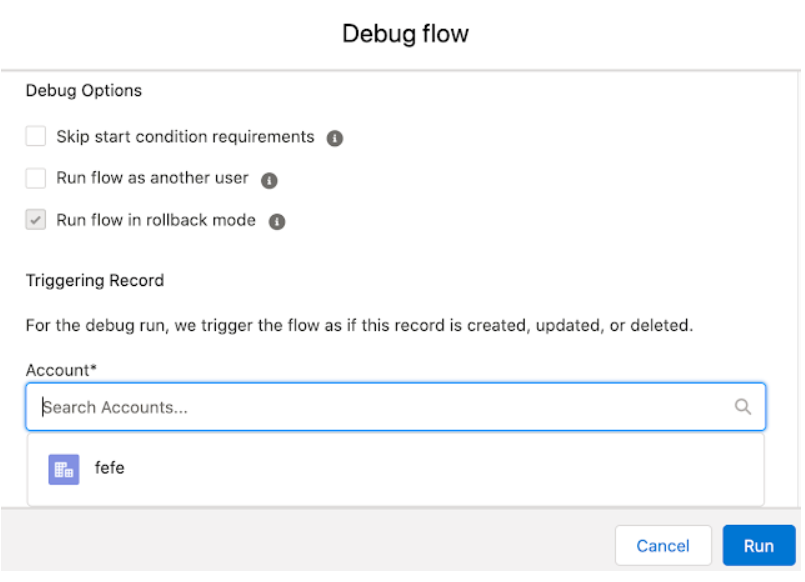
Salesforce Summer ‘21 has brought many Flow features and enhancements. You can debug Record Triggered Flow with the help of Debug tools. Earlier different kinds of workarounds were required for debugging Record Triggered Flows, being a massive gap in Salesforce.
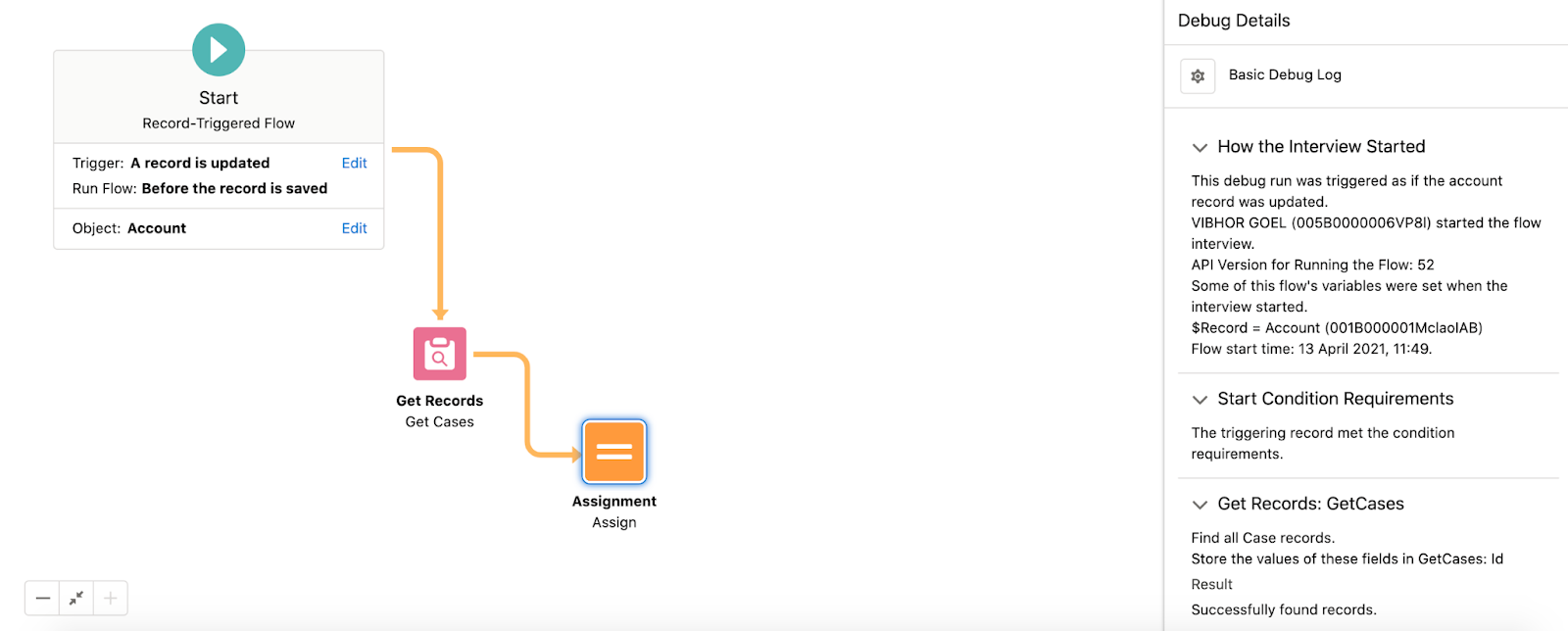
There is also an addition of a native collection sort element within Flow Builder. This feature allows Sort Collection Variables in ascending or descending order.
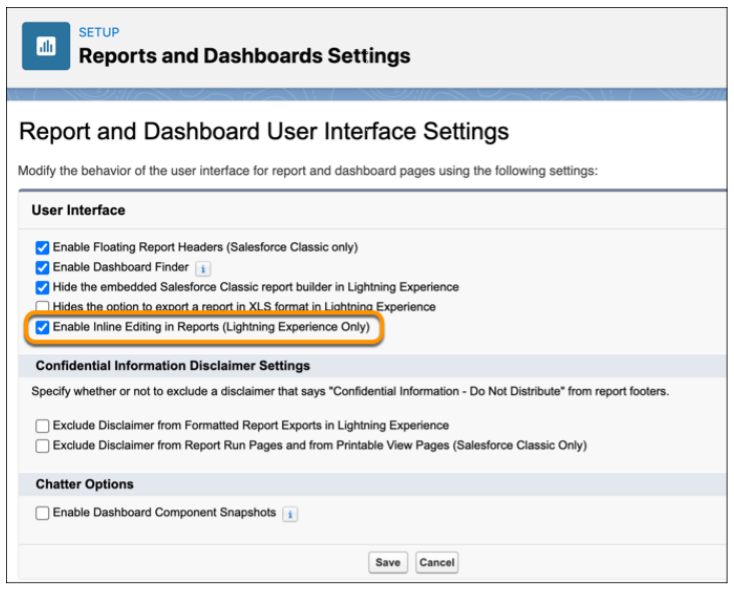
Users can save time and clicks by keeping data up to date in the reports and object records. When any source data goes out of date, you no longer need to go back to the original record to update the information. The feature of inline editing allows updating the text or numeric fields without leaving the Report Run page.
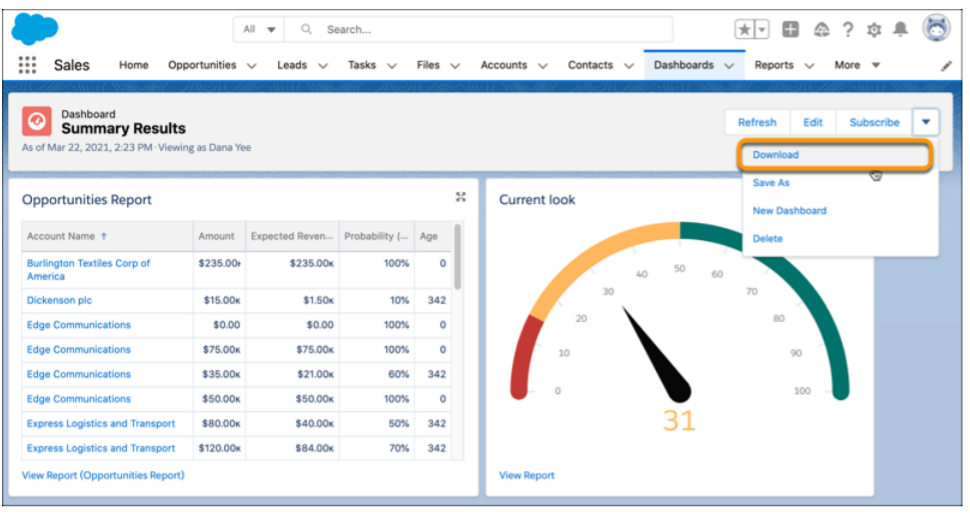
You can download any image on your dashboard embedded in a presentation to receive a PNG file. Earlier, you were only able to acquire a dashboard image with the help of an app for screen capture.
Summer ‘21 has brought more NLP languages for Einstein Bots. This makes it easier to reach out to more customers in the language preferred by them. Einstein Bots will now support Korean, Swedish, and Danish for Natural Language Processing in beta.
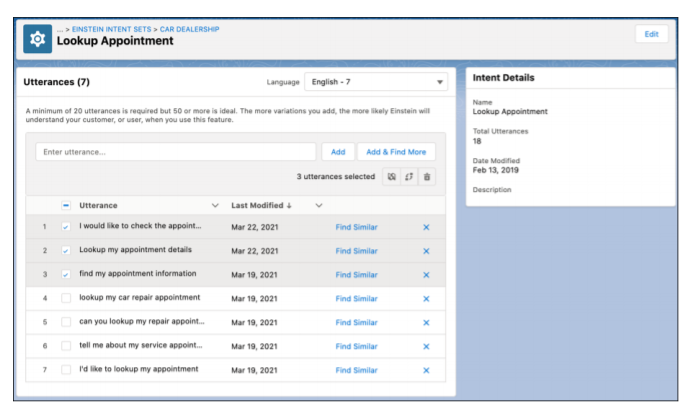
Also, the Einstein Bot Builder is equipped with an upgraded intent management experience for expanding your bot. The feature of dialog cloning is added with the option to include the attached utterance. This allows you to move bulk utterances between intents or to another intent set. The intent set now contains various languages, and users can easily assign bulk utterances to a new language. Users can focus on the utterance matching with the language of the bot with bot training, ensuring that the model fits right for your target customers.
The release brought us a new product, Salesforce Data Pipelines that helps to enrich the Salesforce data. When your CRM data is scattered on different services, the product can help you consolidate it for a single and accessible view that enables faster decision-making. You can also use Data Pipelines for transforming bulk Salesforce information without having to use third-party tools.

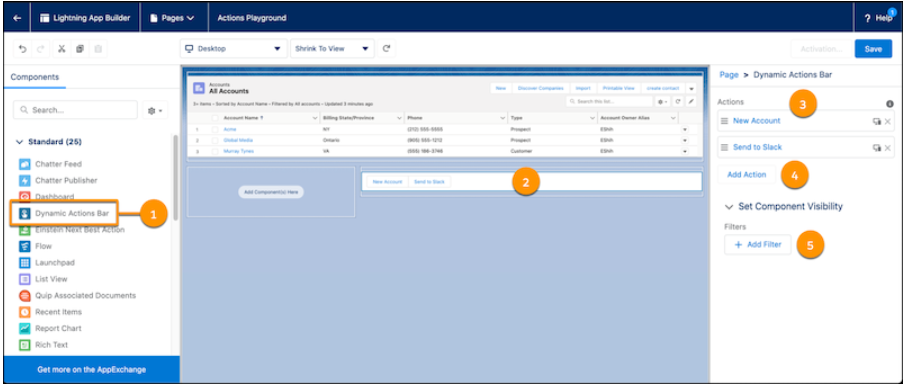
You can now have a Dynamic Actions Bar for your app page that helps you handle all the information actions from a single bar. You can easily drag and configure the components of the bar on your app page by using the Lightning App Builder. You can also use standard and custom global actions for customizing your bar.
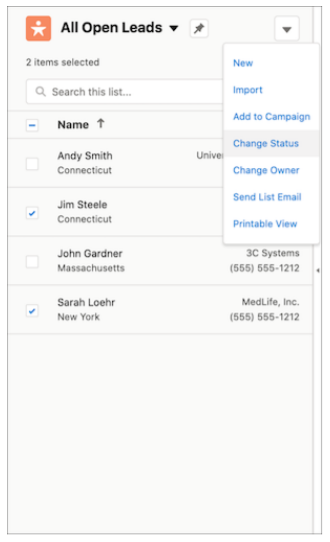
You don’t need to open a different list page for different details now. You can easily enable the split view to access multiple records at a single time. In a split view list, select the relevant items and choose an action for them in console or standard view.
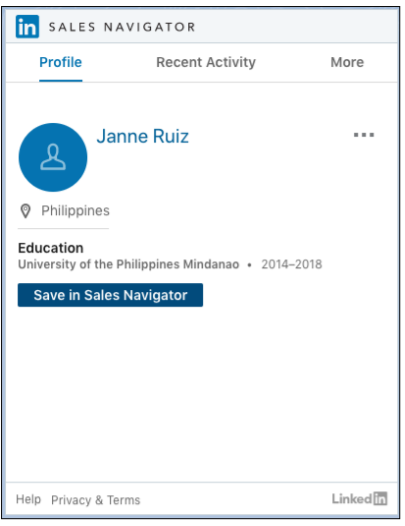
The release has brought a great feature for sales representatives to connect with customers in more significant ways through LinkedIn Sales Navigator native integration. Sales representatives can use native components to easily access LinkedIn profiles on contact, leads, opportunity, and account pages. This further makes it easier for them to send connection requests and InMails using native Lightning Actions.
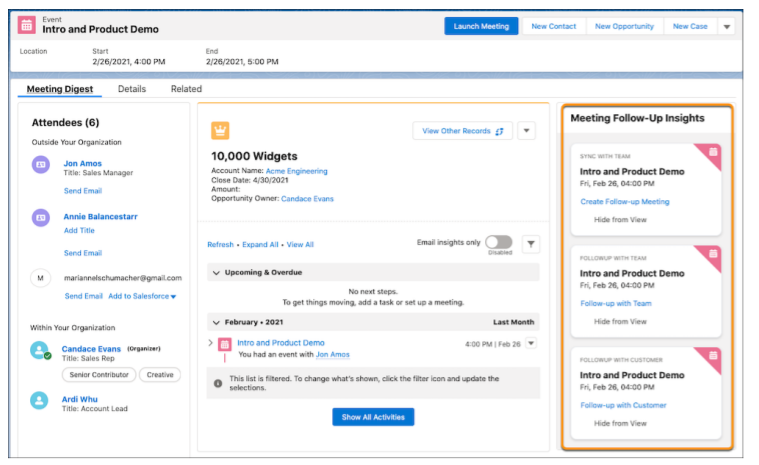
To prepare for meetings in a better way and to help organizers address customer concerns, Salesforce added Meeting Digest with the feature that gives insights about the cases which are of the highest priority. It also notifies the meeting organizer about the outstanding customer requests. In addition to this, representatives also receive helpful reminders of follow-up meetings or sending emails after the meeting.
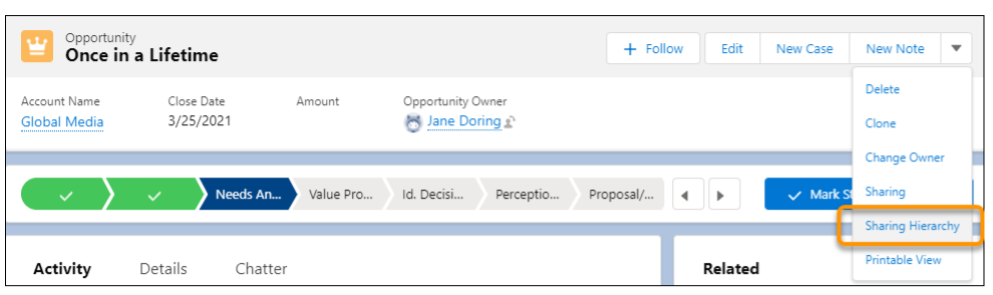
Earlier when multiple users had access to a record, it was never clear why they were having the access and what their roles were. But with Summer ‘21, a user can see why they have access by finding it in the Record Sharing Hierarchy in Lightning Experience.
Salesforce Summer ‘21 has brought some great features for administrators, developers, and users. All of it adds to the experience and simplicity of using the CRM platform. We highlighted some of the eye-catchy features that we couldn’t resist sharing. There’s more to it that makes Salesforce Summer ‘21 something you might look forward to.



