Salesforce recently introduced new Customer 360 innovations that help to connect, commerce, marketing, and service data on one platform so companies can personalize every single interaction using insights from different departments.
Companies these days face mounting pressure to do more with less, all while striving to meet the rising consumer expectations. Ongoing changes in data privacy laws make it difficult to meet those expectations, and we can expect a cookie-less future to be fast-approaching.
This is where it is important to implement the next-gen Marketing and Commerce Clouds to give organizations new ways to deliver unique, connected and personalized experiences.
Marketing Cloud makes it easy to humanize every interaction, making marketers more efficient. Let’s have a look at some of the recent innovations:
The feature helps bring together Marketing Cloud Personalization and Engagement to deliver personalized, 1:1 customer engagement based on behavioral triggers new product catalog. Organizations can utilize data to understand preferred products by customers and engage with them when they are back in stock or on any active sale.
This connector helps to combine orders and product data to gain insights into revenue, product, and sales performance over time.
Businesses using Marketing Cloud can now automate data integration and understand where to spend to achieve an increase in ROI across campaigns, channels, and products. For example, marketers will be able to see the number of orders placed during a promotion, or the top three products ordered from different demographics in real-time.
Brands can automatically connect their data from different departments in a unified customer profile. It will help them to plan efficiently plan and optimize their Google Ads campaigns.
With this capability, marketers can deliver personalized campaigns using the first-party data they have instead of cookies. Also, in the near future, marketers can incorporate segment-level insights into the interface of the Customer Data Platform.
This is the app that unifies a company’s commerce and marketing data. It enables marketers to access it all on a single platform, using actionable insights to generate interactive dashboards.
Here are some new features with which Commerce Cloud will bring a new approach to digital commerce:
Salesforce’s NFT Cloud, which is now in the pilot, can help businesses expand customer experiences to Web3 environments in a trusted and sustainable manner.
It can help you manage and sell non-fungible tokens (NFTs) directly on the Salesforce Customer 360 Platform and connect customer data securely to gain a 360-degree view.
With the help of Social Integration, businesses can create and automate product feeds, publish ads, and segment audiences while finding and targeting new audiences. They can even create TikTok ads that will redirect to their commerce websites.
Commerce Cloud will have new capabilities that give agents a complete view of order history across channels through which service departments can transform into revenue drivers.
The feature will give them the ability to issue exchanges, returns, promotions, or complete orders, without the need of transferring them to other departments.
Businesses can create, manage, and scale a marketplace solution quickly on Commerce Cloud. It enables them to extend their catalog range with products from other companies and reach new buyers and channels. This can help brands drive new revenue streams, leading to an increase in cart sizes and membership subscription fees from vendors.
All these enhancements could take your productivity and work efficiency to a great level. But make sure you get expert guidance on what features would be right for you.
Hiring Salesforce consultants would simplify your way to plan and work through these new Customer 360 innovations and maximize your capability of working with Salesforce.
Digitalization has now become more important than ever. With that truth, Salesforce announced the new Digital 360. The upgrade focuses on helping companies go digital faster and deliver the next-generation digital experiences to their customers.
Consumers today are pushing the limits of the digital-first concept. With everything being done online, from groceries to purchasing cars, the marketing budget of businesses is following suit, with online sales reaching over $4 trillion. Also, digital advertisements are expected to hit half of all global ad spend this year.
With these shifts of businesses, Salesforce is helping companies with innovative measures through Digital 360. To get more from digital strategies, companies have to work on creating connected experiences and be aware of customers’ preferences and needs.
Salesforce brings in new technologies that combine data and digital to bring marketing, commerce, service, and sales together, helping companies put customers at the center of their digital strategy.
David Schmaier, President and Chief Product Officer, Salesforce, said,
“With Digital 360, companies have the full power of Salesforce to go digital faster, build a single view of their customers, and drive growth.”
Salesforce unveils the next generation of Marketing Cloud, allowing marketers to access a single source of truth about customers. This information will help them to connect with customers, using AI-powered personalization to inspire action and loyalty. It will also help to optimize the overall marketing impact with unified analytics.
Here’s more to everything new with the Marketing Cloud:
Businesses can benefit from Salesforce CDP, an enterprise customer data platform that helps to combine and supercharge customer interactions from everywhere. Companies can bring information from across sales, service, marketing, and commerce to deliver powerful marketing that grows relationships and revenue. Salesforce CDP integrates two technologies for a dynamic experience:
Customers are digitally interacting with brands, which has increased the need to safeguard their online privacy. With the strategic partnership between Google and Salesforce, marketers can understand their customers in a way that respects their privacy and maintains trust by using first-party data.
Both the companies will keep working to make it easier for businesses to gain customer insights from Salesforce products, including the Salesforce CDP, to activate advertising on Google.
Marketers can use create personalized advertising for audiences on Snapchat by utilizing their first-party data stored in Salesforce. Companies can engage with customers with tailored content on the platform and identify new targets considering existing customers using lookalikes.
Companies now have the option to use Marketing Cloud’s WhatsApp Business Solution. The feature will help them to increase customer engagement with keyword detection and transactional messages. It makes it easier for the representatives to contact customers on WhatsApp directly.
Commerce Cloud is an essential product for companies, allowing them to move beyond a single transaction and work on lifelong relationships. It now supports new technologies that will help to identify business trends and personalize customer experiences, along with easier order management.
With Commerce Cloud data integrated into Salesforce CDP, companies can get a complete view of customer data across every touchpoint. It allows them with a single source of truth, making it easy to use commerce data in cross-channel marketing.
Commerce Cloud brings in the new B2B2C Commerce app for B2B companies, allowing them to easily launch a connected, direct-to-consumer (D2C) e-commerce storefront, just using clicks.
B2B companies can now easily capture the first-party data, understand their full customer base, connect directly with marketing, services, and sales to successfully unlock a new revenue stream.
The feature helps companies go beyond the buy button and work on achieving fulfillment, delivery, and loyalty. It comes with Omnichannel Inventory and Distributed Order Management to allow teams to access real-time inventory across an entire network of stores. All of this will give teams more transparency and control over their orders with features like self-service fulfillment tracking, order modifications, and more.
Commerce Cloud will now have the new Progressive Web Application (PWA) Kit and Managed Runtime, to allow developers to quickly decouple front-end and back-end technologies and create highly customized consumer-facing experiences, known as headless commerce. It will help developers by saving time with maintaining infrastructure and more time creating interactive and innovative customer experiences.
Many of the Digital 360 features like Salesforce CDP for Loyalty Management, Distributed Order Management, Whatsapp Integration are already available to users. The rest of the features are due in the coming months.
Reimagine the digital growth of your business with all these new upgrades. If you have any questions or need help with your Salesforce, contact us to get help from Salesforce-certified experts.
It’s that time of the year when Salesforce administrators and other professionals sit tight to unwrap everything that Salesforce brings to them with its new release. After some helpful updates in Spring ‘21, Salesforce is back again with its Summer ‘21 release notes, and there’s so much in it that we can’t keep calm.
Salesforce announced the release date and Sandbox preview of Summer ‘21, and now the release notes are available too. Although there’s a lot that Salesforce brought up for its users, some features got our attention. Here are the top 10 features that will go a long way for Salesforce administrators and developers.
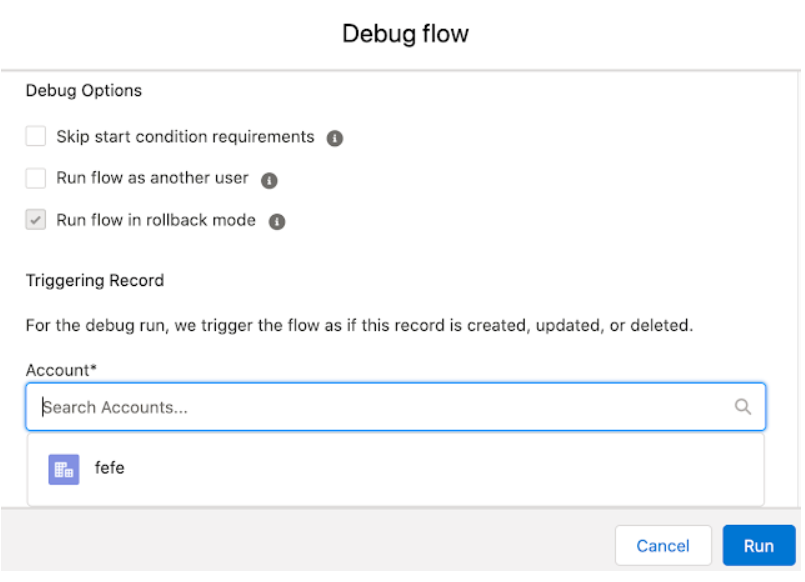
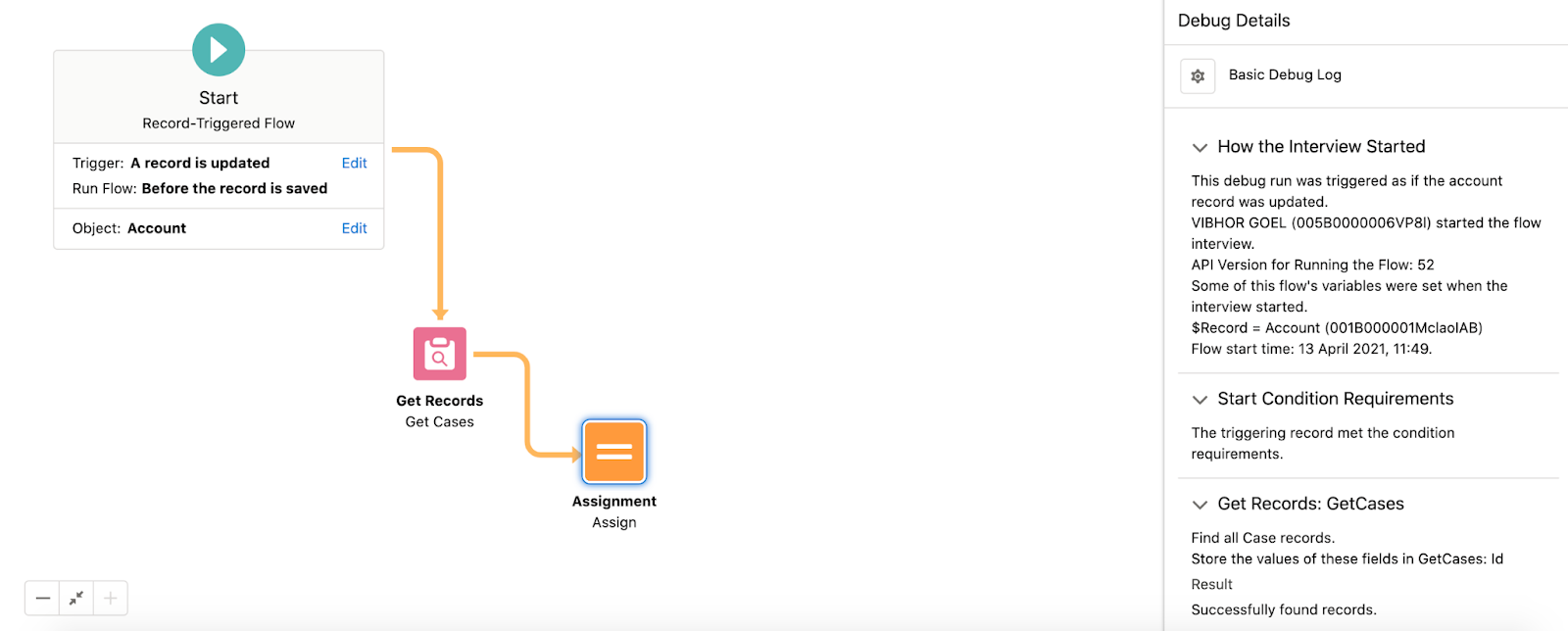
Salesforce Summer ‘21 has brought many Flow features and enhancements. You can debug Record Triggered Flow with the help of Debug tools. Earlier different kinds of workarounds were required for debugging Record Triggered Flows, being a massive gap in Salesforce.
There is also an addition of a native collection sort element within Flow Builder. This feature allows Sort Collection Variables in ascending or descending order.
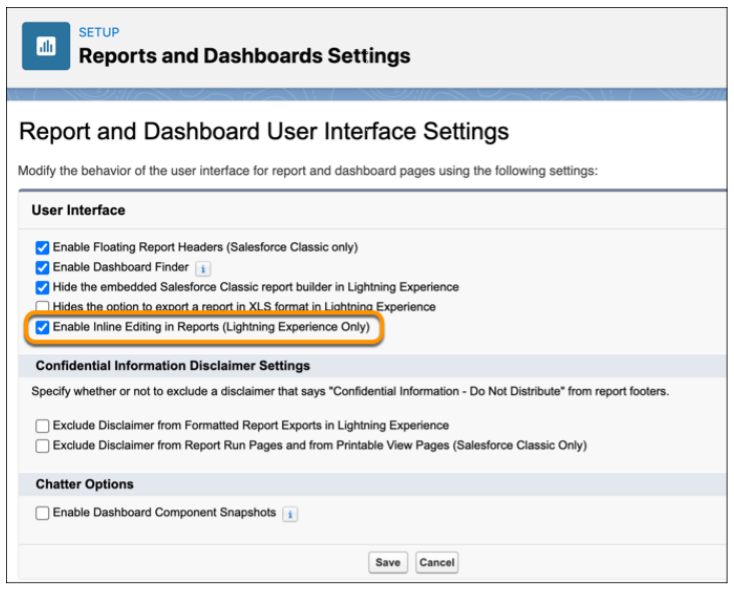
Users can save time and clicks by keeping data up to date in the reports and object records. When any source data goes out of date, you no longer need to go back to the original record to update the information. The feature of inline editing allows updating the text or numeric fields without leaving the Report Run page.
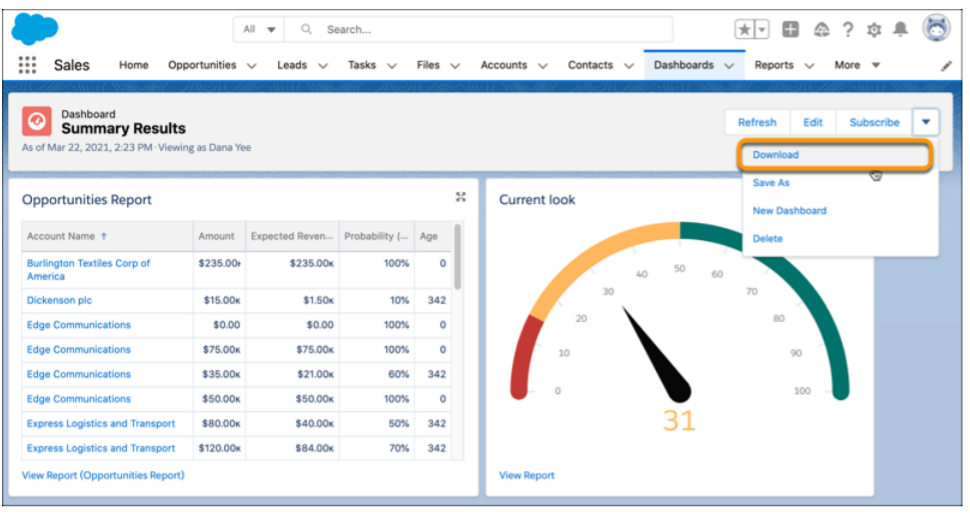
You can download any image on your dashboard embedded in a presentation to receive a PNG file. Earlier, you were only able to acquire a dashboard image with the help of an app for screen capture.
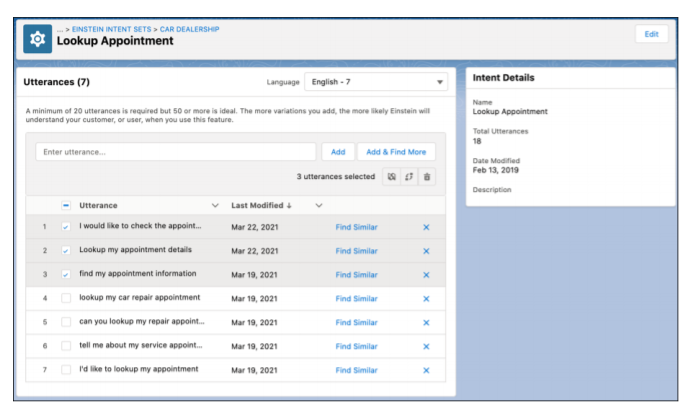
Summer ‘21 has brought more NLP languages for Einstein Bots. This makes it easier to reach out to more customers in the language preferred by them. Einstein Bots will now support Korean, Swedish, and Danish for Natural Language Processing in beta.
Also, the Einstein Bot Builder is equipped with an upgraded intent management experience for expanding your bot. The feature of dialog cloning is added with the option to include the attached utterance. This allows you to move bulk utterances between intents or to another intent set. The intent set now contains various languages, and users can easily assign bulk utterances to a new language. Users can focus on the utterance matching with the language of the bot with bot training, ensuring that the model fits right for your target customers.
The release brought us a new product, Salesforce Data Pipelines that helps to enrich the Salesforce data. When your CRM data is scattered on different services, the product can help you consolidate it for a single and accessible view that enables faster decision-making. You can also use Data Pipelines for transforming bulk Salesforce information without having to use third-party tools.

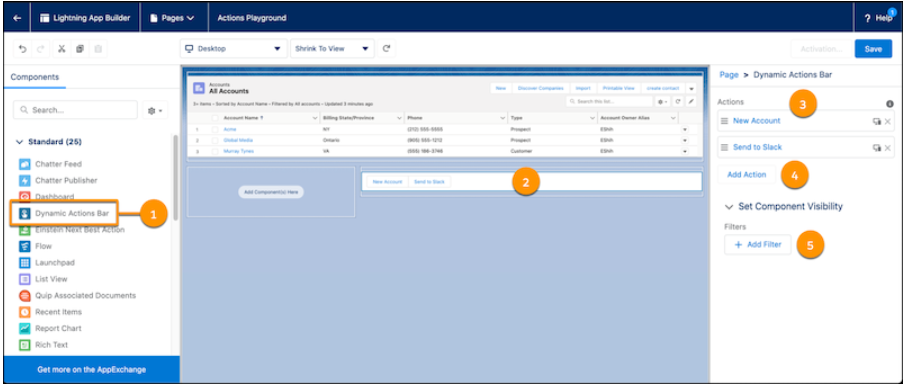
You can now have a Dynamic Actions Bar for your app page that helps you handle all the information actions from a single bar. You can easily drag and configure the components of the bar on your app page by using the Lightning App Builder. You can also use standard and custom global actions for customizing your bar.
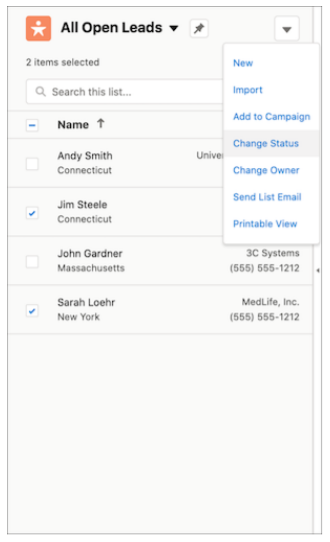
You don’t need to open a different list page for different details now. You can easily enable the split view to access multiple records at a single time. In a split view list, select the relevant items and choose an action for them in console or standard view.
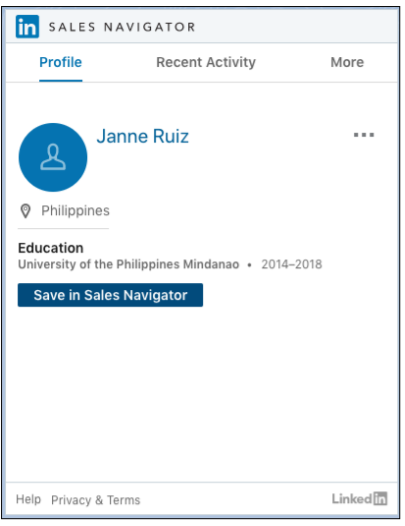
The release has brought a great feature for sales representatives to connect with customers in more significant ways through LinkedIn Sales Navigator native integration. Sales representatives can use native components to easily access LinkedIn profiles on contact, leads, opportunity, and account pages. This further makes it easier for them to send connection requests and InMails using native Lightning Actions.
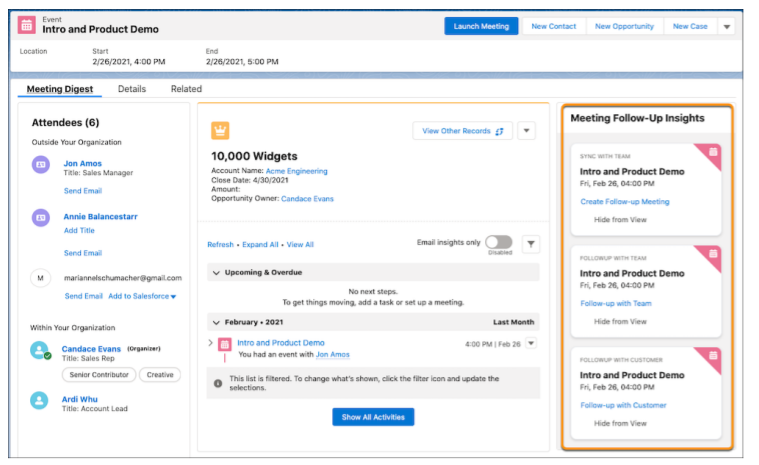
To prepare for meetings in a better way and to help organizers address customer concerns, Salesforce added Meeting Digest with the feature that gives insights about the cases which are of the highest priority. It also notifies the meeting organizer about the outstanding customer requests. In addition to this, representatives also receive helpful reminders of follow-up meetings or sending emails after the meeting.
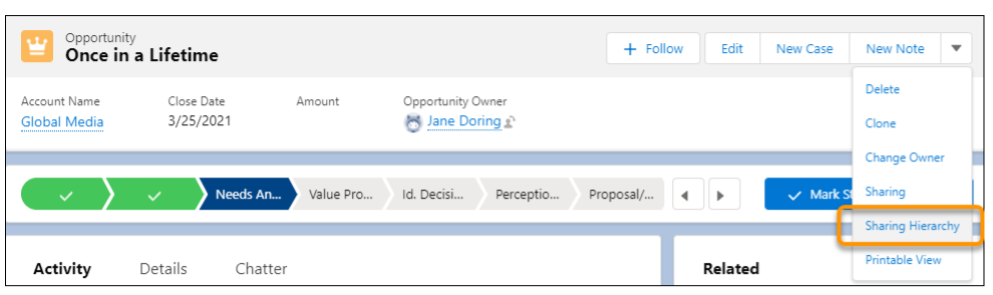
Earlier when multiple users had access to a record, it was never clear why they were having the access and what their roles were. But with Summer ‘21, a user can see why they have access by finding it in the Record Sharing Hierarchy in Lightning Experience.
Salesforce Summer ‘21 has brought some great features for administrators, developers, and users. All of it adds to the experience and simplicity of using the CRM platform. We highlighted some of the eye-catchy features that we couldn’t resist sharing. There’s more to it that makes Salesforce Summer ‘21 something you might look forward to.
With healthcare professionals adopting the right technology, a dramatic improvement in the care management approaches has been witnessed over time. From elevating the patient experience to analyzing the health records and making the right decisions, there’s a lot involved in the healthcare sector. Thankfully Salesforce Health Cloud finds itself capable of meeting these challenges. The Health Cloud is only among an increasing number of platforms that support a more engaged and tech-savvy patient base. Per Salesforce, 71 percent of millennials want to engage, control, and manage their healthcare actively. The Salesforce Health Cloud exceptionally satisfies these requirements.
Salesforce introduced Health Cloud as a patient engagement platform or ‘Healthcare CRM’ that connects to a treatment or Hospital chain’s existing IT system. Its capabilities incorporate doctor-patient relationships while offering record management services. The Health Cloud supports one-to-one relationship management through a patient profile, integrating information from multiple data sources, including medical devices and electronic medical records (EMRs). The primary benefit of Health Cloud is to improve visibility into the entire healthcare journey and systematize interventions.
With Salesforce Health Cloud, the way the medical data gets handled transforms completely. Here’s a look at how it helps medical establishments turn a corner.
#1 It unlocks operational efficiencies for busy medical staff from a unified platform
By enabling all stakeholders with access to critical data, enabling real-time collaboration and proactive engagement, the Health Cloud allows healthcare professionals to improve efficiencies to drive better outcomes. It allows care-teams to access the latest patient information and upcoming tasks, encouraging better adherence to care pathways. Similarly, pharmaceutical providers can drive awareness of patient support programs and track marketing and sales activity with the Health Cloud, which offers them an integrated view of all patients and provider interactions with them.
#2 Hospitals, labs, care facilities can consolidate progress across existing systems
With Salesforce Health Cloud, there’s no need to start again from scratch or undertake a massive effort to connect siloed systems and data. It layers on top of your existing systems and software applications and easily integrates with your current data. Health Cloud supports quick integration with electronic health records and claims management software, giving the team a comprehensive view of the healthcare journey of patients. It provides teams with a single view, eliminating the need to toggle among various systems and screens to find information about each patient.
#3 Treatment chains can deliver personalized care more productively
Salesforce Health Cloud pushes forward AI-enabled personalization for digital healthcare. After adding third-party data to the existing data in CRM, you can choose from several different use cases depending on your services. AI is used to surface the training resources for staff and helps in anticipating issues based on patient history. AI features supported by Health Cloud also use predictive analytics to identify at-risk populations and recommend next-best actions for greater engagement and timely intervention.
#4 Wellness & Therapy Clinics can capture preferences to build relationships & engagement at scale
Circling back to its core role as a CRM platform, the Health Cloud efficiently captures communication through a myriad of preferred channels – including live chat, phone, mobile apps, emails, and online forums. This helps the services to proactively engage with healthcare consumers, knowing the right time and the right way to establish contact. This CRM helps gather the data about the consumers, which can be further segmented to create contextualized engagements. This way healthcare practices and professionals have everything they need to stick to a consumer-centric approach right in front of them.
Although in-house legacy systems have been the heart of patient information for a long time, realizing they may not be the most efficient way to organize patient information opens up patients to novel tracks for care and prevention. Going forward, unoccluded and centralized patient data will be key to greatly simplify treatment planning, as treatments themselves become increasingly data-centric and even overlap with patient data to lead advances in treatment methodology.
Innovation in business workflows and technologies has been a fixture of advanced business practice. But, before going all-in for the latest technological implementation, chasing a new-fangled acronym, it helps to stand back and reassess the quantum of improvement you’d eventually get. An even deeper analysis is needed to figure out whether a business needs new developments from the ground up or merely an enhancement of existing structures and features.
The cardinal rule of “If it ain’t broke, don’t fix it” applies to platform development too.
That said, Greenfield and Brownfield development have some pronounced differences that make them stand apart. While working on a Greenfield approach, you’ll see the benefits of starting on a clean slate, addressing deep-rooted issues, and following the best practices of development and implementation. On the other hand, following the Brownfield approach has its own benefits, like a step-by-step approach, faster implementation, the need for fewer resources, and less business change impact.
For businesses, customer satisfaction and relations take precedence. And lest we forget, it’s Salesforce’s ability to bring customers closer and enhance customer relationship management that’s made it the most sought-after CRM in the market. Its numerous features compel organizations to explore various implementation options. Depending upon the complexity and needs of business operations and allowing for overlap, users broadly lean toward either Greenfield or Brownfield implementations. To commit to a side, they’ll need a look at their bases of distinction, some of which are as enumerated
Greenfield implementation with words like ‘transformation’ or ‘innovation’. It’s because Greenfield is all about building a new project from scratch. In platform terms, this could mean getting rid of the existing system or platform and planting a Salesforce Org in its place. In contrast, Brownfield implementations are all about building on top of existing platforms and getting them to communicate with new ones. The approach extends older business processes and capabilities and depends on workarounds, refactoring & middleware. Schema extensions are a good example of this. You could extend them pretty much anyway by adding custom objects, lookup relationships, master-detail relationships, and all custom fields (except Geolocation) through Schema builder.
Yet another example of a Brownfield project is the existing AppExchange apps. Its collaboration with customers doesn’t end with a launch as a managed package. To meet customers’ ever-changing needs, the app’s existing functionalities are redefined over and over to work well with changes made to Salesforce with each release.
In Greenfield, time constraints are more relaxed and come with no limitations to working with existing systems or infrastructure. Everything starts from afresh and demands more time investment in comparison to Brownfield. Development is also accelerated using updated code libraries that tend to be compatible with other technology from the time out of the box. When it comes to a Brownfield approach, the Salesforce implementation or development project takes comparatively little time as teams tend to have everything set up beforehand.
But this, too, could change if the modification being pushed is a major update. Major updates could take even longer if they’re based on new technology that really qualifies as Greenfield.
Greenfield approach provides enough scope for customization to achieve desired results out of Salesforce CRM. Without any limitation of previous architecture, the process can be initiated in the desired direction and tailored based on business requirements.
But the Brownfield approach holds a few limitations in terms of customization capability. Developers are bound to work with existing codes and architecture. And considering the capacity of in-use features, customization is done.
Coming to code usage, the Greenfield approach isn’t at all tied down to legacy code restrictions and leaves no room for code reusability within Salesforce. Like when metadata is in managed packages, there’s limited changeability, or you may not be able to make any changes at all. Also, the codes are private, and any modification is not at all possible.
On the other hand, the brownfield approach fosters code reusability within Salesforce. To redefine the program’s functionality and enable the speedy completion of a wide range of tasks, Salesforce’s existing codebase is taken into consideration. Like in unmanaged packages, even once the metadata is installed into production, the codes are visible, and you can still make changes related to an app. Further, Salesforce’s modular architecture allows you to reap add-on functionalities at an extra cost to basic offerings. You can pay only for the functionalities of your business.
A Greenfield approach works on the principle of a new beginning. It demands new implementation, development, code creation, etc., which drives up overall Salesforce Appexchange development costs.
Brownfield approach demands working on the existing infrastructure, code reusability, and extending capabilities of already in-use features. Thus, the usage of existing components leads to a reduction in the cost incurred in redefining a business process.
The scope for scale in Greenfield solutions is much wider since initiated development from scratch creates enough room for scaling up the process. In a scalable business process, it becomes easier to meet the extensive demands of users when needed. But that’s nothing to say of the compatibility issues that bottleneck Greenfield systems when they eventually need to interact with legacy systems. Even new processes demand additional and qualified resources to deal with transformed workflows, which further affects the management of the Salesforce Cloud.
While with Brownfield, limitations are tied to the original structure. Their support for scalability is limited but completely backward-compatible. Building on legacy systems translates to easy user adoption and compatibility. This familiarity also helps with the easy management and administration of Salesforce clouds.
Completely new implementations and development are more prone to risks due to unconfirmed business processes. New experiments come with new challenges, so fresh implementations are more likely to come with undetected, counterintuitive risks that could snowball under the hood and may surface when it’s only too late.
Compared to that, the ‘known’ issues that come with Brownfield projects look like a blessing, but the scenario is different. They are built on a stable infrastructure that is already in use. Hence, such projects are less prone to risks.
Greenfield and Brownfield are both crucial approaches for businesses and come with distinctive benefits and serious limits. Where Greenfield aids extended innovation capacities and scalability, Brownfield systems involve less risk and less investment. It depends on one where a firm is in its journey as a business.
Legacy system modernization is the key to deliver next-level customer experiences and simplifying new business implementations. But contrary to popular opinion, modernizing legacy software isn’t merely about updating systems. Instead, it’s pretty much a prerequisite across industries and institutions to eliminate barriers to digital transformation. The footprints of legacy technology are widespread and restrict newer software capabilities. As a result, business ventures are continually urging for the legacy system advancement to grow and remain competitive.
Despite this, many legacy systems remain untouched, especially at government institutions for fear of breaking stable processes depended on by millions of beneficiaries.
The inability to provide users access to advanced technologies does correlate to the loss of fresh opportunities. It incapacitates businesses from accommodating future endeavors successfully with severe technological debt and bottlenecking. At the outset, outdated systems add to inefficiency and operational cost, but hidden costs are much more disturbing. These include high support, maintenance, integration, and compliance costs, to name some.
However, it isn’t easy to replace an old technology due to the sheer cost involved, high risk, and the need for retraining which can often outweigh hidden costs.
Before jumping into possible solutions for remodeling the older process it’ll help to look at current uphill challenges to get some perspective on what we’re up against. We illustrate this with a few examples here:
To eliminate various finance operation loopholes, technology upgrade plays a significant role in driving down redundant transaction frequency and downtime. For example, the cost of mobile and online transactions is $0.10, whereas offline processing costs $4.25 for financial ventures.
(Source: Javelin Strategy & Research)
No doubt, the use of old technology may cost you less but overhead expenses can cost you much more than you invest in technology advancement.
High-level technology comes with high-level security, and this is where the need for technology advancement erupts. As legacy systems are enriched with the less advanced technology they’re more vulnerable to cyber attacks, malware, and even less resistant to hacking. Legacy infrastructure is one of the prime reasons responsible for cyber attacks and accidentally published information.
(Source: Accenture’s State of Cyber Resilience Index 2018)
As an important ingredient for legacy modernization projects, Mule ESB (Enterprise Service Bus) is a rescuer. It works great to get rid of almost every concern impeding legacy advancement. With its extended capabilities, it helps lowering the costs and the risk associated with legacy advancement. It also helps to cut back on retraining time to a minimum. And with the introduction of MuleSoft’s unified platform for data integration and API management, you can use APIs to help you to steer clear of complexities of legacy system hampering services and data.
Consequently, it leads to a reduction in overall maintenance costs cutting down the need for legacy system experts and security threats to your record system. Ultimately, it provides you the component flexibility you need for future projects.
Time is money for enterprises, and any project deployments demanding inflated time investments don’t generally end up with unparalleled customer support. In fact, they may push project completion time frames from weeks into months. Modernization isn’t just imperative to advance the software’s performance but also to boost organizational agility and understand users’ needs. For your existing clients and prospects, you can simplify deployment to drive down timelines and improve their overall experience.
Legacy modernization has paved the way for organizations to cope up with persisting issues associated with time frames, deployment, customer support, and many others. With recent strides in middleware and platform technology and the right recommendations, businesses are better equipped and stand a chance to address unique market needs and outperform competitors delivering advanced services.
No matter how big your database is, if you’re unable to utilize its potential, it makes no difference to your business. And this is where most companies lack due to the inability to explore their data. A large chunk of data stored by the firms is in unstructured data format. Consequently, it takes up enormous time, effort, and resources to bring unstructured data into a standardized form. That’s where you can use Einstein Analytics to sort it all.
Unorganized data urges the right method and analytics to derive meaningful insights and reap data benefits. But fortunately, Salesforce users are far from such inconvenience due to Einstein Analytics which enables intelligent search, discovery, and analytics.
Salesforce Einstein Analytics is a cloud-based analytical tool that helps with predictive analysis through reports and dashboards. Not only does the tool help you to gain quick insights into data, but it also keeps you posted about activities taking place in the organization. This analytic app empowers CRM users to make the most complex decisions, unveiling the latent potential of data.
Further, enhancing the capabilities of Einstein Analytics, AI-powered Einstein Discovery lets business users detect and understand relevant patterns based on data available. Most importantly, it delivers smart explanations for the identified patterns in easy-to-understand languages.
So there’s no additional need for building data models to analyze patterns.
Big enterprise databases usually create problems when it comes to extracting valuable information, but not with Wave Analytics. It was a cloud-based tool that helped users to build reports and dashboards regardless of the size of the database.
Edgespring- an analytics cloud company was acquired by Salesforce in 2013. A year after at Dreamforce 2014, people came to know Edgespring as Wave Analytics, and later the name changed to Salesforce Einstein Analytics, which we have now.
For a better understanding of Einstein Analytics, let’s check out its various components.
Analytics collects and organizes your data into four components which are as follows:
App
You can treat an app as a folder, just like you’d use the Private Reports folder in Salesforce, you can use My Private App in Einstein Analytics to store dashboards, lens, etc. Each user has their own app, and it can be shared with different levels of access based on roles, groups, etc.
Dashboard
The dashboard lets users analyze and explore widgets. Users can simply monitor the key metrics of a business. Also, the dashboard permits the addition of interactive charts to squeeze out the information in an easy-to-read format.
Lens
A lens is quite similar to the Salesforce report and provides a view of data in datasets. Using a lens, users can view data in graphical form. Without any restriction, a lens can be saved and shared independently with users.
Dataflow
A dataflow is a set of instructions to transform the data as per your dashboard needs. It helps you to specify what data to extract from Salesforce objects or datasets, how to transform the datasets, and which datasets to make available for querying. In simple words, dataflow helps you with datasets for the dashboard.
Data and analytics have become fundamental components for delivering enterprise value. Thus, to enhance a company’s ability to grow faster, an analytical approach is a prerequisite to making any informed decisions. By 2022, 90% of corporate strategies will explicitly mention information as a critical enterprise asset and analytics as an essential competency.
Further, by the end of 2024, 75% of enterprises will shift from piloting to operationalizing AI, driving a 5X increase in streaming data and analytics infrastructures.
Source: Gartner projections
Without a doubt, data and analytics have been accelerants to digitization and transformation. The emergence of Salesforce Einstein Analytics has not driven enterprise decision-making but also aided users with predictive insights and prescriptive recommendations. The use of analytics has unraveled new opportunities within their data at every turn. Learn more about the technology with our Salesforce consulting services and leverage it easily.
While it’s easy to pass off ‘omni channels’ as a fad, they’ve come to be increasingly relevant with recent market shifts.
We’re transitioning from an older strategy of taking products directly to customers, to more personalized and cost-effective communication with consumers over several channels of preference.
The effectiveness of print media, ads, and email campaigns are on the decline as multi-device marketing today reveals itself as the way forward for marketers.
From the outside, OCM is a cross-channel business model meant to enhance the customer experience across the entire bandwidth of devices and socializing platforms. This fits in well as marketers tend to streamline their platforms as a swimlane by focusing on each one of them, and have their own structure and goals.
It helps businesses integrate channels at the back end, bringing marketers closer to understanding customer behavior and journey, while also helping configure messages based on interests of consumers.
Marketers can then collect data across different social networks and know what channels and times work best for outreach. When clients make in-store purchases, messages or emails are automatically sent out with offers, rewards, and coupons for similar products. Retailers too, can use OCM to track their customer’s shopping frequency, allowing customers to collect points and feel rewarded for loyalty.
Enumerated here are just some of the things you should do while switching to OCM.
#Step:1: Analyzing Data
Analyze your data and check in on which channels your consumers use to connect with your company. Conduct surveys for this, or even ask them directly.
Then, compare notes to validate inferences from data.
#Step:2: Staying Connected for Marketing
Your omnichannel engagements are only as good as the online presence they build-off. So be sure to put yourself out there.
#Step:3: Updating Data
Stay on top of data in the CRM platform to ensure consistency inwards.
#Step:4: Viewing Data over the CRM platform
Invest in cloud-based CRM platforms that update automatically, so teams with access can directly view the data from anywhere and make synchronized changes.
#Step:5: Using channels to view journeys
Allow consumers to integrate or pull in data from channels to curate personalized journeys.
#Step:6: Answering customer questions
You’ll need dedicated response teams and knowledge articles for customer answers that help out immediately and project concern.
#Step:7: Reordering the content on customer interest
Analyze the metrics, data and deliver more personalized content and service throughout the entire journey.
Omnichannel business processes can lead to better customer experience by successful campaigns, integrated business process, brand visibility and better analytics of organization.
Let’s take a look into some advantages that businesses can achieve:
Data collection and Analysis
Businesses can collect data from different channels like shopping carts, social media, and analyze data so that they can personalize content based on customer interest.
Customer segmentation, Campaign designs
Analyze the consumer data that’ll help you find ideal customers, separate them according to their choice, and create better campaign designs.
Elevated brand visibility
This helps to place your message across different channels promptly, whether it’s plastered over a mobile screen, online storefront, or in-store.
Cost-effectiveness
Businesses can drive marketing campaigns and deploy your resources more efficiently within budget.
Highlighted below are the benefits of measuring and tracking in OCM.
Here goes!
Competitive Advantage
It allows businesses to outperform their competitors by measuring the relevant metrics like comments, shares, follows, likes, and much else. Beyond that, it also focuses on traffic and conversion metrics.
Customer Acquisition Cost (CAC)
It is the cost of winning a customer to purchase a product or service. Customer acquisition costs often relate to customer lifetime value, which is an asset for the company.
Metrics helps you understand how, where, and when a business should spend his marketing budget.
Tracking allows businesses to measure customer interaction, satisfaction, brand awareness.
It collates views on new products or services and aggregate collections of data that allow you to view insights like email opens, clicks, undeliverable messages online. It also helps in analyzing the effectiveness of Campaigns in OCM.
Lead and Contact records provide information about different aspects that impact the social media and campaigns conducted. Analytics provides reports on time-based engagement for aggregate, email, or subscribers data.
The omnichannel also automatically tracks all real-time website activity, ad clicks, SMS, email clicks, submissions around your existing website. Then combine a predictive scoring tool with the tracked data to identify leads that need to be urgently addressed.
Further down, custom scoring involves a process builder to check Email opens and clicks, helps in classifying your leads and contacts. Landing pages activity helps you to track interactions such as web form submissions, white paper downloads, trail subscribes, and many more. It sets custom Lead Score after a form submission and when the subscriber interacts with emails or with web submissions, his score increases.
Marketing Cloud offers a kind of tracking to build a profile automatically to highlight product interests in the mind of the lead. This makes the lead click on a particular product or service and connect with the business and become a sales-qualified lead.
Tracking plays a vital role in OCM by bridging the gap between online and offline media channels, providing digital coupons, which is one of the excellent approaches to retain customers across channels.
More controversially though, tracking tells you whether the customer has arrived at a store or is surfing online. That said, combining location data with handset data helps customers to reach your stores or sites and products easily. Collecting data through online surveys help know views about new products.
Aside from this, customers get information about recommendations, history of the product if people have it previously, product availability, its review, ratings, and many more.
Email tracking, like the name suggests, is a process of tracking Emails sent to customers based on interest. Most email tracking tools capture data, based on location, time of email sent, links, and attachments if any.
It also enables you to see whether your first email is interesting enough for the recipient to open or not. You can check if the contact has opened your email multiple times in one day.
Ideally, if they haven’t opened the first, they’re unlikely to open future follow-up emails, so you should stop there without sending them further. Further down, email tracking helps you save time by preventing unnecessary follow-up emails, both for representatives and recipients.
It is a process of categorizing prospective customers on individual actions. By tracking from initial touch till the end, you’ll understand campaigns, your sales and marketing process as a whole. It tracks the basic information of lead such as first name, email address, title, company name, company size, and many more. It also tells you about how actively a lead is engaged with the company and does their activity reveal strong, immediate, and relevant interest or not. Later the team will then determine a scale of scores and find out which profile attributes and which activities contribute to them to get the attention of leads, till is set till the lead becomes a sales-qualified lead.
Listed below are some important aspects which has to be considered while following the lead tracking process:
Omnichannel marketing provides customers completely integrated experiences from the first touchpointon. Aided by tracking and analytics over several rubrics, the strategy distills the message you intend to project.
Marketers are brought closer to measures of satisfaction levels of customers and identify which brands take their attention, and opinion for new products also.
If the marketing and tracking levels are disjoint, audiences may become less likely to engage with your brand, resulting in lowered loyalty and purchases. Hence, it’s safe to say that both of these are co-dependent.
Salesforce CRM has been always working on the latest trends in the industry to ensure customers’ trust and reliability in the long run. It is never behind in adding new and powerful functionalities to its platform to make it much easier for its users. Recently, it also came up with the Dark Mode for Salesforce, specially designed to help people at its best. From allowing it to be easy on people’s eyes to help them save huge battery percentages, it has been a complete savior for the majority of the people using it regularly. This can be done by adding a new extension by Salesforce called the ‘Lightning Extension.’ It is easily downloadable from the Chrome App Store and can be executed step by step in the following manner.
Installing the Lightning Extension:
So, mentioned below are a few steps that need to be followed in a series to get started with the latest extension by Salesforce CRM. Have a look-

So, by following this easy 3-step user guide, one can install the lightning extension in Chrome effortlessly without wasting any more time. It also gives you many other privileges, which we will talk about later.
You can look at the following pointers to understand the prime advantages of the dark mode in detail. Let’s get started.
Less strain on eyes-
As we are already aware that Salesforce enthusiasts are almost engaged in tasks of prime importance every time, and working with a Salesforce org on dark mode can relieve their eyes or relax. This also goes for the lesser strain on the eyes and hence, more concentration.
Power-saving mode-
So, this Salesforce Lightning Dark Mode is also efficient in saving power. It can definitely be your power-saver once enabled, as it would consume a lesser battery in comparison to the usual mode.
There are different ways through which you can enable dark mode in Salesforce. Some of these ways are mentioned below:
Google Chrome Lightning Extension
Earlier, this was the easiest method to use Salesforce in dark mode, but on June 14, 2021, Salesforce ended the Google Chrome Lightning Extension feature as it had an adverse effect on performance.
Salesforce Dark Theme Beta
Another Google extension that can be used for dark mode is Salesforce Dark Theme Beta which emerged as a kind of replacement for the previous Google Chrome extension. This feature enables dark mode for Classic and Lightning Experience, Trailhead, Knowledge Articles, Developer Docs, Discussion Forums, and Lightning Design System Library.
Super Dark Mode
This is another Goog;e Chrome extension that enables Salesforce in the dark mode. You can call it even the darker mode of dark mode. While the Salesforce Dark Theme Beta extension can only be used for Salesforce pages, Super Dark Mode enables dark mode for all pages you access on your browser.
Ending Note
So, in a nutshell, it can be added that one must try out the Dark Mode by Salesforce Lightning as soon as possible to avail of the mentioned benefits. They can also explore other amazing functionalities on using it for the first time. So, getting started with the right.
Image source: Lightning Extension



