


services  .  Implement Advanced Functionalities for Service Cloud – Knowledge Base

Implement Advanced Functionalities for Service Cloud – Knowledge Base

Pro Salesforce Header

Implement Advanced Functionalities for Service Cloud - Knowledge Base

People these days are becoming impatient. They always have a lot going on; thus, the customer service team must be on their toes to catch up with customers.

The faster your team gives a resolution, the higher the chances of growing brand loyalty. To make it easier, Salesforce Service Cloud supports a feature of Knowledge Base to enable customers to resolve their issues faster. As a Salesforce consulting firm, we have helped many clients from different industries set up their knowledge base to facilitate self-service capabilities.

Salesforce Knowledge or Knowledge Base is a collection of documentation, articles, and other resources that have information about the services and products you offer. It is a self-service model to help customers find answers to their queries, assisting in case deflection.
As the name suggests, Salesforce Knowledge is a comprehensive knowledge base in Salesforce Service Cloud to enable your customers, internal agents, and partners to find answers through self-service.

What is Salesforce Knowledge?

Salesforce Knowledge gives Salesforce users the ability to create a knowledge base to store articles and documentation that will help service your partners, website visitors, internal agents, and customers. You can include articles and details about your product or service or add answers to frequently asked questions to your knowledge base.
The feature allows you to set up a self-service model that will enable your customers to get the relevant content that could resolve their queries and increase satisfaction.

Salesforce Knowledge Base Features

Now that we know what Salesforce Knowledge is, let’s learn about its unique features.

1. Ratings

Salesforce Knowledge allows users to rate any content or article. Lightning Knowledge supports a thumbs-up or down rating system for the users. You can add or remove these voting buttons to control who can rate what kind of articles.

2. Data Categories

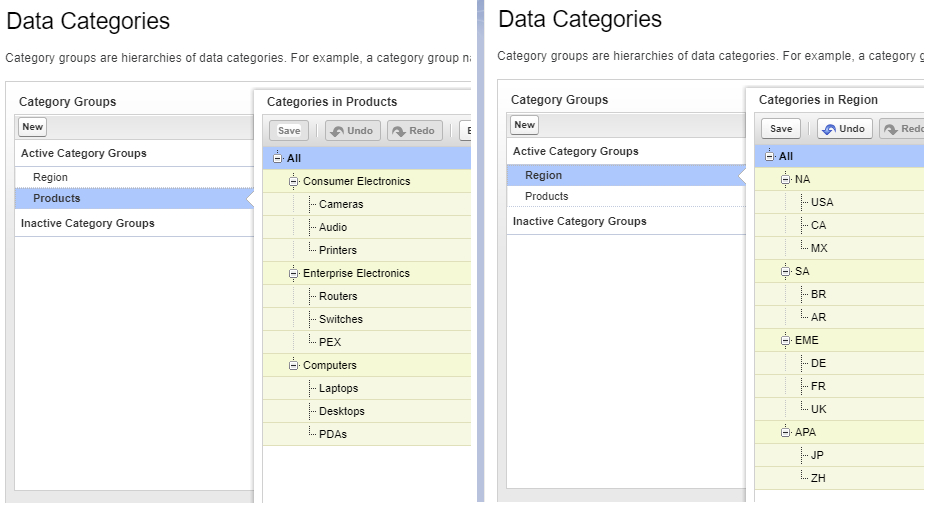
Data Categories and Data Category Groups help users with article access and organization. It enables you to organize or group your content into different Data Category Groups.
We’ve shown an example where articles are listed under several categories and subcategories to enable users to find the article they are looking for quickly.
You’ll also be able to access another capability, Data Category Visibility, which will help you control data visibility according to permission sets and profiles so that users can access knowledge relevant to them.

3. Topics

You can add relevant topics and classify articles based on different content types. You can consider it to work like keywords. An article can have many topics assigned to it, depending on its content. Also, make sure not to over-assign topics as it could lead to returning irrelevant results on searching.
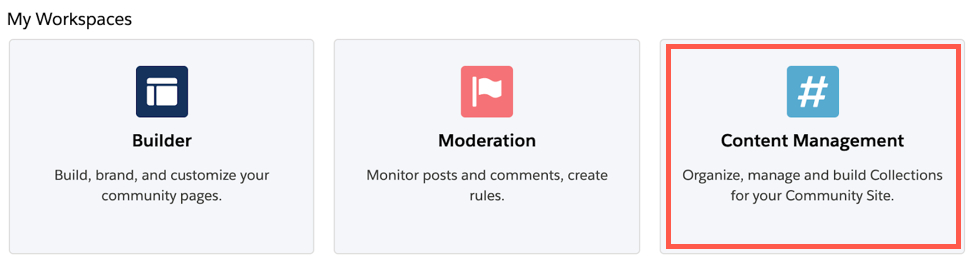
To assign topics to articles, go to Content Management > Topics in the Salesforce community workspaces.

4. Case Deflection

Salesforce can also help customer support teams to manage a high volume of cases, saving them from feeling overwhelmed. Providing knowledge articles to customers helps to deflect support cases from customer service representatives.
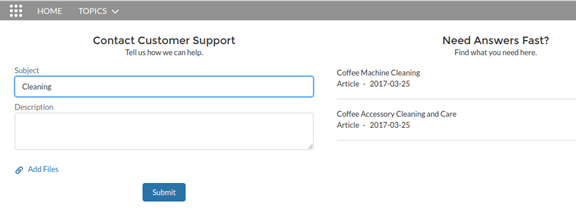
Salesforce makes it easier by enabling the Case Deflection component for users. Using this feature, Salesforce users can submit cases while having a right-hand panel to provide recommended knowledge articles based on what the user types into the case.

Content Management for Knowledge Base

Salesforce Knowledge allows its users to give feedback through comments, ratings, or chatter to enable direct editing of the draft and polishing the articles for customers. The knowledge lifecycle focuses on the continuous improvement of the content for the knowledge base.
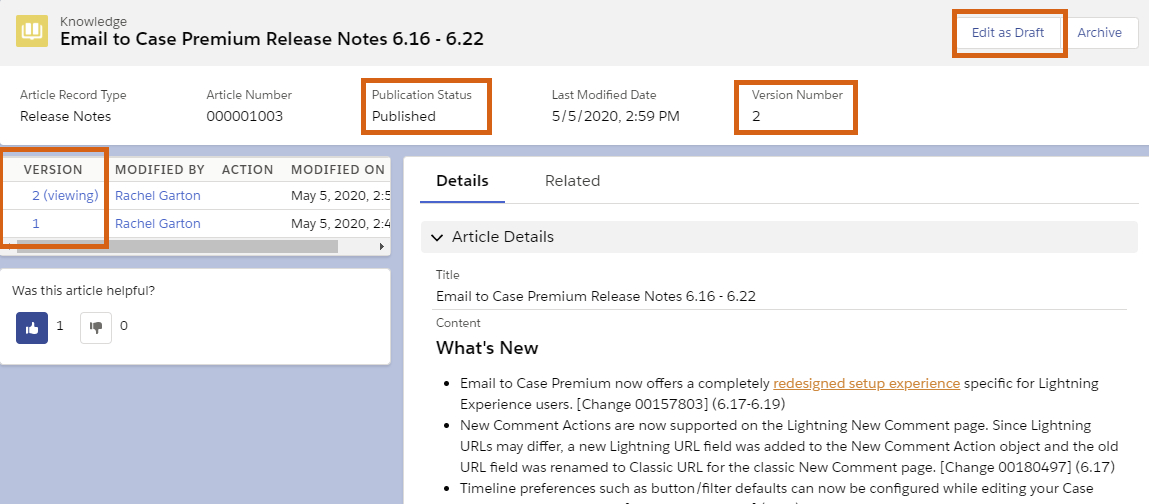
Each article in the knowledge base has been assigned a respective Version number. Whenever a user has to make changes to an article, they will have to edit it to a new version and publish it. This enables users to publish content without impacting the existing versions.

Winding Up

When the idea is to keep customers at the center of the business, it is essential to cater to their queries as quickly as possible. While customer service agents might not be available every second to assist them, the knowledge base can be a great way to enable self-service for customers.

Boost your Service Cloud capabilities by extending information to the knowledge base. You can contact our Salesforce consultancy services and get the best Salesforce experts to assist you.

Have a Message For Us?

Please fillup the form and send your message.

Loading......

Captcha

Refresh

Click on submit to be contacted for a demo of our products or Salesforce Services.

Love the enthusiasm!

But you’re here too early,
even for an early bird.

Come back when the calendar tells you to.
Meanwhile, checkout the previous articles.
Love the enthusiasm!

But you’re here too early,
even for an early bird.

Come back when the calendar tells you to.
Meanwhile, checkout the previous articles.

Get free strategy and consultation for Salesforce

I’m pretty sure you’re using Salesforce and things are going smoothly.
But we’ve seen that business users often need specific out-of-the-box capabilities, automation, and customized processes to keep pace with competitors.
In our initiatives to promote better Salesforce usage as a Platinum Partner, we’ve helped businesses create efficient automation and powerful point-and-click.
This has also eliminated costly human errors. Luckily, you’re in the right place.
So implementations aside, if you’re ever looking to talk about overall strategy or get stuck somewhere don’t hesitate to jump on a call with me.
I’m always up to help you elevate your Salesforce game.
Have a Message For Us?

Please fillup the form and send your message.

Loading......

Captcha

Refresh

Click on submit to be contacted for a demo of our products or Salesforce Services.

Get free strategy and consultation for Salesforce

I’m pretty sure you’re using Salesforce and things are going smoothly.
But we’ve seen that business users often need specific out-of-the-box capabilities, automation, and customized processes to keep pace with competitors.
In our initiatives to promote better Salesforce usage as a Platinum Partner, we’ve helped businesses create efficient automation and powerful point-and-click.
This has also eliminated costly human errors. Luckily, you’re in the right place.
So implementations aside, if you’re ever looking to talk about overall strategy or get stuck somewhere don’t hesitate to jump on a call with me.
I’m always up to help you elevate your Salesforce game.

Need help implementing this?

Leave your details here and cloud expert will get back to you and hold your hand through this


Have a Message For Us?

Please fillup the form and send your message.

Loading......

Captcha

Refresh

Click on submit to be contacted for a demo of our products or Salesforce Services.

Learn about Opportunity Split and
Calculate your Sales Commissions,
All in Real-Time

Having a huge sales team might be good for your business but splitting a fair credit for an opportunity, that’s where the trouble lies.
What you need, is a way to split credit/share fairly among the team members of any closed-won opportunity. Salesforce provides you a standard functionality in Sales Cloud, Opportunity Splits, to help calculate commissions.
We understand it is important to share revenue from opportunities and give team members due credit for helping to close deals. We’ve implemented the Opportunity Splits in organizations from different industry verticals to allow everyone involved to get credit for their work and show it on their revenue reports. This has helped team members to roll their individual sales credits into quota and pipeline reports for the entire team.

Types of Opportunity Splits You Should Know

Broadly, there are two types of opportunity splits that you should be aware of
– Revenue Split and Overlay Splits.

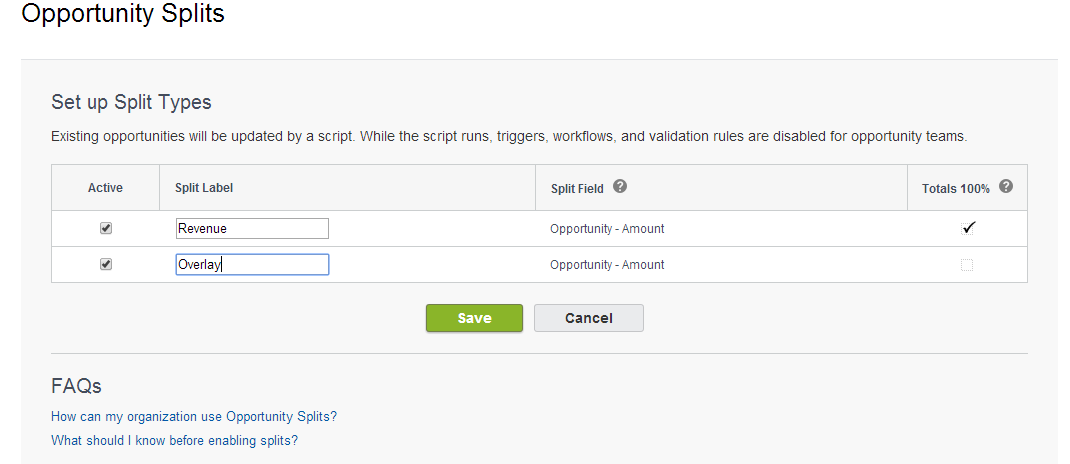
1. Revenue Splits

Revenue Splits help to allocate credits to sales representatives or team members directly responsible for any given opportunity. It uses splits that can total 100% of the opportunity amount.

2. Overlay Splits

Overlay Splits allows you to credit supporting team members who are not directly responsible for an opportunity. It uses splits that can total any percentage of the given opportunity, along with percentages over 100%.
Now the next thing you need to know is how you can enable opportunity splits. Let’s have a look at the steps

How to Enable Opportunity Splits

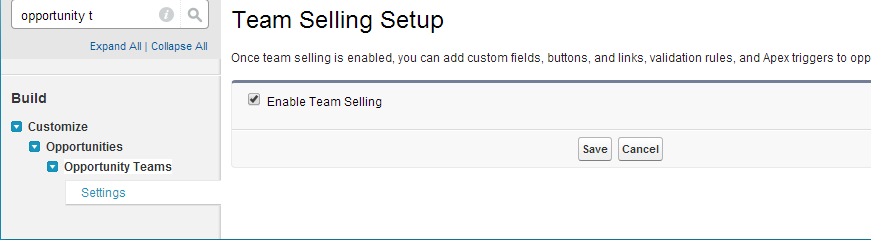
To enable opportunity splits, we have to enable Opportunity Teams (Team Selling setup).
Step 1: Follow these steps to enable opportunity teams.
Go to Setup → Build → Customize → Opportunity Team.
Click on settings → enable team selling and save.


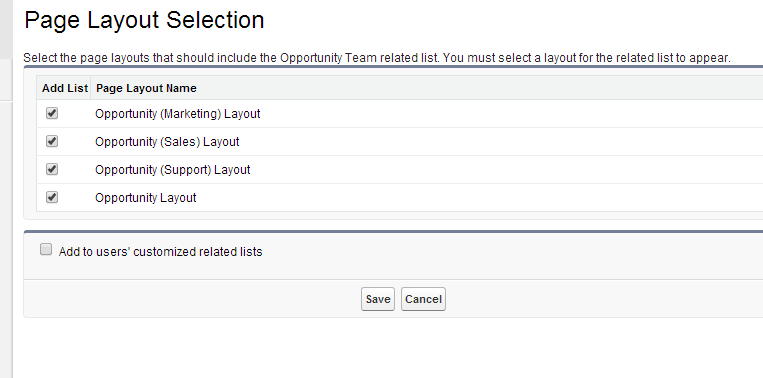
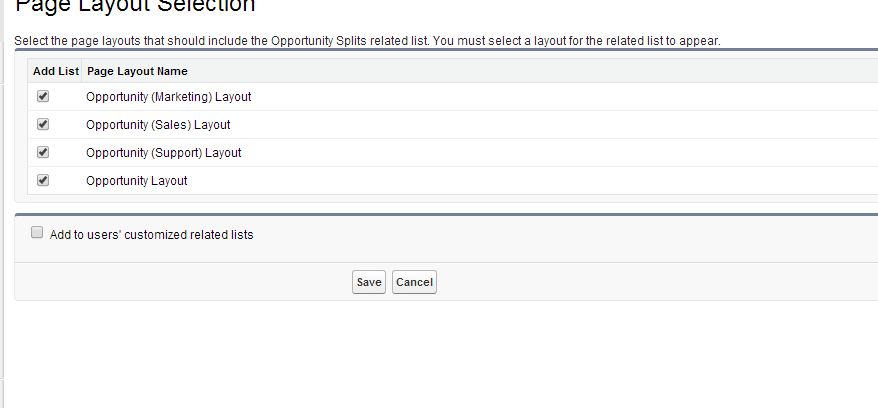
Add the Opportunity team list to required opportunity page layouts and click Save.

Step 2: Enable Opportunity Splits.
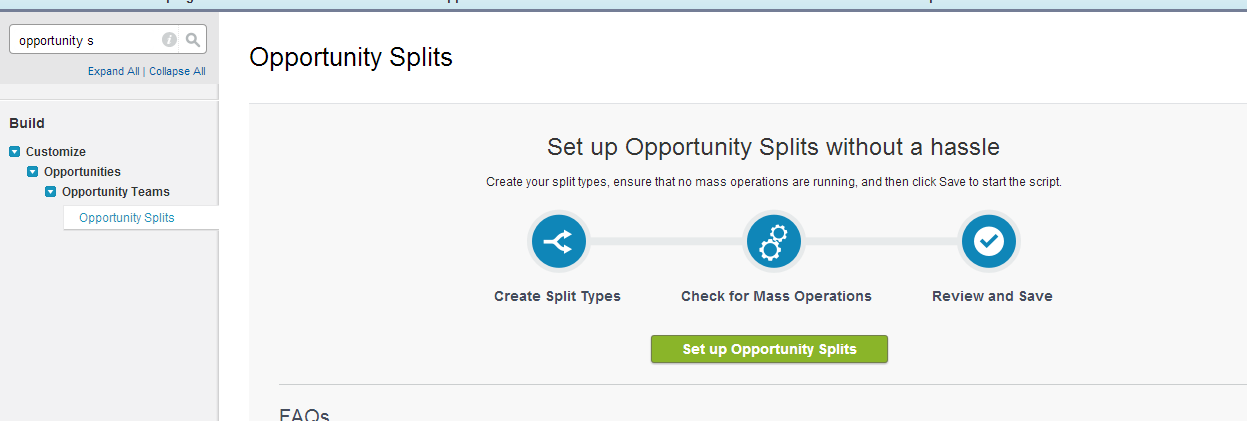
Select Setup →  Build →  Customize →  Opportunity Team → click on Opportunity Split.
Click Set up Opportunity Splits.
You will navigate to the following screen.
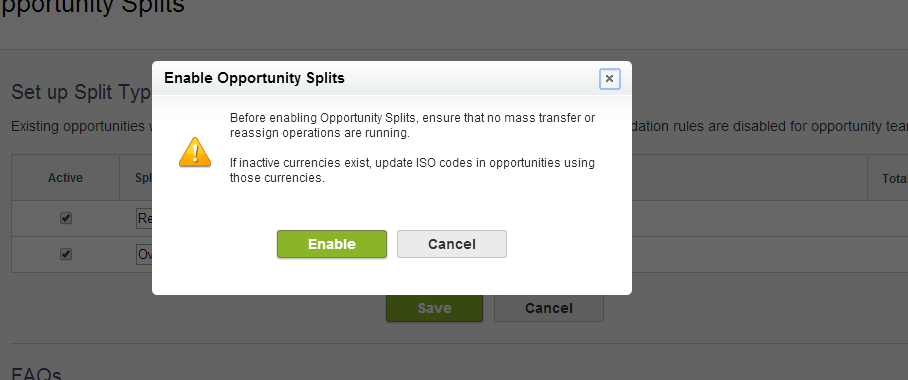
Select the type of split you want to enable for your organization and click Save. After that, you will get a warning page as shown below.
Click Enable. Add opportunity split list to the required opportunity page layouts and click Save.
Now opportunity split is enabled to your organization. You can also download a PDF of the steps for enabling Opportunity Splits in Salesforce.→ 

Calculate Commissions in real time

Based on target and incentives we can now calculate commissions for sales agents month-ver-month based on their individual quota targets and sales achieved.

Wrapping Up

We understand how much the compensation matters for a hard-working sales team and can help you simplify the process. And this is just the tip of the efficiencies you can drive for sales teams with Salesforce. It can simplify reports validations, approvals, and other sales processes too.


In the meanwhile, opportunity splits using the PDF given above will help you do so, and if you need help our certified experts can always assist you.


Have a Message For Us?

Please fillup the form and send your message.

Loading......

Captcha

Refresh

Click on submit to be contacted for a demo of our products or Salesforce Services.

Get free strategy and consultation for Salesforce

I’m pretty sure you’re using Salesforce and things are going smoothly.
But we’ve seen that business users often need specific out-of-the-box capabilities, automation, and customized processes to keep pace with competitors.
In our initiatives to promote better Salesforce usage as a Platinum Partner, we’ve helped businesses create efficient automation and powerful point-and-click.
This has also eliminated costly human errors. Luckily, you’re in the right place.  
So implementations aside, if you’re ever looking to talk about overall strategy or get stuck somewhere don’t hesitate to jump on a call with me.
I’m always up to help you elevate your Salesforce game. Talk to Rohit for expert advice. 
Have a Message For Us?

Please fillup the form and send your message.

Loading......

Captcha

Refresh

Click on submit to be contacted for a demo of our products or Salesforce Services.

Ways to Reduce Salesforce License
Cost - Understand your Options

We’ve commonly observed many Salesforce projects failing because of incorrect licenses or people having a lack of understanding due to which they end up paying way more than was required. All of this is because they don’t know how to optimize their licenses.
But help is at hand.
Different Salesforce licenses are available for different usage levels and use cases. Each has its pros and cons depending on your intended goals at the time.

Thankfully, there’s also no license lock-in, and you can always upgrade to a higher license and Salesforce Edition depending on your changing requirements as a growing business.

STEP FOR CHOOSING THE RIGHT LICENSES

We’ve also seen many organizations struggling with overspending on Salesforce license costs and helped them optimize it and reduce their expense. The best approach is to start small and grow progressively.
With almost a decade-long experience, we know all the important points that are to be taken into consideration when choosing the license and recommend the same to our customers, so they won’t end up spending more than they need to.
So we’re here to share some helpful tips with you that will help you make a wise choice while choosing a Salesforce license while optimizing the costs involved.

1. PICK A LICENSE BASED ON YOUR NEEDS

Although “the more, the better” sounds good generally, this isn’t applicable to Salesforce license pricing.  

Many users blindly purchase Salesforce Enterprise Edition so they can derive full access to the standard CRM and AppExchange apps. Even though the license allows them to access any standard or custom application without any restriction, they fail to utilize all features for which they paid such a hefty amount.

If you’re new to Salesforce, don’t go all out. Start with a smaller number of licenses, because implementations can take time.
So, it makes sense to start with an honest assessment of your requirements along with some foresight. This prevents you from overpaying for a license you won’t fully utilize while preventing any bottlenecks in operations.
You can also choose from a mix of different license types for different team members and departments depending on specific requirements.

2. TRY A MODULAR APPROACH

A more modular approach to licensing is to add more licenses as implementations for new departments and team members are rolled out. Salesforce offers a flexible Salesforce License Pricing scheme that you can choose If you don’t wish to have it all at once.
Doing this lets team members in relevant business functions access necessary premium capabilities. It also brings down upfront license costs immediately and leaves room for expenses you may actually need, like customization.
You can start by choosing the minimum basic package and scale it up with add-ons as you need.

3. UNDERSTAND LICENSE TIERS

Once you’ve understood your license and business needs, you should read up on license tiers offered by Salesforce for each cloud and the capabilities offered by each. Teams can then weigh trade-offs depending on their budgets and choose the right license for themselves.
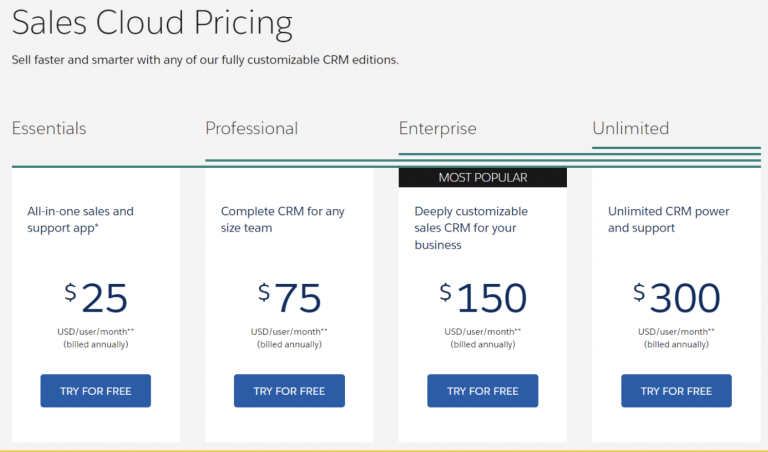
As an example, we’ve listed out the different license tiers of the Salesforce Sales Cloud and the features they offer.
For every Salesforce product, there can be different types of licenses that you can avail. For example, there are four editions for Sales Cloud:
    Essentials ($25):
Provides access to all-in-one sales and support app.
    Professional ($75):
Provides access to all features of Essentials edition along with Lead registration and Rules-based lead scoring and collaborative forecasting.
    Enterprise ($150):
Provides access to all features of Professional edition along with Workflow and Approval Automation.
    Unlimited ($300):
Provides access to all features of Enterprise edition along with 24/7 Support.
You can also choose the platform edition if your business follows a uniques sales method and needs to build custom processes from scratch.
Companies can reduce license costs by subscribing to Platform licenses too.
The cost of Salesforce Enterprise licenses is around $1,800 per year per license and Platform licenses cost $300 per user license per year.
Choosing a Platform license thus may help businesses save $1,500 per license every year in certain situations.
    Platform Starter ($25):
To build custom apps for effective service, sales, and marketing productivity, with access to 10 custom objects.
    Platform Plus ($100):
To extend Salesforce to every employee, department, and to transform development for everyone, with access to 110 custom objects.

4. MANAGE USERS PROACTIVELY

Whichever license you purchase, you’ll still get only one user to log in with one license. You also cannot share the login credentials with others. But you can circumvent this limitation with “License Reduction”.
All you have to do is log a case with “License Reduction” in the subject field. When a user is deactivated, you can follow it up.
This way, you don’t have to keep re-assigning the license to other users. This technique helps organizations with a large number of licenses to reduce Salesforce licensing costs over time.

Over to You

It’s pretty evident that it’s definitely not a cakewalk to understand Salesforce License Pricing. Nevertheless, you can always prevent extra licensing expenses by following some smart tips.
Salesforce has many other products besides just the Sales Cloud and Platform like the Marketing Cloud, Pardot, and Experience Cloud among several others.
Speak to us to ask which license is right for you.
For any more guidance on how you can save some extra bucks on Salesforce while getting the functionalities you need, reach out to our certified Salesforce experts.
Or just reach out to me, Rohit, for a consultation call.

About the Author

Rohit Bhalla

l COO @ 360 Degree Cloud

I live, eat, and breathe Salesforce

  Salesforce Certified Veteran
  Strategist of ISV & OEM Apps, Salesforce Solution Consultant
  Experienced Business Process Implementation Expert | 8years, 500+ Implementations
  Salesforce Evangelist, Speaker at multiple Salesforce and Product Events
  Upcoming Author of “11 Blunders of Bleeding Money with Salesforce Partners
Have a Message For Us?

Please fillup the form and send your message.

Loading......

Captcha

Refresh

Click on submit to be contacted for a demo of our products or Salesforce Services.