
services  .  Process Builder on Deathbed, let’s learn Flows

Process Builder on Deathbed, let’s learn Flows

Pro Salesforce Header

Process Builder on Deathbed, let's learn Flows

It has been some time since the news has swelled about Salesforce retiring Process Builder and Workflow Automation rules. And this isn’t just news anymore; it’s actually happening.  

Salesforce will deprecate Process Builder and Workflow Rules starting from Winter ‘23. Initially, you’ll be able to run Process Builder, but you won’t be able to use these tools to create any new automation. 

That’s where you’ll be using Flow.

Why Salesforce is Retiring Process Builder and Workflow Rules

The real value of Salesforce lies in its ability to automate manual tasks. 

Salesforce has been widely adopted in organizations to automate manual, repetitive, and time-consuming tasks to free employees to focus on tasks that can generate more sales and enhance customer retention. And as a Salesforce consulting service, we know that’s where the true ROI lies for businesses working with Salesforce.

This is why Salesforce always prioritized using automation and offered multiple tools. With each major release, Salesforce brings new tools that are better than the previous generation, making it easier for users to work with complex process automation without any code.

The CRM also supports several automation tools with overlapping capabilities – the main three being Workflow Rules, Process Builder, and Flow.

That being said, using multiple tools at once for automation has its share of problems:

It’s challenging to get an overall picture of your automation and your automation’s health when they are spread across several products.
The automation requirements of businesses keep becoming more complicated, thus increasing the need for more sophisticated tools to resolve issues.

It can become very costly and time consuming for companies to maintain and enhance multiple tools. That’s why it makes sense to have just one tool to handle everything. This enabled Salesforce to future-proof Flow and enhance its capabilities.

What makes Flow the best option to replace Workflow Rules and Automation Builder

Most Salesforce users need to know that Flows are capable of much more than both Workflow Rules and Process Builders.
In particular, Flows offers:
Better overall performance
Functionality like Fast Field Updates to improve high-volume automation ntegrated system.
Powerful error handling and debugging
Reusable functionality, such as the use of Sub-Flows
Additional features, such as Screen Flows
And this only scratches the surface of what Flow has to offer.

What you should expect next

It has been some time since the news hasAlthough there’s no need to get nervous or panic about the Workflow Rule and Process Builder retirement, there’s certainly a level of momentum needed that you need to focus on.  

You can only ignore this once Salesforce decides to switch Workflow Rules and Process Builder off!  

Depending on the age and complexity of your org, you could have hundreds if not thousands of automation.

We always considered the migration tools from Salesforce a great resource, but the truth is that they are only sometimes the answer to your migration needs.

The current Salesforce migration tool can be considered as 1-1.
This means that 100 Workflow Rules allow users to create 100 Flows. This can be considered a problem. The current recommended best practice number of Flows per object is given as three by Salesforce.

As part of your migration project, a ‘rebuild and enhance’ strategy is advised – you should map out all existing automation and work out how they can be combined into an optimal Flow strategy.

Need Help with Flow?

You’ve been using Workflow Rules and Process Builder for a long time, but it’s time for you to upgrade. When you have the right support, the transition won’t be daunting at all. We’ve helped many of our clients to switch smoothly to Flows, which ultimately added ease and efficiency to their operations.

So, get the assistance you need with certified Salesforce developers and smoothly migrate your processes over Flow.

Have a Message For Us?

Please fillup the form and send your message.

Loading......

Captcha

Refresh

Click on submit to be contacted for a demo of our products or Salesforce Services.

Our Top 10 Feature picks from Winter'23 Release

It can be ‘winters’ for the people, but for Salesforce users, it is ‘Winter ‘23’.
It’s time for Salesforce users and enthusiasts to fasten their seatbelts as we’ll start the ride through the top features of the Salesforce Winter ‘23 release that gained our attention.

As a Salesforce consulting agency, we always walk parallel to the new Salesforce releases and updates to implement the same for our customers. After all, we won’t want our customers to miss anything trending.

We took some time and looked at what this release brought with it.
After a thorough evaluation, we picked out the top 10 features of Winter ‘23 that no Salesforce user should miss out on.
Let’s start with our top picks from the latest release.

1. Analytics Home

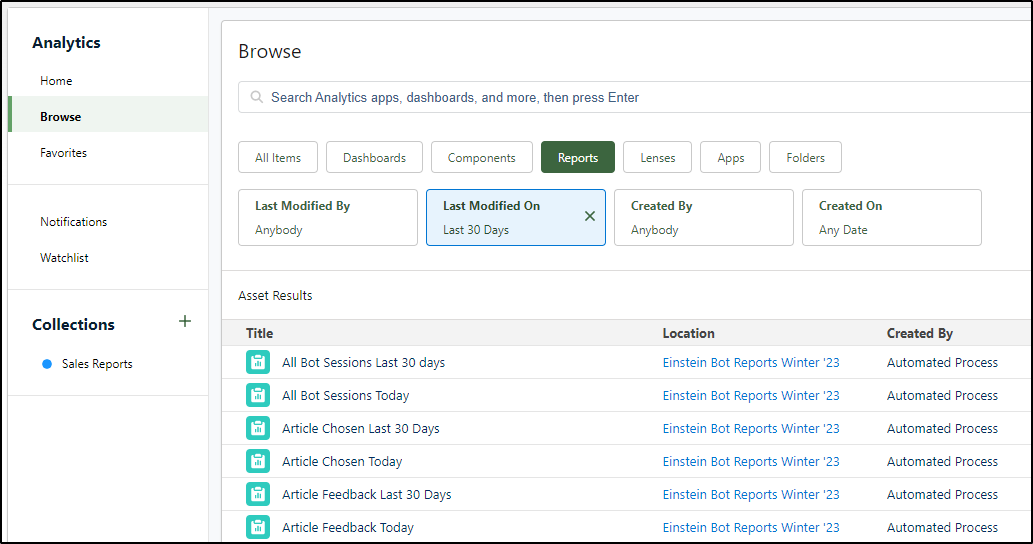
This brand-new feature by Salesforce enables users to aggregate dashboards, reports, and various other analytics in a single place for better evaluation and tracking.

2. Retirement of Workflow Rules

With the latest Salesforce release, you cannot create new Workflow Rules.
You’ll still be able to edit your existing workflows as they will keep running. Salesforce just eliminated the capability to create new ones.

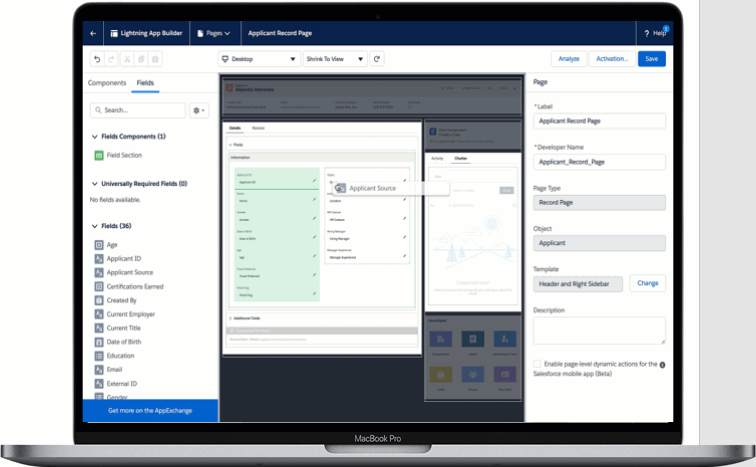
3. Dynamic Forms

The long wait of Salesforce users is finally over as they can access dynamic forms for Contact, Account, and Opportunity record pages.
The dynamic forms will allow you to:
Access progressive page rendering to open a page with improved load time
Easily use the drag-and-drop feature to move individual fields into the page.
Quickly view sections and fields to access the needed data at the right time
Build dynamic pages without working with multiple page layouts.

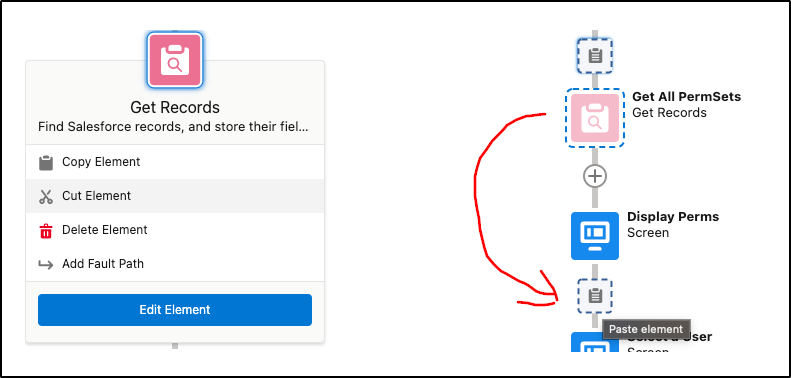
4. Cut and Paste Elements in Flow

The new release allows users to cut and paste Flow elements.
They no longer have to keep copying and pasting and deleting the elements that have been copied. It is not necessary to rename the element being pasted.
This will help in saving time for flow builders.

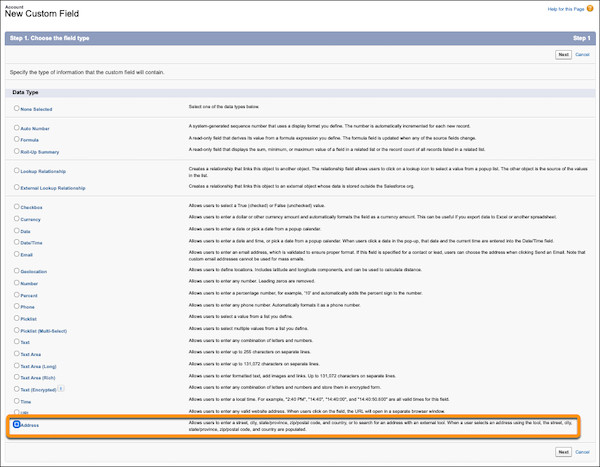
5. Custom Address Fields

For years, Salesforce users have been waiting for custom address fields that could work the same way as a standard address field.

Winter ‘23 ended this long wait by making this feature Generally Available now.

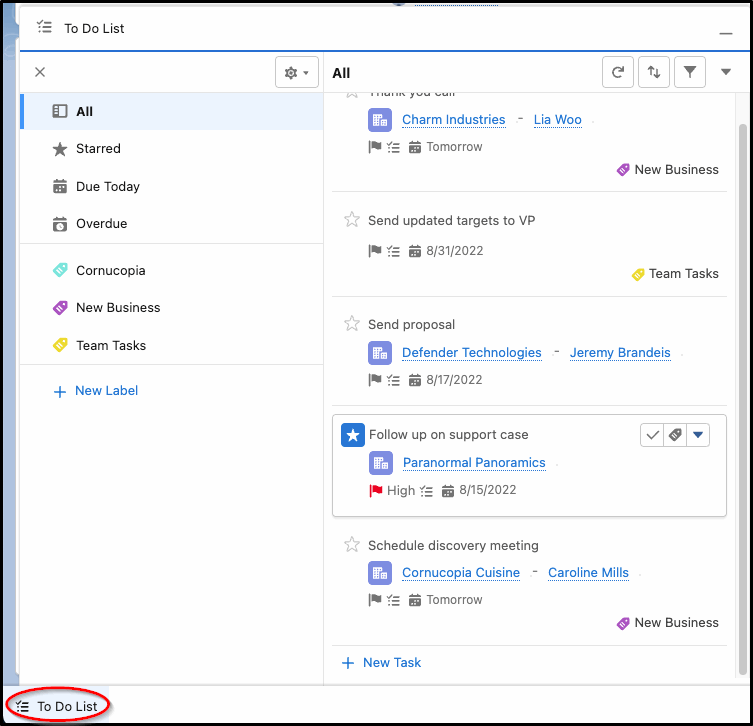
6. Access To Do List in Apps

Users can now find all the tasks assigned in one component that will be available throughout the Salesforce environment.
You can access the To Do List available in the Utility Bar and manage your tasks by organizing them in a single view.
This feature is available for Lightning Experience in Performance, Enterprise, and Unlimited editions of Salesforce Sales Cloud.

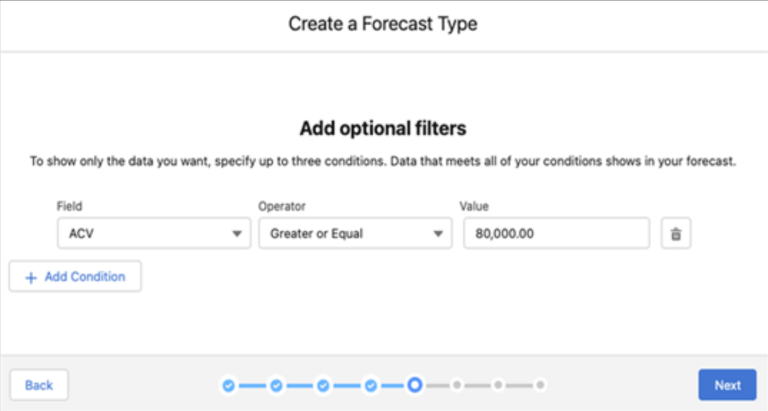
7. Forecasting Updates

Earlier Salesforce provided the feature to filter the forecast using standard Picklist, standard Number, and Record Type.

The new release will allow you to filter your forecasting using the customer Picklist fields or Opportunity Numbers, thus enabling you to get better and more accurate forecasts for your business.

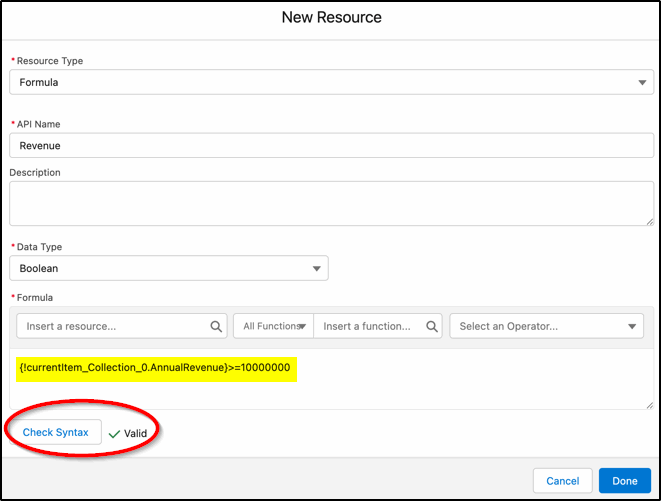
8. Checking Formula in Flow

You can now access the syntax checking feature with the enhanced formula builder to check the formula created from within the formula builder.
Previously, Salesforce users had to save the flow and then look for syntax errors.

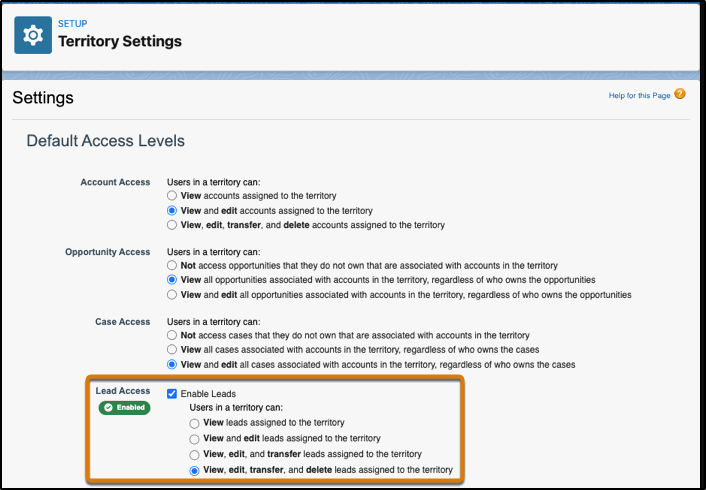
9. Assigning Leads to Territories

Users can now enable access to Leads on the basis of their territories while distributing leads manually among the respective territories.

10. Flow Datatable available in Beta

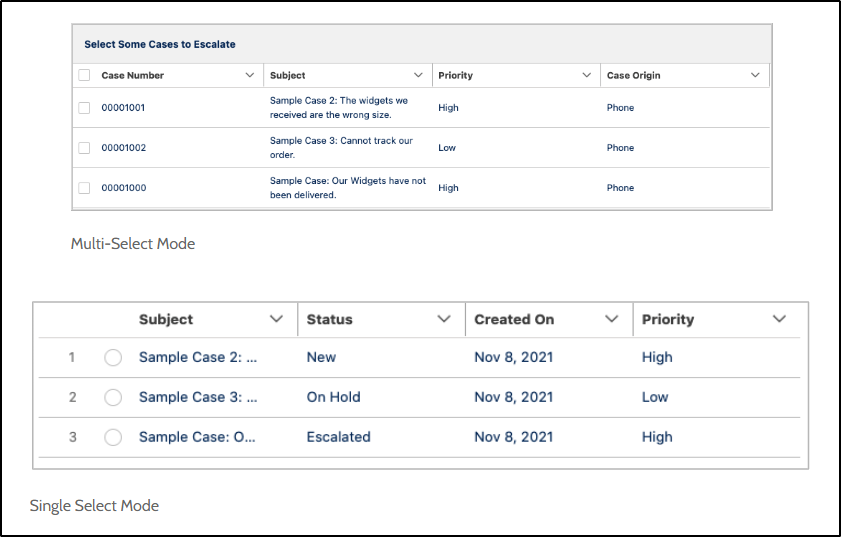
Winter ‘23 is bringing another new beta feature, the native datatable element.
The feature will allow you to create tables, allowing users to select or view records. It will allow them to create more informative and richer pages that can show hundreds of records to the user.

Wrapping Up

We’re very much impressed with everything that the new release got us.
Try all these new features from the Winter ‘23 release and uncover new enhanced productivity levels.

And if you need assistance with these new features, our Salesforce consultants are always ready to help you.

Have a Message For Us?

Please fillup the form and send your message.

Loading......

Captcha

Refresh

Click on submit to be contacted for a demo of our products or Salesforce Services.

Our Top 10 Feature Picks from the Latest Salesforce Release

It just feels like yesterday when we were talking about features from Spring ‘22 release and now we’re here to discuss the top features from the Summer ‘22 release. Maybe time literally flies.
Since the Summer ‘22 release notes were out, every Salesforce enthusiast would have been waiting to get their hands on the latest features. We’re simplifying this a bit for you.
We’ve given it time and thought and picked out the top features from Salesforce Summer ‘22 release. Have a look at these and evaluate how they’re going to help your business.

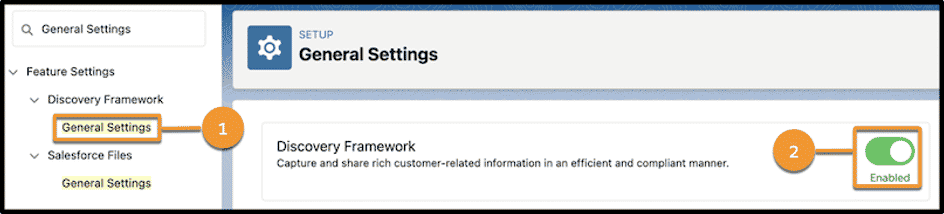
1. Discover Framework

The new Discovery Framework data model allows users to manage questionnaires through data collection. Here are some of the capabilities you can enjoy:
  Create forms:
You can access an intuitive UI with OmniStudio to create complex forms.
  Create questions:
You create both standard and hierarchical questions and can even manage a repository of questions using as a single source of truth.
  Import and export (beta):
You can import and export assessment questions and assessment question sets using metadata APIs.
To enable Discovery Framework, go to
Setup→Discovery Framework→General Settings→Discovery Framework.

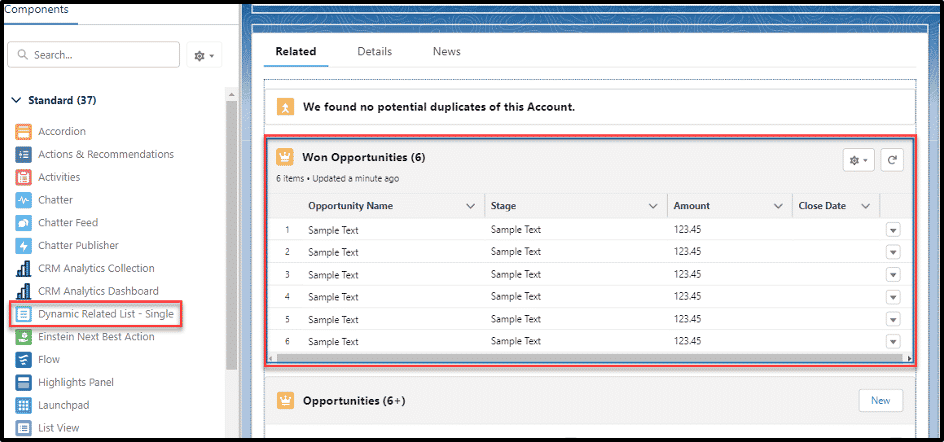
2. Dynamic Related Lists

There would surely be many times when you wanted to customize and filter related lists within the Lightning App Builder. The new release has made this possible.
With the new lightning component, “Dynamic Related List – Single”, you would be able to:
change the related list name,
add filters for which records to display,
update the number of records to display (up to 30),
and select the actions you allow from the related list.

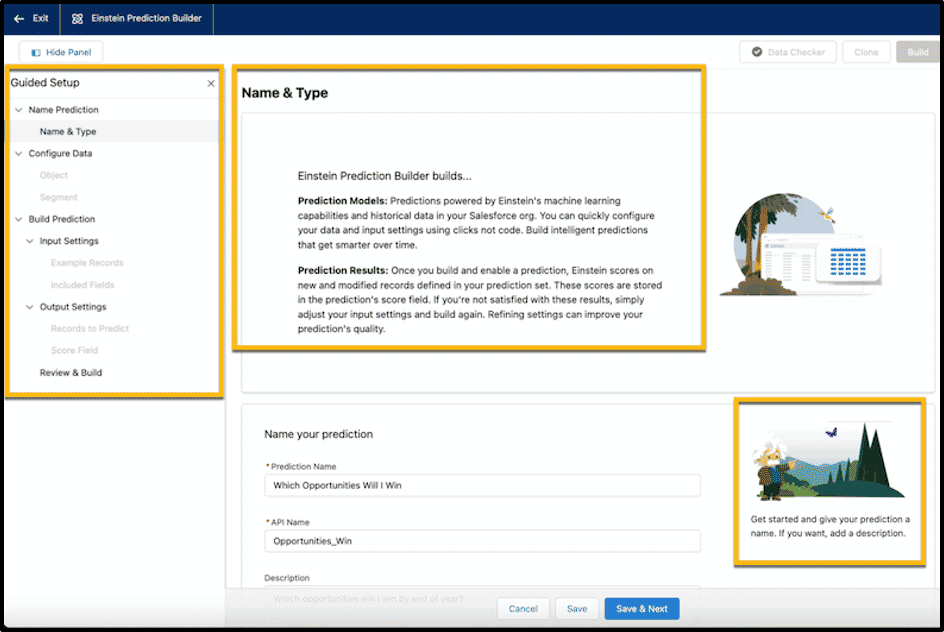
3. Einstein

Summer ’22 has brought two amazing updates to Einstein with it:
With the new lightning component, “Dynamic Related List – Single”, you would be able to:

Lead Scoring:

You now get the ability to estimate the ROI of your company using Einstein Lead Scoring.

Guided setup for predictions:

You can now enable Einstein Prediction Builder with the help of the guided setup

4. Reports and Dashboards

Let’s have a look at several updates that we can find in Reports and Dashboard.

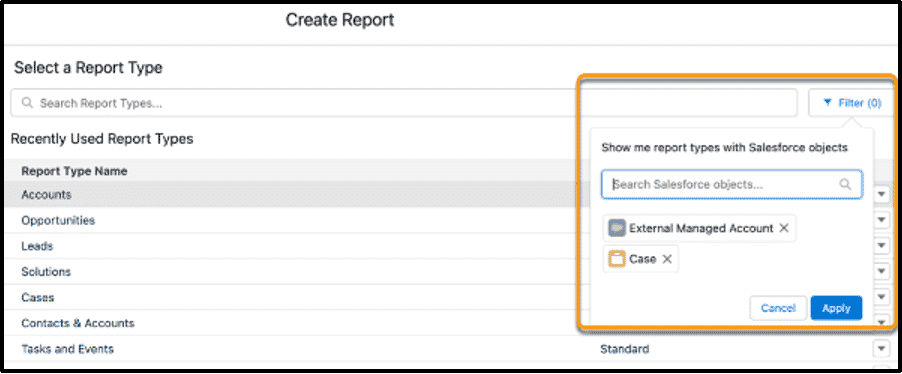
Reports based on selected Salesforce objects (Beta)

You can be able to filter specific objects while creating a new report!
You can enable this Beta feature by reaching out to Salesforce Support.

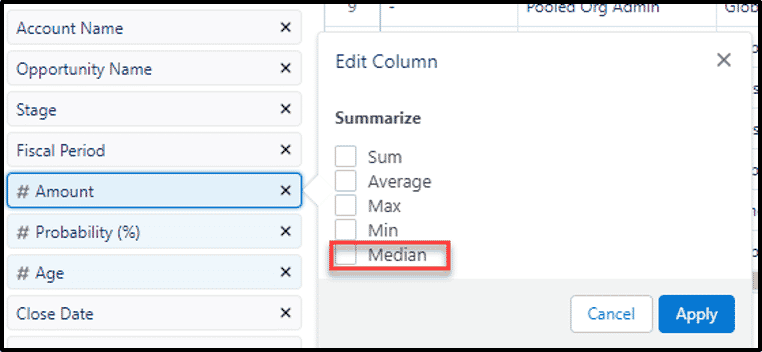
Summary functions on reports also consist of the Median function now

Edit multiple fields

With the help of inline editing, you can easily edit multiple fields and records without rerunning your report, thus saving you a lot of time.

5. Clean Up Inactive Picklist Values(Beta)

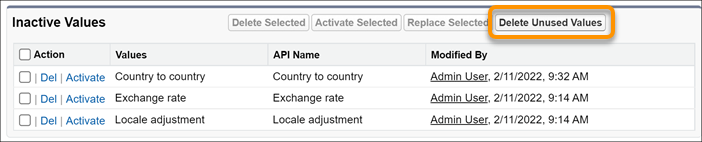
The previous update enabled you to get notified of the inactive values existing in your custom picklist fields. With Summer ‘22, you can clean up these inactive picklist values for a specific picklist field in one go.
You can find a new button Delete Unused Values on the picklist field. You have to select the values and hit the Delete Unused Values button to delete them all.
Note: You can access this feature only for custom picklists that have predefined values.

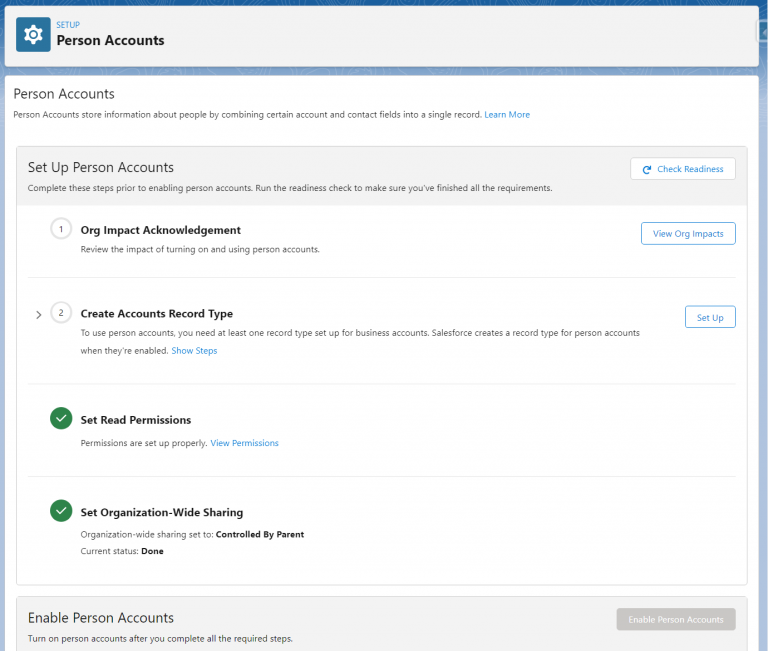
6. Enable Person Accounts without the help of Salesforce Support

Earlier, when you wanted to get your Person Accounts enabled, you had to contact Salesforce Support for the same.
But with the new release, Salesforce has introduced a guided setup that will self-enable Person Accounts.

7. New Product Names

You’re no stranger to product rebranding if you had been using Salesforce for a long time.
Even Summer ’22 has some product rebranding for you.
Here’s a list of products that got name changes:
TableauCRM is now CRM Analytics
High Velocity Sales is Sales Engagement now

These are the 6 Marketing Cloud Products that have been renamed:

Pardot will now be called Marketing Cloud Account Management
Salesforce CDP is to be called Marketing Cloud Customer Data Platform now
Advertising Studio is renamed to be Marketing Cloud Advertising
Messaging/Journeys is called Marketing Cloud Engagement now
Interaction Studio is now Marketing Cloud Personalization
Datorama is renamed to be Marketing Cloud Intelligence

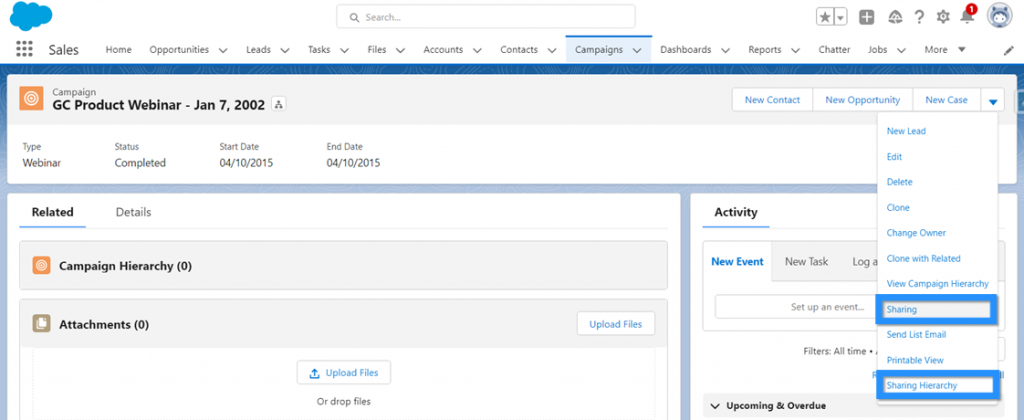
8. Share Individual Campaigns with Colleagues in Lightning

Campaign Owners will now be able to share individual Campaigns manually with other Salesforce users.
Earlier this feature was only available in Classic and now it can be accessed in Lightning Experience as well.

9. Customize Cumulative Rollup Names

It’s been a long time since we’ve witnessed some updates in forecasts.
But now, we’ve got a bunch.
Even the last release had some new updates like efficient forecast setup, custom filters, new forecasting KPIs, and many such features.
With the Summer ‘22 release, we’ll have the ability to customize cumulative rollup names. This will allow you to change the label of a cumulative rollup.

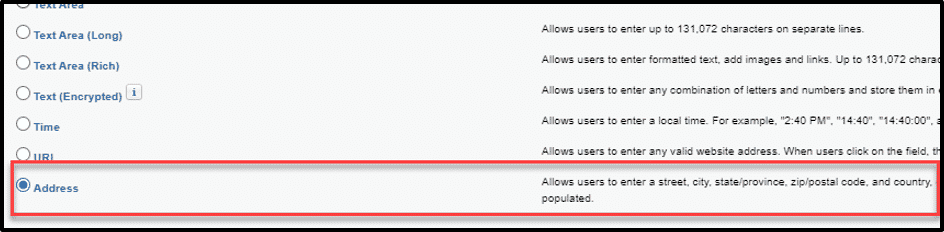
10. Custom Address Field

You have surely been waiting for a custom address field that works the same way as the standard address field for a long time.
Well, the wait ends now.
This is a Beta feature from the new release.
Note: Before the custom address field is available, you must have State and Country/Territory picklist values configured.

Unlock the Salesforce Features from the New Release

This article here will help you get through the top features of the Summer ‘22 release and help you understand them and implement them in your business.
But it can surely be difficult to always be overwhelming to keep up with the upcoming new feature and pick out the right ones for your business logic and processes
Our certified professionals can assist you the best so you can understand these features well and identify what works the best for you, so you can concentrate on the bottom line.
Have a Message For Us?

Please fillup the form and send your message.

Loading......

Captcha

Refresh

Click on submit to be contacted for a demo of our products or Salesforce Services.

Learn why everyone is migrating to
Lightning Web Components

Better performance, user experience, and security are the key parameters to keep in mind when pursuing innovation in tech.
Along these lines, the most exciting development in the last few years was the release of Lightning Web Components by Salesforce which is the most used and talked about.
It’s a stand-out innovation that delivers on each of the above-mentioned parameters successfully.
Lightning Web Components is essentially a programming model that enables you to use custom templates, elements, modules, shadow DOM, and decorators.
It also provides a set of specialized services that are an extension of the existing cutting-edge web technologies and core stack. These services include Lightning Data Service, User Interface API, and base lightning components.

What are Lightning Web Components?

To understand Lightning Web Components in a better way, it is first important to know the tech it is built on. The concept of ‘components’ has existed in the webspace for quite some time now.
The idea behind it is to split the components of the User Interface (UI) into smaller chunks. These chunks are meant to be self-contained and reusable.
Now that you understand components, you might ask: What is a web component?
Web Components are primarily a set of standards for different specifications. These specifications mainly include:
    HTML templates:
These are the user-defined HTML templates that are rendered when they are called upon. This template is embodied in the HTML Living Standard specification.
    ES Modules:
This specification focuses on the reuse and inclusion of JS documents in a standard-based, modular, and performant way.
    Custom Elements:
These are the HTML elements that have customized templates, tag names, and behaviors that are made through a specific set of JavaScript APIs.
    Shadow DOM:
A ‘shadow Document Object Model’ or ‘DOM’ is used for isolating JavaScript and CSS. It is a method to create components within the DOM.
Lightning Web Components are built on top of these specifications using standardization as a tool to implement a new variety of lightweight web frameworks. These frameworks bring specialized functionality to the platform, rather than simply plugging gaps within it.
Here are some use-cases related to Lightning Web Components that could help you understand its capabilities more closely.

1. Adding Actionability on the Dashboards

Using LWC, you can implement things like Lighting record forms, Lightning data tables, or any custom functionalities for enabling record-based actions on a dashboard.

2. Model Analytics and Next Best Action

LWC allows you to create custom ‘next best actions’ (for guided processes) that can be used directly inside the analytics. LWC can also help to manage many customized what-if scenarios.

3. Custom Charts and Visualization

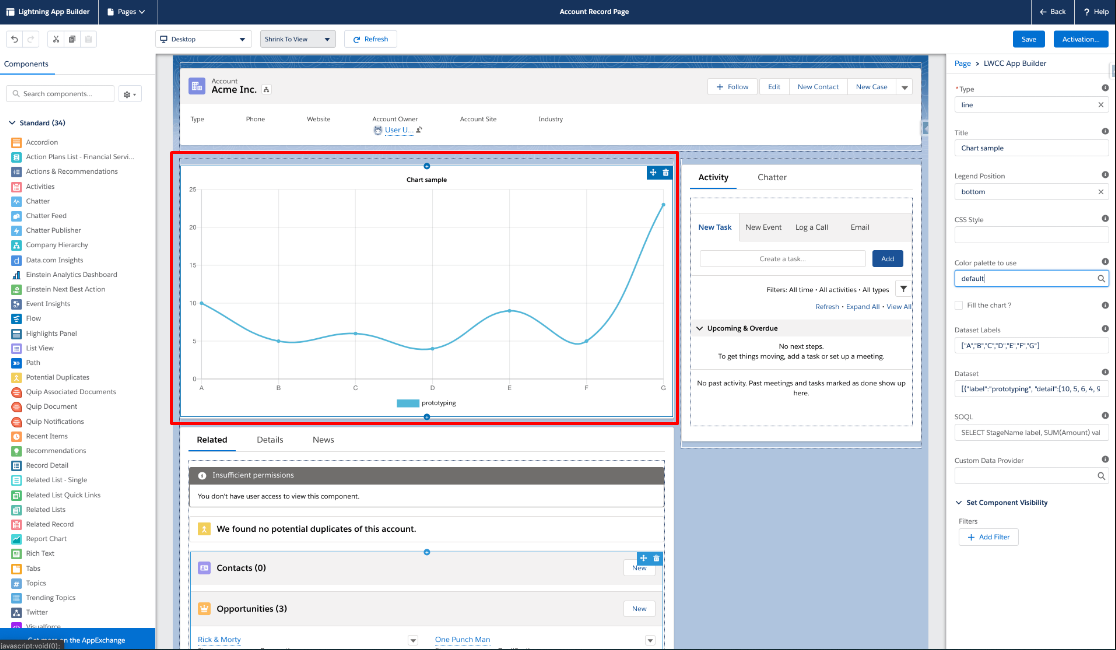
Lightning Web Components allow customization to be extended to have different visualizations that are not yet supported via Tableau CRM by adding support for external javascript libraries which tend to support a wider variety of visualizations. You can access external libraries (such as Chart.js, d3.js, or LightningWebChart.js) for displaying the visualization chart.

4. Interacting with third-party system data

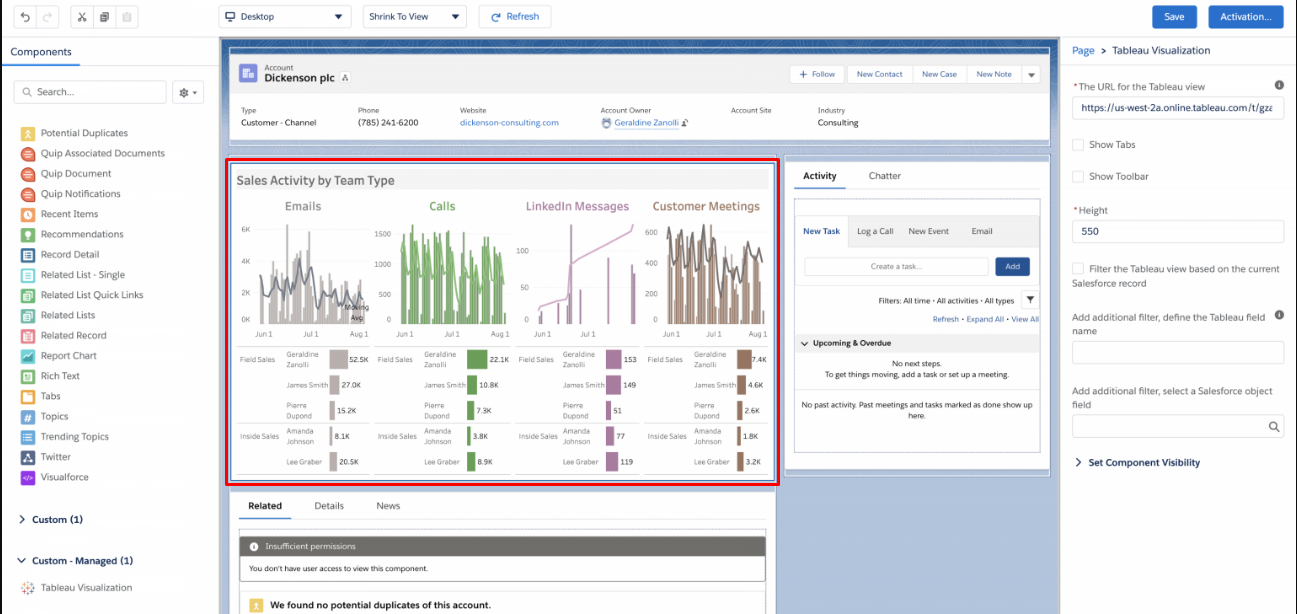
LWC allows the use of ‘iframes’ to show third-party systems in Salesforce. It helps to display analytics along with dashboards.
Consider a scenario where you need to display a dashboard housed on a third-party service or an application that needs to be used with the dashboard to initiate actions.
An example of this is to display Tableau dashboards.

Reasons for you to migrate to Lightning Web Components

As you’ve just seen, Lightning Web Components have emerged as the new lightweight framework with various advantages over the existing Aura web components.
We’ve listed some major reasons businesses are (and should) consider migrating to Lightning Web Components:
    Easy to use:
Native web standards are used to develop this framework which are present in the browser and there is no additional abstraction layer, like in frameworks such as Aura.
    Faster Loading:
As the name ‘lightning’ suggests, this framework loads the components a lot faster than its predecessors.
    Improved Performance:
An abstraction layer is absent in this framework which makes it faster to render than components of Aura which leads to improved performance.
    Reusable Components:
LWC allows you to write components that can be seamlessly reused in other components. This is possible as there are no UI limitations here.
    Out-of-the-Box Usage:
The framework supports built-in browser security features which help to reduce the need for customization. This helps to facilitate a more out-of-the-box usage.
    Better Results:
Lightning Web Components can successfully stand on the parameters of browser compatibility, better testing, and security, considering the way it used Script, CSS, and DOM Isolation.
    Easy to Learn:
Developers do not need to learn any additional framework for working with Lightning Web Components, thus making the transition smooth.

Final Words

Everything we discussed should make it clear that it’s time to leave behind the struggle you’re facing with Aura components and make the transition to Lightning Web Components for a smoother workflow.
And before you migrate, if there’s anything more you want to know about LWC, our certified experts are always ready to assist you.
Have a Message For Us?

Please fillup the form and send your message.

Loading......

Captcha

Refresh

Click on submit to be contacted for a demo of our products or Salesforce Services.

Let's find out Potential Problems
in your Salesforce with
Optimizer Report

We all know Salesforce as a powerful CRM but if not implemented right, you might not end up achieving the productivity you expected. You need to be able to evaluate if the health of your Salesforce org is good enough to be fully functional. Salesforce Optimizer Report can be your secret weapon to help you out.
The Salesforce Optimizer Report gives Admins an insight into the general health and performance of their Salesforce org. We have been working with Salesforce Optimizer to evaluate the Salesforce instance of our customers to determine how their organization uses Salesforce features to generate suitable recommendations for how they can optimize existing feature usage along with ways to simplify customizations and drive user adoption.

What is the Salesforce Optimizer Report?

The Salesforce Optimizer Report is a free and simple tool that helps to remove the guesswork out of your Salesforce org, efficiently looking for potential problems in your implementation. It allows you to generate a PDF report to flag potential issues that may be responsible for hindering the performance of your instance.
The report you derive will be easy to reach and will help you identify items that are outside of what Salesforce considers the healthy range. It will also show the impact of those issues if you leave them unaddressed. Thus, it’s safe to say that Salesforce not just spots issues but also provides necessary recommendations to resolve them.

What’s Covered in the Salesforce Optimizer Report

The Salesforce Optimizer Report reviews areas related to the data limits and configuration within your organization. It consists of, but is not limited to:
    org limits
    page layouts
    configuration-related items like custom fields
    automation items like validation rules and workflow
    permission-related items like permission sets and profiles
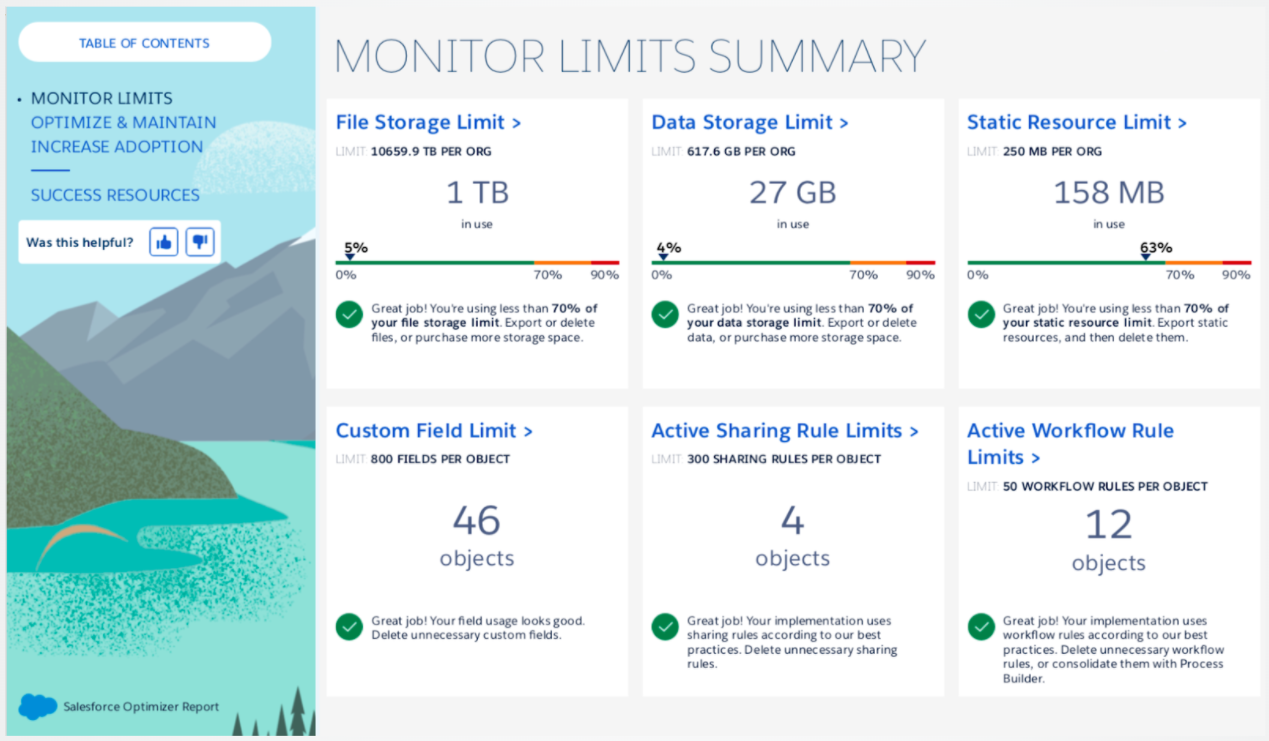
Along with this, the report also covers aspects related to user adoption and overall usabilities such as users accessing Salesforce with older apps or browsers and features that they are not fully utilizing.
The Salesforce Optimizer Report has three main sections.
1. Review
It is the first part of the report that reveals everything that Salesforce found in your org (both good and not so good aspects).
2. Optimization
Next, the report will show the possible options on how you can remove some of these red flags.  
3. Resources
In the last section, Salesforce provides training materials and tutorials for educating its users.
Now, let’s give a look at the steps to enable the Salesforce optimizer

How to Enable Salesforce Optimizer

You don’t have to worry as It’s very easy quick and easy to setup Salesforce Optimizer. You don’t have to install any package as it’s enabled from Setup. You need these permissions to be able to run it:
    Customize Application
    Modify All Data, and
    Manage Users.
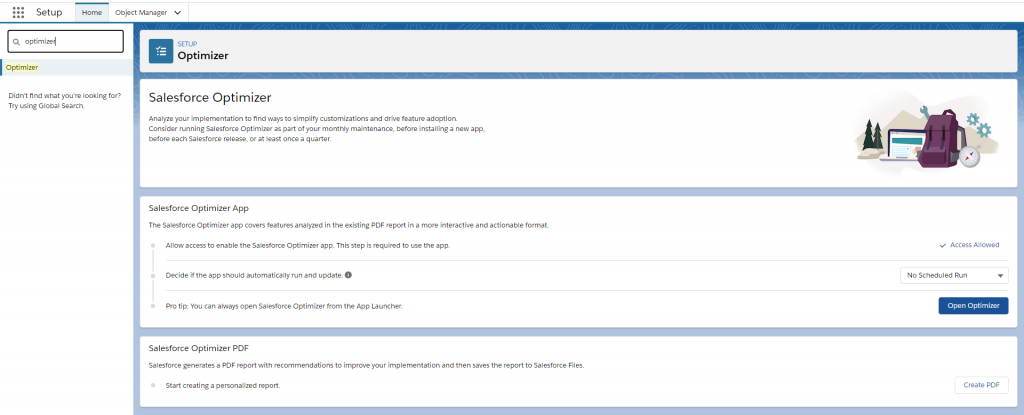
  • Navigate to the Setup menu and search ‘Optimizer’ in the quick search box.
  • Select ‘Allow Access’ and you will be able to launch the app.
  • You’ll get the option to create a PDF immediately. You can also set the app to automatically run and update once a month.
Once the analysis is completed, you will receive an email about it. If you choose to generate a PDF, it will get saved in your Salesforce org as a file. Now that you’ve seen how to use the Salesforce Optimizer to check if your Salesforce is performant you can use this PDF for ready reference on
how to enable Salesforce optimizer.

Before You Go

With all this brief, we can confidently say that running the Salesforce Optimizer Report should be an important part of your governance process. As you work with different enhancement projects, it can be difficult to ensure if a suite of features in your org is working at full potential and where there the report will help you.

While you work on continuously enhancing and customizing your Salesforce, analyzing its health alongside is essential. Reach out to our certified Salesforce professionals for a quick Salesforce health checkup.

Have a Message For Us?

Please fillup the form and send your message.

Loading......

Captcha

Refresh

Click on submit to be contacted for a demo of our products or Salesforce Services.

Exciting new features in the Salesforce Spring '22 release

If you’re anything like us, you’re up the night just before the latest Salesforce release in anticipation. With spring around the corner, Salesforce is back again with some fascinating features in its Spring ‘22 release.
We’re sure that everyone has been longing to get their hands on the new features of the release. To stay ahead in the game, we are always active with trying out new features and enhancements in every release, guiding our clients on how it can improve their business operations, and implementing the same.

Your wait for the Spring release ends here.

We’ve given a deeper look at the Spring ‘22 release and evaluated many features that could improve the development strategy, administrative tasks, UI, productivity, and data management. After reviewing it all, we’ve filtered some features of Spring ‘22 that should help us get started.

Salesforce has brought some incredible capabilities in-store that can level up your CRM game.

Spring ‘22 Release Features that were worth the Wait

1.Collaborative Forecasts

Ability to see recent changes to forecast categories.
You can now combine Forecast Types and Forecast Settings into a single setup page for a more efficient Forecast setup.
Custom filters to control the opportunities in a forecast based on the record type.
    Ability to see recent changes to forecast categories.

    You can now combine Forecast Types and Forecast Settings into a single setup page for a more efficient Forecast setup.

    Custom filters to control the opportunities in a forecast based on the record type.
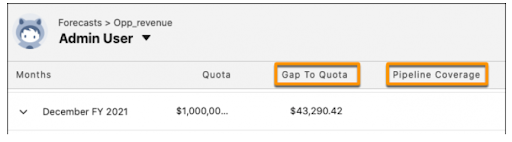
Along with these, the release has also added Gap to Quota and Pipeline Coverage metrics to the forecast.

2. Stronger Data Protection

Doesn’t matter how many releases keep coming; data protection will always be the top priority. With Spring ‘22 release, we can enable Enhanced Personal Information Management to prevent external users like community users or portals from viewing information of other users.

3. Flow Updates

Any Salesforce release would be incomplete without a bunch of cool Flow updates. This release also got us some such updates that can be very useful for Salesforce users.
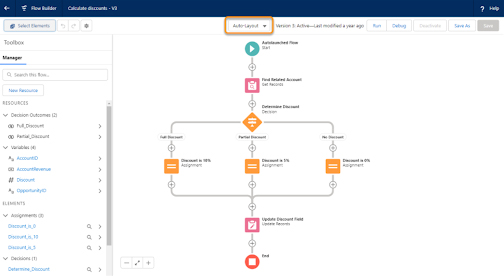
Auto-layout to automatically place flow elements in now GA.
You can view all Flows associated with an object in one place using Flow Trigger Explorer.
You can now easily determine the running order of your flows.
    You can view all Flows associated with an object in one place using Flow Trigger Explorer.
    You can now easily determine the running order of your flows.

4. Easily Find the Right Report Type for New Reports (Beta)

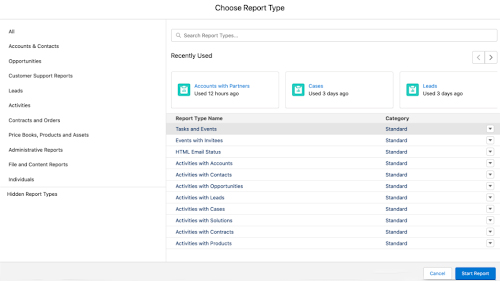
You can now access the enhanced report type selector to find the right report. Click ‘New Report’, you’ll see your recently used report types, along with the list of report types with name and category.
Also, you can find more details about any report like who created it, objects used by the report type, ease to check if a report type contains the field needed.

5. Updates for Einstein Search

Einstein Search has been available for Salesforce users for a while to get the best of AI-driven features. But now there’s much more you can do with it.

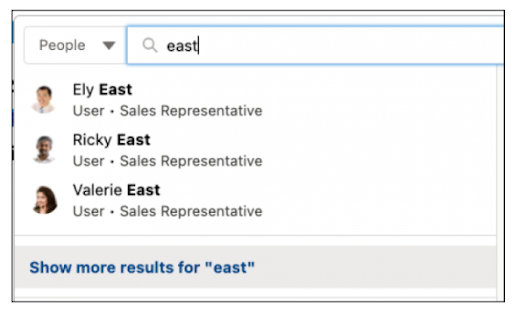
You can use Natural Language Search with Tasks
Easily distinguish between users or groups that have similar names with Profile Images.
    You can use Natural Language Search with Tasks
    Easily distinguish between users or groups that have similar names with Profile Images.
You can adjust natural language search results (Pilot).
    You can adjust natural language search results (Pilot).
6. Monitor your Slowest Desktop Record Pages

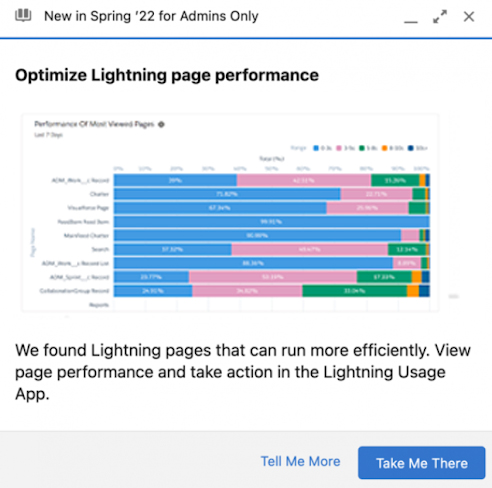
User adoption can get seriously impacted when the pages take too long to load. But now, you can identify pages that have performance issues in a new prompt in the Lightning App Builder.

7. Revenue Intelligence

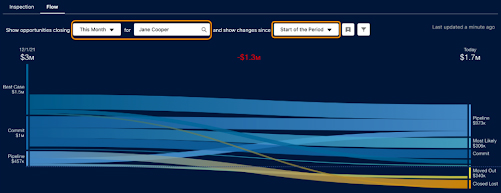
Revenue Intelligence is a powerful add-on feature for Salesforce that combines Tableau dashboards with Pipeline Inspection. It thus makes it easy for users to view results in a pipeline progress flow chart.
With Salesforce Spring ‘22 release, you can now generate more revenue and build stronger pipelines using Revenue Insights. Also, you’ll be able to see the changes in the pipeline through a dynamic chart.

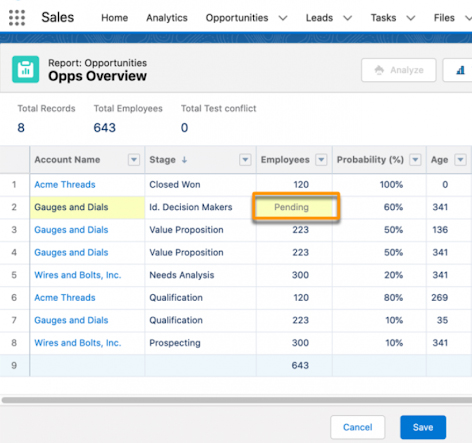
8. Edit Multiple Fields Inline on the Report Run Page (Beta)

With every release, inline editing for reports keeps getting better. This release allows you to edit multiple fields and records without having to rerun your report. This brings greater feature parity between reports and list views, thus helps saving time.
Another feature that we liked is that fields will show as ‘Pending’ in case they are related to a field that has been updated.

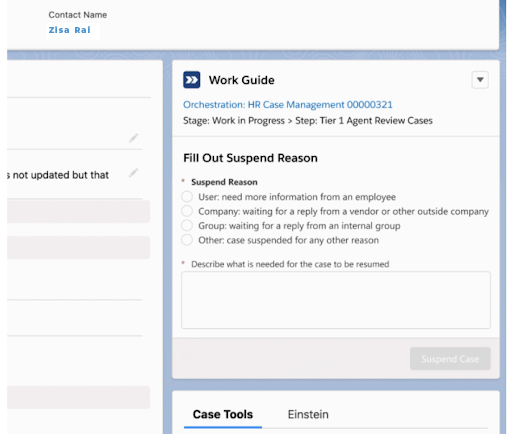
9. Use Orchestrator Work Guide to Connect Users with Tasks

Salesforce Flow Orchestrator is the new functionality for Flows to allow Salesforce administrators to string Flows and business processes together. With the new release, you can use the Orchestrator Work Guide to connect users with tasks. It will help to display actions assigned to users.

10. Archive Experience Cloud Sites (Generally Available)

Salesforce Community or Digital Experience Site can now be archived along with the ability to mark it active or inactive. The feature will allow you to archive a site from its detail page once it has fulfilled its purpose.

Pardot Enhancements from Spring ‘22 Release

The release has even brought some exciting Pardot enhancements that you must check out.
1. Pardot Lightning Email Builder Enhancements
The Pardot Email Builder has got a few upgrades with the Spring release.
Choose Email Template Types to be made available in Salesforce Exchange
Ease to push emails for Lighting Experience into Completion Actions and Automation Rules
Ability to set up Custom Components for Email Template Builder
   Choose Email Template Types to be made available in Salesforce Exchange
   Ease to push emails for Lighting Experience into Completion Actions and Automation Rules
    Ability to set up Custom Components for Email Template Builder
2. Pardot Lightning Page Builder Enhancements
The new drag-and-drop Landing Page Builder made marketers very excited. Check out some new improvements to this feature.
Easily add scripts to landing pages
Ability to customize Pardot Form Styling in the Landing Page Builder
Get access to new prebuilt templates
   Easily add scripts to landing pages
   Ability to customize Pardot Form Styling in the Landing Page Builder
    Get access to new prebuilt templates

3. Pardot Automations for Email Privacy Changes
Spring ‘22 release has brought along a reporting page to get an overview of your automation on emails. It will allow you to track how many Dynamic Lists, Engagement Programs, and Automation Rules are configured to rely on the opening of emails.
4. Improvements to the Pardot Slack Connector (Beta)
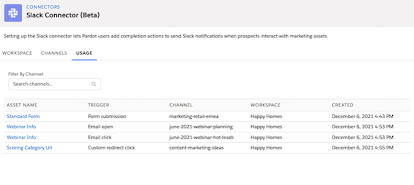
This beta feature brings along many improvements. You can now access completion action for sending a Slack notification when your prospects interact with marketing assets. Also, you can see a Usage tab on the Slack connector to track which of your assets are using the completion action.
5. Redirects for Unpublished landing pages
With the release, you can now configure redirect settings that will get activated when an enhanced landing page is unpublished.

You can also download and print out the Salesforce Spring ‘22 features →as a PDF and pin them up at the office for reference.

Next steps

Mark your calendar for release readiness
In the meanwhile, hold on tight and mark some important dates to make the most of new features.

February 4 to 11: Release readiness live broadcast

On these broadcast dates, you’ll witness some exciting features with their demos in real-time.

February 11 and 12: Final release weekend!

These are the two most important dates.
It’s when all the remaining instances will be upgraded.

Speak to us

The PDF should help you cover ground on the new release and help you understand the new enhancements that could level up your business game. But staying right on track with every new feature and choosing the right ones for you can be difficult.
Customizations can break, and not all features may be for you.
Our Salesforce experts can help you know what features work best for your business and can be scalable as it keeps expanding.
Make sure you don’t miss out on any new Salesforce features mentioned above. You can always reach out to our certified professionals to understand these features and learn the way to work with them.
Have a Message For Us?

Please fillup the form and send your message.

Loading......

Captcha

Refresh

Click on submit to be contacted for a demo of our products or Salesforce Services.