
For a professional services provider company, it is essential to have advanced knowledge of the field the company is related to. Companies related to professional services can deliver any service and require relevant professionals, whether a technician or a consultant. And every professional would require work on different operations, which can be difficult. Using Salesforce for professional services can make the task easy.
There are professional services that are more complicated than others and are heavily regulated. In such firms, using automated workflows and ensuring compliance is more necessary. Also there can also be the need to work with third-party vendors and manage data regarding every conversation. Even for sectors like Salesforce non-profit services, there can be a lot to manage, for which CRM implementation could be a great call.
Such situations make it essential to work with Salesforce and manage all the business aspects while eliminating siloed data.
It is not hidden from any company that Salesforce can help in the professional services sector to improve customer experience and automate workflow. Let’s see what more Salesforce can do for such firms.
The experts at the company should always have detailed knowledge about each prospect. That’s where Salesforce for professional services helps close more deals by evaluating each customer’s requirements.
With Salesforce, you can always maintain a single view of customer details and track their interactions, making it easier to understand them.
Salesforce helps to use such a personalized approach to manage customers, allowing the team to know them well and deliver the value that customers expect.
With Salesforce professional services, you can always know when is the right time to take action or change the course of action for a customer.
For example, you are running a financial services firm, and you find a change in the recommendations for a client portfolio. In such a situation, you can work on running an automated email thread that will describe the changes according to the factors that caused the trigger. You’ll also lead the email to open a phone consultation for a detailed discussion.
Salesforce helps you to use external and customer-driven conditions to evaluate the suitable course of action that could help to improve customer relationships and deliver value.
Salesforce enables professional services to centralize your data around every stakeholder: customers, employees, or contractors. This enables you to manage and track every piece of information so you can always maintain accuracy with data.
For example, a web development company can use Salesforce to analyze the work hours of the team to fulfill any respective project. This analysis would help to break down the cost and optimize the output.
Salesforce also helps to check the errors and other red flags to analyze things like any client who’s always paying the dues late. This will allow the team to access relationship intelligence and prioritize leads and tasks accordingly.
If you want to take your professional services firm from the dark ages to the digital age, Salesforce is a great way to work with. The CRM would help you work with a planned marketing pipeline to bring in new customers, automate tasks, and set actions on different triggers.
You can do a lot more for your professional services firm by hiring a certified Salesforce professional. You can contact us to learn more about how capabilities can empower the professional services you offer.
When customers don’t receive the service they expect, chances are higher that their loyalty will shift. The same kind of dynamic also exists between employers and employees. It is essential that employers must deliver a great experience for employees — or they might risk losing them. That’s where workflow automation can be helpful.
Automation has proved to be a gem for companies to keep up with both customer and employee expectations. There are numerous ways in which workflow and process automation can actually contribute to making work easier for employees.
Let’s have a look at these four that can help businesses gain a competitive edge while boosting employee satisfaction and retention.
With the help of low-code tools, automation has become more accessible to employees. Users can easily streamline workflows through automation. You can use it to schedule follow-ups for sales calls or to create a workflow to automatically posts messages.
Employees can now build reusable components that can help users to automate processes, so any existing bottlenecks can be removed. Reusing components allows teams to quickly resolve problems and frees them so they can focus more on other complex needs.
Initially, there was no easy way to connect different systems, workflows, or data without as it required writing complicated code. According to a report by MuleSoft’s 2022 Connectivity Benchmark, 90% of businesses say data silos end up disconnecting them from the data they need to understand about their customers and employees.
With the help of low-code automation, you can bridge this gap. You can utilize pre-built connectors and point-and-click tools to bring data and systems together. This helps employees can deliver a seamless customer experience while improving their productivity and job satisfaction.
When you connected automated business processes with the customer journey, it helps make it easier for employees to interact with the respective customer to deliver personalization and customized service.
Consider, for example, when a sales rep adds a new customer to Salesforce, it automatically creates and organizes events mapping to the entire lifecycle of the customer.
It has been seen that many companies are using automation and AI closely and this trend is expected to grow longer.
Let’s take a case for example. You can acquire AI-powered predictions about which customers might churn. But someone has to notice the prediction and plan if any action is required here.
Employees always embrace the idea of automating processes that could eliminate friction from their daily tasks. Workflow automation can simplify the daily activities of employees, making it easier to interact with customers.
You just have to get the right team of Salesforce consultants on board who can help you implement Salesforce and access its automation features to boat day-to-day productivity.
For any contact center, the key to enhanced efficiency is customer service automation. But not every company is able to achieve that automation successfully. The need is to work more to enhance your customer service process, even after automating it.
According to one of the research reports from Boston Consulting Group (BCG), 70% of digital transformation efforts are not so well implemented. There’s a lot that needs to be done to make sure the customer service team is making the most of digitization.
You might have already automated the process using Service Cloud features, but how do you know if your automation is working well for your operations? And if it’s not going right, what can you do about it?
Here are a few steps that can help you to ensure that your customer service process automation is up and running for success:
Before you launch the workflow company-wide, check if your automation is working the way it was planned and if it will work for people who are going to use it. You need to conduct testing for the workflow.
Make sure the testing process includes some people who are typical contributors to the service process.
For example, if your automated workflow has some processes related to middle- and back-office employees along with customer service agents, then you should include these users too for the testing process.
If you achieve positive process improvements from the test, make sure that the workflow automation is available to all who would be using it. The respective users actually need to use the workflow at scale to acquire its full benefits.
It is important that the users know about workflow automation and that they understand how they should work with it.
For internal users, you can spread the word through learning lunches, training sessions, or some other communications channels. For external users like customers and partners, make sure they know where to find and access links, which could be a website or self-service portal, that could take them to the automated process.
Once the automated workflow is up and running at scale, gather as many metrics as you can to know how the automated workflow is performing.
One important metric that you should consider is the average time the automated customer service process takes to complete. You should also look for the impacts of the automated process on your issue resolution time, customer service response time, costs, and customer satisfaction scores.
Next, consider looking at usage stats. Discover the percentage of your process stakeholders who are actively engaging with the automated workflow? Also, consider measuring the number of times the automated workflow is engaged on a daily, weekly, and monthly basis. Are there any errors with the process?
Now you need to compare your automation metrics against the original metrics due to which you selected your customer service process for automation.
For example, if your goal was to achieve an improvement in the cycle time of your returns process, you need to compare this metric before and after the respective process automation. Check if the cycle time has improved and by how much. If there is not a lot of improvement, you’ll need to identify the issue.
Always remember that you should keep the customer experience front and center. Whether your initial goals were to free agents for cross-selling or to boost the process cycle time, in the end, it should all come back to the customer.
All the points we’ve mentioned above would help you set up your automated customer service process and ensure its success. And if you need help, you can always hire a Service Cloud developer who could offer you the best assistance with the implementation.
Like many business practices in different organizations, supplier management has seen major transitions over the last few years because of growth in technology and the global scale of the economy. There can be multiple suppliers making it hard to choose the best fit, but using emerging strategies like automation for managing supplier and partner experiences can improve the way everything is being handled.
In today’s business environment, responsiveness is no more a choice. Instead, it’s something essential for the survival of a business. Your repetitive and time-taking tasks can cause a lack of consistency, inefficient work, and poor performance of employees. That’s where businesses implement Salesforce to automate such tasks and speed productivity, boosting employee performance.
Any company dealing with its suppliers needs to maintain real-time records while improving coordination with the suppliers. It doesn’t matter how big your team is, handling this kind of work manually might not be the best way. That’s where automation helps such businesses. Here we have listed a few areas in which a business can consider implementing automation for managing supplier and partner experience.
It can be a time-taking and tedious task to validate invoices using a complex variable structure. It needs many rounds of audits by legal and finance teams. It is important to make sure that the services are charged according to the contractor rates and supplier performance.
Also, there can be chances that the complexities of manual data collection can lead to data redundancies, causing the data at the supplier and partner end to not match.
Surely all these complications can make it difficult to maintain data together and align it well with everyone involved, but Salesforce can help improve it all. You can leverage Salesforce automation to achieve a 3-way audit of the invoice. It will help to form a structured comparison between invoice, contract, and supplier performance data.
To ensure that the work assigned to suppliers is done effectively, businesses need to monitor the performance. Each business handles this task differently. Some manage it in-house, while others assign the task of reporting performance data to suppliers only. As the data related to suppliers can be granular and in disaggregated format, it could be difficult for a company to evaluate it all to recognize performance.
With automation, you can resolve all these issues. Automation can make the process of automation monitoring easier, bringing the distorted data together to evaluate performance. Salesforce helps you get all the supplier information in a single view, making it easier to capture performance data.
Usually, a contract tends to have the statement of work, pricing mentions, amendments, and other important details related to contract expiration. All of this information is crucial and required to be maintained safely. Losing these details can get a company caught in many problems, which can affect its market reputation.
With Salesforce, you can automate reminders related to managing these sensitive details and can even set contractual milestones and events so that you can drive higher value from these contracts by being attentive to each event.
Earlier minutes of meetings with suppliers were managed through spreadsheets and emails. But as suppliers increases, it could become difficult to manage all such information manually. It would lead to errors and redundant details.
Salesforce allows you to govern all interactions for supplier management centrally, maintaining meeting records, attendance, follow-up schedules. You can easily automate reminders of meetings and set triggers to generate follow-up emails.
Any growing business would have a lot to manage, and anything that could reduce team burden is simply a gift. That’s the importance of automation for a business adding ease to supplier information management and making tracking easier.
Get such power of automation to your business to significantly boost productivity. Talk to our Salesforce experts to get access to automated processes and operations.
Financial institutions tend to have protocols and shorthands developed over several years for efficiency that they’d like to bring over to their digital transformations and record-management systems. In this feature, we cover the essentials of a Lendio-Salesforce integration that we implemented to demonstrate this.
This integration eliminates gruntwork and manual entry for the agents, so they don’t have to switch between systems. It also lets lending agents or ‘loan officers’ record account holder information and loans & deposit details stored on Lendio, automatically to Salesforce, eliminating the possibilities of human errors.
You’ll see how key details form lending accounts are saved under different objects on Salesforce by calling the Lendio API to pull details deals stored on Lendio.
Agents and admins can save time and maintain the records of transactions related to each account on Salesforce without manually feeding it, avoiding any duplicity of records. It also enables easy searching of records on Salesforce, showing all the records of an account of a particular month in a single view.
Lendio is an external system used to maintain lending information such as account holder details, the number of transactions made, and the amount deposited, along with loan-documentation for due-diligence and background checks for loan approval.
Lendio-Salesforce integration is suitable for banking and financial institutions to automatically map Salesforce with their system to capture all the records, eliminating manual intervention and any chances of duplicity.
With Lendio-Salesforce integration, a schema is set up on Salesforce and is mapped with multiple fields on Lendio. APIs are integrated to call those fields that fetch information from Lendio and automatically store it under Salesforce objects.
We map different fields on Lendio with the Salesforce objects through APIs.
When a user invokes Lendio’s APIs through Salesforce for records, the data from Lendio is captured and segmented under different objects on Salesforce.
1. Integrations created on Salesforce
An Apex Trigger is created over the standard Salesforce Opportunity object so that whenever its stage is changed to any of the values out of Decline/DocsOut/DocsIn/Funded/Active Repayment/ or Pending,
the trigger will invoke a batch class to update its related Salesforce/Lendio deal records.
A batch class is developed so that whenever the Opportunity stage is set to either of these values- (Decline/DocsOut/DocsIn/Funded/Active Repayment), it will update the status value of the related deal records in Salesforce. Furthermore, /Deals/ID/Status API is invoked and the stage value of the same deal records present in Lendio is updated.
2. Posting & Receiving Offer Details
A Trigger is developed on the Salesforce Opportunity object which will invoke a batch class whenever the deal stage is set to approval.
A batch class is developed such that whenever the deal stage is set to approval, it will invoke the POST /Deals/ID/Offer API, which will create an offer record in Lendio under a particular deal record.
A Trigger is developed on Lendio Record Tracker such that if an ID, Offer, and Update values in Record ID, Type of object, and Type action fields are received respectively in ID Tracker object, it will invoke a batch class to get offer details from Lendio.
Another batch class is developed considering that whenever an Offer ID, Offer Object and Update Action in ID tracker object are received, it will invoke GET/Deals/ID/Offer API to fetch the offer details and update that offer record accordingly under a particular deal record.
3. Test Classes to check the working of Apex Classes
Test classes are developed in Apex for the different web service classes, Apex batch, and Triggers, to make sure all the classes are working as expected. Along with this, parser classes are also created in Apex for all API callouts.
The primary purpose of Lendio-Salesforce integration is to capture records of deals stored on Lendio automatically. Without this integration, Salesforce Admins would have to type-in all entries manually into Salesforce.
On creating a deal within Lendio, the user hits the web service class made for Salesforce and passes the required parameters to Salesforce, which includes data from multiple fields. When the APIs created on each deal is called, it bifurcates the data to store it under the relevant objects on Salesforce – Contacts, Accounts, and Opportunities.
When a user calls any respective deal API, the information under that deal on Lendio is captured through mapping with Salesforce, and data from multiple fields acquired is stored under different objects on Salesforce- Contacts, Accounts, and Opportunities.
Accounts
Salesforce is mapped with Lendio to fetch the Account Name, which is the borrower name associated with a particular transaction. Values for Phone and Alternate Phone are fetched in the same way. There is a formula field Count Of Opportunities, which keeps incrementing as the number of opportunities keeps increasing. There are fields like State which are initially stored in a separate field to convert the abbreviation of state name into a complete name, which is then fetched into the standard field on Salesforce. Figure 1 shows all fields created in the object Accounts.
Figure 1
Details captured into the Object- Accounts

Contacts
All the fields in Contacts are acquired from Lendio through mapping. A record of contact can have multiple owners, in which one will be the primary owner, and the rest will be added as additional owners. This could be managed under Opportunities by setting Owner 1 as the primary owner of the record, and Owner 2, Owner 3, and so on for additional owners. Figure 2 shows all the fields created in the object Contacts.
Figure 2
Details captured into the Object- Contacts

Opportunities
All Opportunities created need to accept the following details.
<Account Name- Date when Opportunity was created- Number of Opportunities on the respective Account>.
In Figure 3, you can see the Opportunity name as NEHA, Nidhi- 12/17/2020- 4, where ‘NEHA, Nidhi’ is the Account Name, ‘12/17/2020’ is the date when this particular opportunity was created and ‘4’ is the number of opportunities created for this particular account.
Figure 3
Details captured into the Object- Opportunities
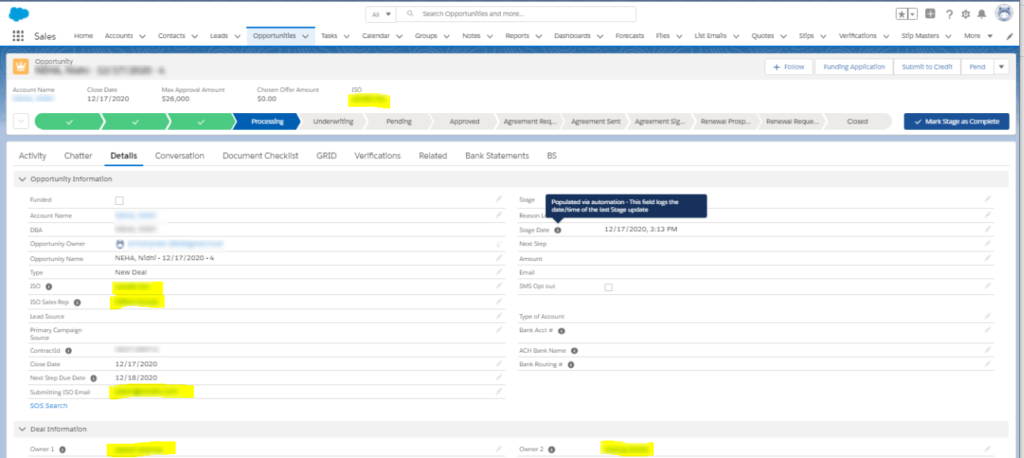
The primary owner for the opportunity can be identified in the field Owner 1, while the other owners would be categorized under Owner 2, Owner 3, and so on.
Under Opportunities, you can find the custom field Bank Statements which shows all the transactions of Bank Accounts created under a particular opportunity. Figure 4 shows the bank statements fetched from Lendio through mapping, with fields like the number of Deposits, NSFs, and $ Deposits in the particular Bank Account.
Figure 4
Bank Statements Captured under Opportunities
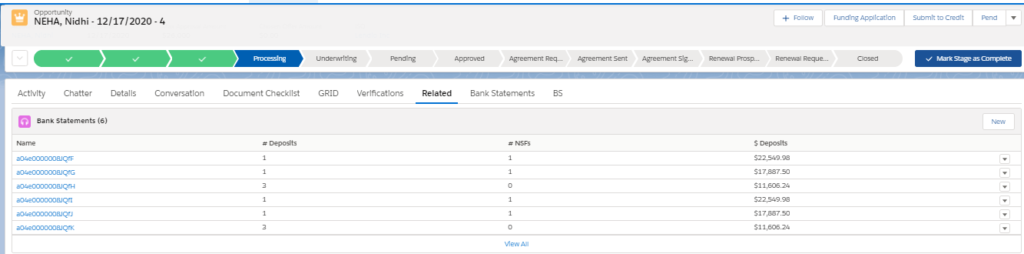
The bank statements are stored according to each month. This means that all the transactions related to a particular Bank Account in a particular month will be shown together.
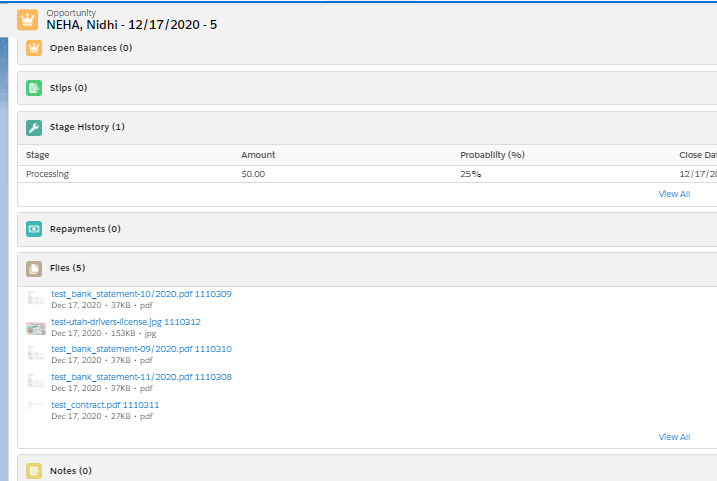
Opportunities also store all the documents acquired from Lendio through mapping. These could be personal or transactional documents of the leads associated with a particular record. Figure 5 shows the multiple documents which are captured under Opportunities.
Figure 5
Multiple Documents Captured under Opportunities
The Lendio- Salesforce integration we went over simplifies storage and management for records in Salesforce for banking and lending institutions. It lets loan officers synchronize loan records over Salesforce without duplicity or busywork. Sensitive information like bank transaction details and documents can be safely recorded with this integration.
That said, integrating your in-house system with Salesforce can bring a great deal of ease to data management. For more information on industry-specific Salesforce customizations, or to get your own legacy systems and processes integrated, connect with a team of professional Salesforce developers.



