
The banking industry has completely transformed and now what matters the most is how a bank is able to deliver personal experiences to its customers and build customer trust. That’s why commercial banking institutions are now moving to Salesforce Financial Services Cloud to deliver a more cohesive and customized customer experience.
Financial Services Cloud helps to connect banking institutions across businesses, geographies, and multiple channels. It helps provide bankers with enhanced visibility into existing opportunities and provides them a 360-degree view of managed and held-away assets.
Whether it is wealth or asset management, every aspect of commercial banking is complex and requires the management of critical information. FSC helps bankers by cutting down complexity, making it easier to track and maintain leads while simplifying the workflow. Here are some ways FSC helps smooth down operations for commercial bankers.
With the FSC package, banks would get access to different referral components that will help bankers and advisors to keep an eye on the performance and journey of the referral. A referral will go through stages from creation to conversion. With FSC, Salesforce will automatically create an Account and Opportunity when a referral is converted. This saves time for representatives to manually create an Account.
Salesforce Financial Services Cloud offers banks the flexibility to rapidly scale with the changing and growing market trends, without any dependency on physical infrastructure. This also means that the financial institutions would be less exposed to outages and downtime and can respond quickly to disruptions.
Bankers can use action plans for automating some of their recurring tasks and reduce manual intervention. Creating action plans would save bankers time which they could invest in revenue-generating operations and also help to make sure that the deadlines are met. The feature allows auto-assigning tasks to different team members, ensuring that there is compliance at every step.
With FSC, commercial bankers can access analytics reports and dashboards to gain insights that will help them to make informed decisions and deliver to customer expectations. To access more advanced analytics and predictive alerts, bankers can also use Tableau as an add-on, which is powered by Artificial Intelligence
Many banking companies that use Salesforce tend to customize Sales Cloud and Service Cloud to improve their operations and service delivery. But now with Salesforce Financial Services Cloud, commercial bankers can simply access the best of Salesforce features to boost productivity and achieve faster deal closure.
Learn more about FSC and implement the same in your banking institution with our certified experienced. Contact us to get along with the best-in-industry Salesforce professionals.
Financial institutions tend to have protocols and shorthands developed over several years for efficiency that they’d like to bring over to their digital transformations and record-management systems. In this feature, we cover the essentials of a Lendio-Salesforce integration that we implemented to demonstrate this.
This integration eliminates gruntwork and manual entry for the agents, so they don’t have to switch between systems. It also lets lending agents or ‘loan officers’ record account holder information and loans & deposit details stored on Lendio, automatically to Salesforce, eliminating the possibilities of human errors.
You’ll see how key details form lending accounts are saved under different objects on Salesforce by calling the Lendio API to pull details deals stored on Lendio.
Agents and admins can save time and maintain the records of transactions related to each account on Salesforce without manually feeding it, avoiding any duplicity of records. It also enables easy searching of records on Salesforce, showing all the records of an account of a particular month in a single view.
Lendio is an external system used to maintain lending information such as account holder details, the number of transactions made, and the amount deposited, along with loan-documentation for due-diligence and background checks for loan approval.
Lendio-Salesforce integration is suitable for banking and financial institutions to automatically map Salesforce with their system to capture all the records, eliminating manual intervention and any chances of duplicity.
With Lendio-Salesforce integration, a schema is set up on Salesforce and is mapped with multiple fields on Lendio. APIs are integrated to call those fields that fetch information from Lendio and automatically store it under Salesforce objects.
We map different fields on Lendio with the Salesforce objects through APIs.
When a user invokes Lendio’s APIs through Salesforce for records, the data from Lendio is captured and segmented under different objects on Salesforce.
1. Integrations created on Salesforce
An Apex Trigger is created over the standard Salesforce Opportunity object so that whenever its stage is changed to any of the values out of Decline/DocsOut/DocsIn/Funded/Active Repayment/ or Pending,
the trigger will invoke a batch class to update its related Salesforce/Lendio deal records.
A batch class is developed so that whenever the Opportunity stage is set to either of these values- (Decline/DocsOut/DocsIn/Funded/Active Repayment), it will update the status value of the related deal records in Salesforce. Furthermore, /Deals/ID/Status API is invoked and the stage value of the same deal records present in Lendio is updated.
2. Posting & Receiving Offer Details
A Trigger is developed on the Salesforce Opportunity object which will invoke a batch class whenever the deal stage is set to approval.
A batch class is developed such that whenever the deal stage is set to approval, it will invoke the POST /Deals/ID/Offer API, which will create an offer record in Lendio under a particular deal record.
A Trigger is developed on Lendio Record Tracker such that if an ID, Offer, and Update values in Record ID, Type of object, and Type action fields are received respectively in ID Tracker object, it will invoke a batch class to get offer details from Lendio.
Another batch class is developed considering that whenever an Offer ID, Offer Object and Update Action in ID tracker object are received, it will invoke GET/Deals/ID/Offer API to fetch the offer details and update that offer record accordingly under a particular deal record.
3. Test Classes to check the working of Apex Classes
Test classes are developed in Apex for the different web service classes, Apex batch, and Triggers, to make sure all the classes are working as expected. Along with this, parser classes are also created in Apex for all API callouts.
The primary purpose of Lendio-Salesforce integration is to capture records of deals stored on Lendio automatically. Without this integration, Salesforce Admins would have to type-in all entries manually into Salesforce.
On creating a deal within Lendio, the user hits the web service class made for Salesforce and passes the required parameters to Salesforce, which includes data from multiple fields. When the APIs created on each deal is called, it bifurcates the data to store it under the relevant objects on Salesforce – Contacts, Accounts, and Opportunities.
When a user calls any respective deal API, the information under that deal on Lendio is captured through mapping with Salesforce, and data from multiple fields acquired is stored under different objects on Salesforce- Contacts, Accounts, and Opportunities.
Accounts
Salesforce is mapped with Lendio to fetch the Account Name, which is the borrower name associated with a particular transaction. Values for Phone and Alternate Phone are fetched in the same way. There is a formula field Count Of Opportunities, which keeps incrementing as the number of opportunities keeps increasing. There are fields like State which are initially stored in a separate field to convert the abbreviation of state name into a complete name, which is then fetched into the standard field on Salesforce. Figure 1 shows all fields created in the object Accounts.
Figure 1
Details captured into the Object- Accounts

Contacts
All the fields in Contacts are acquired from Lendio through mapping. A record of contact can have multiple owners, in which one will be the primary owner, and the rest will be added as additional owners. This could be managed under Opportunities by setting Owner 1 as the primary owner of the record, and Owner 2, Owner 3, and so on for additional owners. Figure 2 shows all the fields created in the object Contacts.
Figure 2
Details captured into the Object- Contacts

Opportunities
All Opportunities created need to accept the following details.
<Account Name- Date when Opportunity was created- Number of Opportunities on the respective Account>.
In Figure 3, you can see the Opportunity name as NEHA, Nidhi- 12/17/2020- 4, where ‘NEHA, Nidhi’ is the Account Name, ‘12/17/2020’ is the date when this particular opportunity was created and ‘4’ is the number of opportunities created for this particular account.
Figure 3
Details captured into the Object- Opportunities
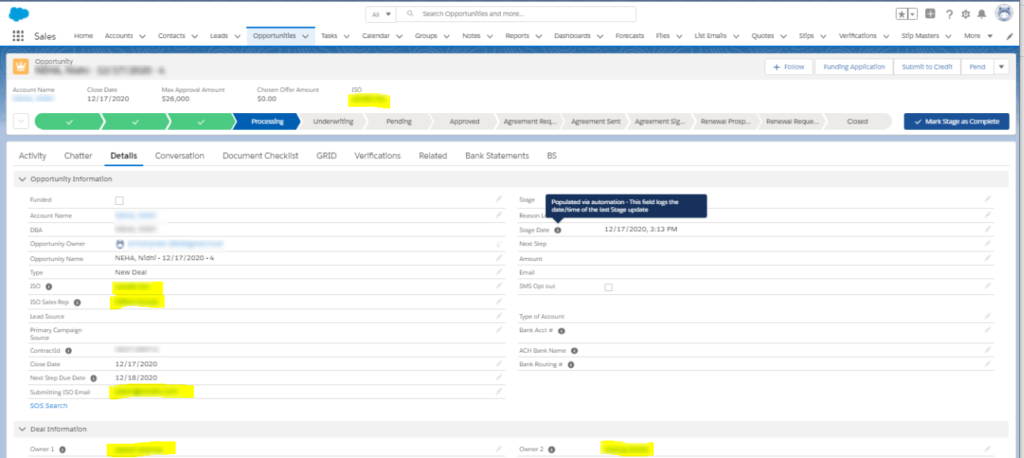
The primary owner for the opportunity can be identified in the field Owner 1, while the other owners would be categorized under Owner 2, Owner 3, and so on.
Under Opportunities, you can find the custom field Bank Statements which shows all the transactions of Bank Accounts created under a particular opportunity. Figure 4 shows the bank statements fetched from Lendio through mapping, with fields like the number of Deposits, NSFs, and $ Deposits in the particular Bank Account.
Figure 4
Bank Statements Captured under Opportunities
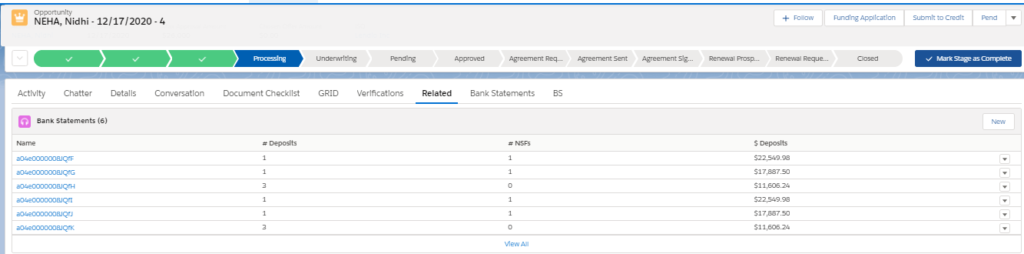
The bank statements are stored according to each month. This means that all the transactions related to a particular Bank Account in a particular month will be shown together.
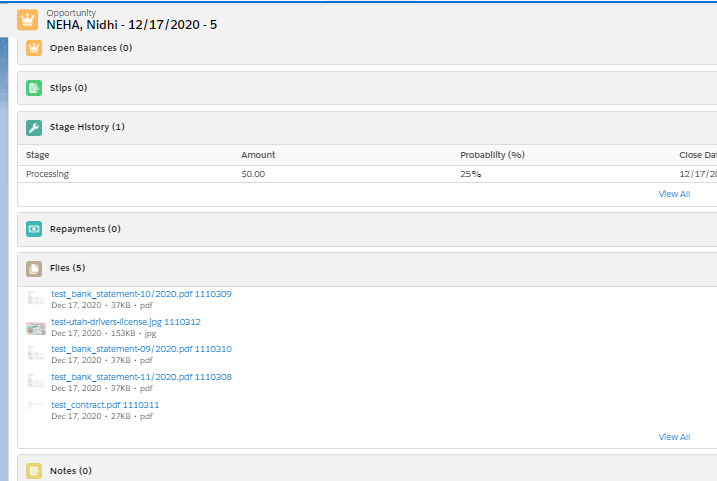
Opportunities also store all the documents acquired from Lendio through mapping. These could be personal or transactional documents of the leads associated with a particular record. Figure 5 shows the multiple documents which are captured under Opportunities.
Figure 5
Multiple Documents Captured under Opportunities
The Lendio- Salesforce integration we went over simplifies storage and management for records in Salesforce for banking and lending institutions. It lets loan officers synchronize loan records over Salesforce without duplicity or busywork. Sensitive information like bank transaction details and documents can be safely recorded with this integration.
That said, integrating your in-house system with Salesforce can bring a great deal of ease to data management. For more information on industry-specific Salesforce customizations, or to get your own legacy systems and processes integrated, connect with a team of professional Salesforce developers.



