Any sales or marketing professional would know that companies tend to handle mountains of customer information, which have to be securely managed and should be easily accessible. This is where the role of different Salesforce integrations comes in.
According to the Connectivity Benchmark Report 2023 by Mulesoft, an organization uses 900 applications on average. The numbers might keep increasing as every company has different departments, and every department uses multiple applications to manage its activities. Using apps could be a way to manage work, but looking into multiple apps could be daunting when you have to find relevant data.
Sales and marketing teams need to continuously access and work with customer data, such as email campaigns, purchase histories, or engagement details. Integrating all these applications with Salesforce is the solution here to access applications within the CRM and make data-based decisions without switching to another screen.
In this blog, we’ll learn more about Salesforce integration while uncovering the top 8 integrations you shouldn’t miss if you want your sales and marketing efficiency to improve.
Considering Salesforce integration is a way you can decrease the workload of your team by connecting applications that are highly used within your organization. It enables teams to access all data from different apps in your CRM, making workflow easier.
Let’s understand the main types of integrations you can work with:
Native integration: Integration using the CRM solution
Third-party integration: Integration built using an external solution for data integration, for example, Zapier.
But you don’t have to stress how you’ll pick the right integration type. Experienced Salesforce integration services will do it all for you.
Salesforce integration, done right, can bring a real difference in the performance of your sales and marketing agents. Specifically, some integrations are highly likely to simplify workflow and boost team productivity. Here are these top 8 Salesforce integrations that you should consider:
1. Linkedin
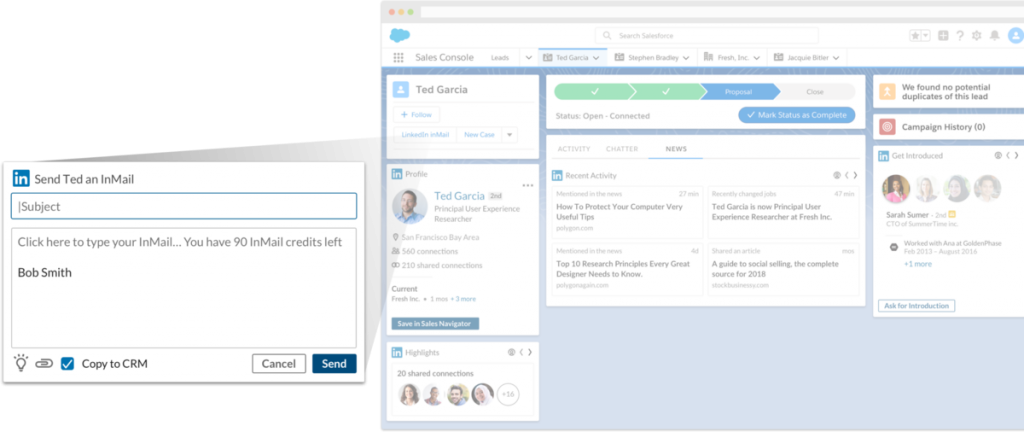
Integrating your Linkedin profile with Salesforce can help the teams identify their potential leads and can prioritize them. Salesforce Linkedin integration would help in decreasing manual lead searching and entry effort.
The integration can be achieved by synchronizing Salesforce records with Linkedin Sales Navigator. The integration would enable you to manage your LinkedIn contacts and send InMails from Salesforce.
2. HubSpot
If your sales and marketing teams are actively using HubSpot marketing, integrating the platform with Salesforce would be a game-changer. HubSpot and Salesforce integration would enable both teams to work in parallel. Bidirectional synchronization would enable both teams to update and access information in real time.
3. DocuSign
This integration allows you to run your electronic signatures and generate documents from Salesforce which can easily be shared with your accounts. These documents can easily be saved into your records. Also, you’ll be able to access real-time reporting from DocuSign within your Salesforce.
4. Mailchimp
Emails are definitely the most trusted means of customer engagement for sales and marketing teams. That’s why email marketing is always a priority for companies using Mailchimp.
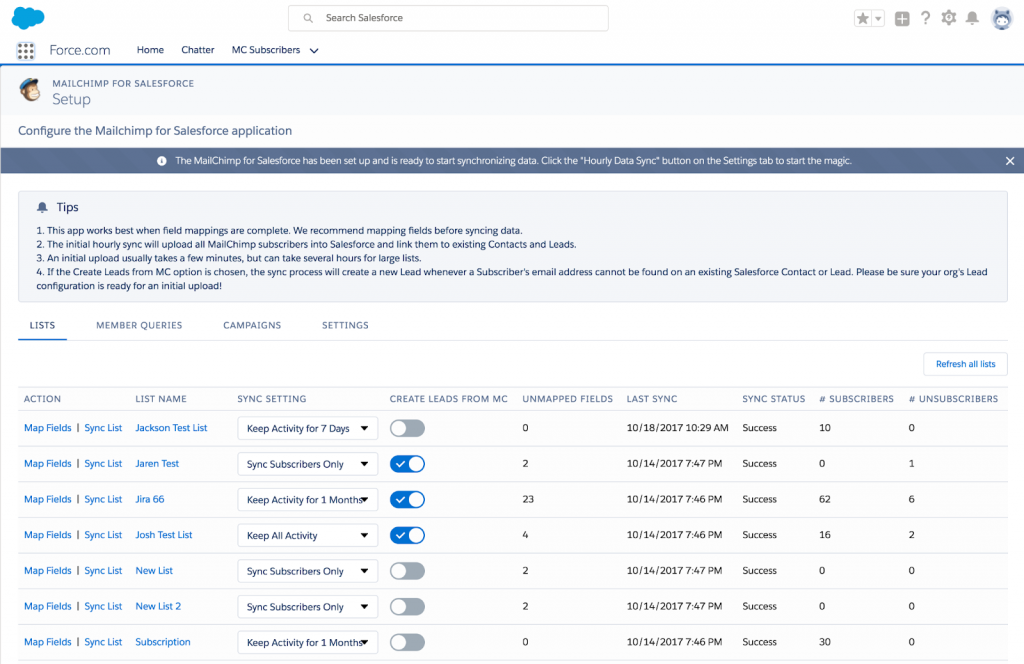
Integrating Salesforce and Mailchimp would allow teams to synchronize the solutions, enabling them to manage email lists and contact details on a single view. The integration allows the creation of email campaigns from the Salesforce org. Also, Mailchimp Salesforce integration allows teams to work on list segmentation within Mailchimp that will be synchronized with the lead and contact records in Salesforce.
5. Calendly
It’s the simplicity of Calendly that has made it so popular call-scheduling solution for almost every sales and marketing team. But its efficiency gets even more enhanced when you integrate it with Salesforce.
The integration allows you to create new call scheduling and book meetings while using Salesforce only. It will allow you to track your Calendly schedule from within Salesforce. This will thus give the sales and marketing teams the ease to book and manage calls within Salesforce without having to switch systems.
6. Quickbooks
Running sales and marketing campaigns also comes with efficient bookkeeping to manage expenses. That’s where Salesforce Quickbooks integration can be of great help. It will provide teams with complete transparency on business operations, financial details, and needed improvements.
Connecting Salesforce with Quickbooks will help to cut down any possibilities of accidental duplicate entries and will also reduce manual intervention, thus making accounting easier. All of this will help teams to manage operations better and get more tasks completed.
7. Slack
If your teams have been using Slack for internal communication, integrating it with Salesforce is a great idea. Conducting the native Salesforce Slack integration would not require any coding knowledge. This enables you to access notifications, work on approvals, and track screen flow directly in Slack.
You can even go for an API integration if you need to do more, like messages between Slack or Chatter.
8. Dropbox
Achieving Dropbox integration with Salesforce would enable you to access the information from your Dropbox directly within Salesforce. It allows you to conduct real-time editing of documents, syncing the changes across all the respective users.
The integration would thus boost the team’s efficiency, enhancing the ability to edit and approve through a centralized platform without having to switch their systems.
Although there are numerous other Salesforce integrations possible, these 8 integrations have caught most of our attention due to their high popularity. There’s no denying the fact that integrating your external applications with Salesforce will cut down a lot of your manual labor to save you time that you could devote to getting more done.
Now if you are still using Salesforce and your external applications separately, it’s your cue to get started with our reliable Salesforce integration services. You can contact us to discuss your integration requirements and take our hand to achieve enhanced productivity.
Financial institutions always work on improving customer service, so they strive for improvements in work efficiency. The most important feature they need here is process automation, and that’s where Salesforce offers them great help. Not just the basic documentation, but core operations like loan processing and KYC automation can all be handled through Salesforce.
It has been a long time that the manual and disconnected lending processes are weeded out and replaced by automated solutions that increased efficiency and reduced chances of errors.
For lenders, Salesforce can work amazingly to speed up their work of loan origination. Here’s how Salesforce helps them:
Other than these features, Salesforce allows numerous features that simplify loan processing, and some of these are mentioned below:
Salesforce helps to aggregate the data from multiple in-house systems required for deciding on loan processing and approval. It uses real-time risk analytics to automatically decide on an application, returning the results within Salesforce. It also allows operationalizing industry-standard risk models in minutes without working on any code.
Salesforce provides agents with a 360-degree view of your customers. It even helps you unify your complete lending process, giving access to data from multiple systems within Salesforce. The centralized view gives lenders, borrowers, underwriters, and brokers a transparent view of information. This ease helps them to make a decision collectively.
Using Salesforce, agents in financial institutions can automatically aggregate data from internal systems, making it all available within a compliance interface built on Salesforce. The processes simplify and orchestrate end-to-end compliance, speeding up the process of KYC approvals.
Salesforce allows users with automated workflow to identify, verify, and validate customer details to streamline the process and approval/disapproval of the KYC application.
Agents can use both structured and unstructured data within Salesforce, accessing on-demand analytics that speeds up the reporting process. Users can consider Salesforce integration to connect their internal systems with Salesforce to aggregate information and create reports with centralized data access using in-built templates.
Customers always expect financial companies to know what they need. Using Salesforce, financial agents can evaluate customer behavior and collate the data they need. This allows them to take a consumer-centric, not product-centric approach.
Salesforce has got everything that financial institutions need to improve efficiency and speed up the loan approval process. Teams in such organizations can automate their complex procession and decision-making system for credit and loan applications, handling it all within the Salesforce environment.
Connect with us to know more about Salesforce capabilities that could improve operations in your financial institution.
As businesses are becoming technology-driven, organizations have started leveraging mission-critical systems to simplify their work and automate their business processes. Salesforce is the customer relationship management system that has won the trust of many companies, helping them hold data about customers and prospects securely together. But along with Salesforce, companies tend to use other third-party systems too and consider hiring Salesforce integration services to get those systems integrated with Salesforce.
Salesforce has become more efficient with its built-in integration capabilities that help collaborate multiple systems used by a team, achieving a single view of all the data on Salesforce. Salesforce integration saves them time from switching between systems for any essential information.
Hiring experienced Salesforce integration services can help you develop custom integration modules, achieving cost-effective integration between multiple systems. Integration can help you with;
Companies have already started using Salesforce for integrating other systems to boost results and enhance productivity. Hiring Salesforce integration services to get the work done can provide numerous benefits to organizations like:
It is known that no out-of-the-box integration software can match the unique needs of a company. This is where they seek to find a unique and specific solution for their business needs. With Salesforce integration tools and services, you can get advice on an optimum integration plan that goes well with your business objects and complexity, solving the following challenges:
If you are working with multiple platforms, you might already have realized how hectic it could be to track and access information on every system. You need a team that can help to build a well-defined integration methodology to execute successful Salesforce integration.
We at 360 Degree Cloud have a team of Salesforce integration consultants who are highly knowledgeable and equipped to understand your business needs and challenges to resolve them with an optimized plan of Salesforce integration. Contact us to learn more about Salesforce integration options that your business might need to increase work efficiency and productivity,
For a successful Salesforce Integration strategy, it is important to determine the right way to leverage the robust APIs of Salesforce for effectively integrating data and streamlining operations. After that, Salesforce integration helps you get a holistic view of your process, a 360-degree view of your customers, and actionable data. But to achieve all of it, it is important to know the best practices for Salesforce integration that top Salesforce consultants follow.
There are many reasons why organizations prefer to go with Salesforce integration. Some of the common reasons are:
We have listed some of the best practices for Salesforce integration that can help a company reap the rewards of successful integration:
Before starting with Salesforce integration, it is important for the representatives to know the context of the data and clean it if needed. Accurate and timely information is essential to conduct the integration. The team should work on utilizing the available information in the right way and generate reports for effective decision-making.
The Salesforce integration team you hire should develop a thorough understanding of the details behind each data element utilized. The employees of the organization should only have access to clean data because outdated records might affect business reputation. So, having clean data at the source will make integration easier and efficient.
It is a serious possibility that an error might occur during Salesforce integration, and if not handled properly, might lead to disastrous consequences. You might have your system efficiently equipped to handle information transfer, but it might go weak when it comes to handling errors.
Such an error might lead to significant data loss in case there is no backup maintained. Salesforce integration services thus give enough attention to maintaining a proper error handling system that alerts you to any potential errors so they could be timely fixed.
Before initiating integration, it is important to be aware of a clearly defined process. For this, the Salesforce experts should:
Earlier data integration was done by building direct batch interfaces where data was extracted to a file that was sent to the target system and imported via a batch job. The process had some pitfall like:
But nowadays, Salesforce developers follow a structured approach for integration which is more cost-efficient and robust, where most of the work by configuration and mapping of data. The process is mainly followed in three steps:
If not done the right way, failed Salesforce integration would lead to wasted time and resources, data loss, errors, and user frustration. The best way to avoid this is to hire Salesforce integration experts who can deliver intelligent and connected customer experiences.
With a decade-long experience under our belt, we can offer the best assistance for any of your Salesforce-related concerns. Get in touch with us to know more about our wide array of Salesforce services.
Yes Bank just took its next step to revolutionize banking and lending services by collaborating with Salesforce. The partnership focuses on building a next-generation technology platform to power the retail lending business, in line with the lender’s strategy, which could further scale to help up the retail assets portfolio of Yes Bank.
From the outside, the prime focus of this collaboration is to create a unified experience for the customers that will drive aggressive retail-led growth for the bank. With this partnership, Yes Bank has marked its position to be among the first banks in India to move to Salesforce for Loan-Origination and Processing.
This new partnership will be empowering the internal and external ecosystem of the bank. The bank’s partners, associates, among others, can leverage the platform for accelerated fulfillment at the point of sale itself.
With Yes Bank- Salesforce collaboration, deployment of the Salesforce Loan Origination System for retail banking can enable YES Bank to provide personalized solutions and connected banking experiences for consumers across segments. The platform may also bolster the bank’s capacity to process higher volumes of loan applications through enhanced automation and progressive API integrations. This could ultimately reduce the turnaround time (TAT) for improved customer satisfaction.
Salesforce Loan Origination System is also expected to help in enhancing collaborative innovation within the Bank, providing all the employees, from relationship managers to loan disbursement officers and risk managers, getting a unified view of customer’s portfolio with added agility in customized digital solutions.
One possibility is that the connected banking system may allow Yes Bank to harness the latest innovations using the ‘API-first’ approach to add capabilities to existing systems.
This will also allow them to augment their CRM with a transformational layer to enable contextual and consistent personalized interactions with business operations with partners and vendors. A reconfiguration of existing systems could lay the groundwork for more comprehensive core upgrades.
Adopting Salesforce can also improve the data storage and management for lending agents compared to in-house systems. Integrating these systems with Salesforce would help in automatically capturing records of account holders on Salesforce, providing a single view of all their transactions. Such integrations with lending systems like Lendio are typically known to automate the process of storing lending records and save hours of busywork for lending agents spent manually recording information of each transaction. (Reach out at sales@360degreecloud.com for more information).
On Yes Bank- Salesforce collaboration, Arundhati Bhattacharya, CEO & Chairperson, Salesforce India said, “The new normal has reinforced the importance of the customer and businesses need to focus on long-term relationships ensuring customer wellness. From creating back-office efficiencies to powering personalized end-user experiences, we look forward to a fulfilling association with Yes Bank.” [source: Economic Times]
All in all, Yes Bank and Salesforce joining hands has brought their potential synergies together which would ultimately create new experiences for customers, employees, and partners.
Financial institutions tend to have protocols and shorthands developed over several years for efficiency that they’d like to bring over to their digital transformations and record-management systems. In this feature, we cover the essentials of a Lendio-Salesforce integration that we implemented to demonstrate this.
This integration eliminates gruntwork and manual entry for the agents, so they don’t have to switch between systems. It also lets lending agents or ‘loan officers’ record account holder information and loans & deposit details stored on Lendio, automatically to Salesforce, eliminating the possibilities of human errors.
You’ll see how key details form lending accounts are saved under different objects on Salesforce by calling the Lendio API to pull details deals stored on Lendio.
Agents and admins can save time and maintain the records of transactions related to each account on Salesforce without manually feeding it, avoiding any duplicity of records. It also enables easy searching of records on Salesforce, showing all the records of an account of a particular month in a single view.
Lendio is an external system used to maintain lending information such as account holder details, the number of transactions made, and the amount deposited, along with loan-documentation for due-diligence and background checks for loan approval.
Lendio-Salesforce integration is suitable for banking and financial institutions to automatically map Salesforce with their system to capture all the records, eliminating manual intervention and any chances of duplicity.
With Lendio-Salesforce integration, a schema is set up on Salesforce and is mapped with multiple fields on Lendio. APIs are integrated to call those fields that fetch information from Lendio and automatically store it under Salesforce objects.
We map different fields on Lendio with the Salesforce objects through APIs.
When a user invokes Lendio’s APIs through Salesforce for records, the data from Lendio is captured and segmented under different objects on Salesforce.
1. Integrations created on Salesforce
An Apex Trigger is created over the standard Salesforce Opportunity object so that whenever its stage is changed to any of the values out of Decline/DocsOut/DocsIn/Funded/Active Repayment/ or Pending,
the trigger will invoke a batch class to update its related Salesforce/Lendio deal records.
A batch class is developed so that whenever the Opportunity stage is set to either of these values- (Decline/DocsOut/DocsIn/Funded/Active Repayment), it will update the status value of the related deal records in Salesforce. Furthermore, /Deals/ID/Status API is invoked and the stage value of the same deal records present in Lendio is updated.
2. Posting & Receiving Offer Details
A Trigger is developed on the Salesforce Opportunity object which will invoke a batch class whenever the deal stage is set to approval.
A batch class is developed such that whenever the deal stage is set to approval, it will invoke the POST /Deals/ID/Offer API, which will create an offer record in Lendio under a particular deal record.
A Trigger is developed on Lendio Record Tracker such that if an ID, Offer, and Update values in Record ID, Type of object, and Type action fields are received respectively in ID Tracker object, it will invoke a batch class to get offer details from Lendio.
Another batch class is developed considering that whenever an Offer ID, Offer Object and Update Action in ID tracker object are received, it will invoke GET/Deals/ID/Offer API to fetch the offer details and update that offer record accordingly under a particular deal record.
3. Test Classes to check the working of Apex Classes
Test classes are developed in Apex for the different web service classes, Apex batch, and Triggers, to make sure all the classes are working as expected. Along with this, parser classes are also created in Apex for all API callouts.
The primary purpose of Lendio-Salesforce integration is to capture records of deals stored on Lendio automatically. Without this integration, Salesforce Admins would have to type-in all entries manually into Salesforce.
On creating a deal within Lendio, the user hits the web service class made for Salesforce and passes the required parameters to Salesforce, which includes data from multiple fields. When the APIs created on each deal is called, it bifurcates the data to store it under the relevant objects on Salesforce – Contacts, Accounts, and Opportunities.
When a user calls any respective deal API, the information under that deal on Lendio is captured through mapping with Salesforce, and data from multiple fields acquired is stored under different objects on Salesforce- Contacts, Accounts, and Opportunities.
Accounts
Salesforce is mapped with Lendio to fetch the Account Name, which is the borrower name associated with a particular transaction. Values for Phone and Alternate Phone are fetched in the same way. There is a formula field Count Of Opportunities, which keeps incrementing as the number of opportunities keeps increasing. There are fields like State which are initially stored in a separate field to convert the abbreviation of state name into a complete name, which is then fetched into the standard field on Salesforce. Figure 1 shows all fields created in the object Accounts.
Figure 1
Details captured into the Object- Accounts

Contacts
All the fields in Contacts are acquired from Lendio through mapping. A record of contact can have multiple owners, in which one will be the primary owner, and the rest will be added as additional owners. This could be managed under Opportunities by setting Owner 1 as the primary owner of the record, and Owner 2, Owner 3, and so on for additional owners. Figure 2 shows all the fields created in the object Contacts.
Figure 2
Details captured into the Object- Contacts

Opportunities
All Opportunities created need to accept the following details.
<Account Name- Date when Opportunity was created- Number of Opportunities on the respective Account>.
In Figure 3, you can see the Opportunity name as NEHA, Nidhi- 12/17/2020- 4, where ‘NEHA, Nidhi’ is the Account Name, ‘12/17/2020’ is the date when this particular opportunity was created and ‘4’ is the number of opportunities created for this particular account.
Figure 3
Details captured into the Object- Opportunities
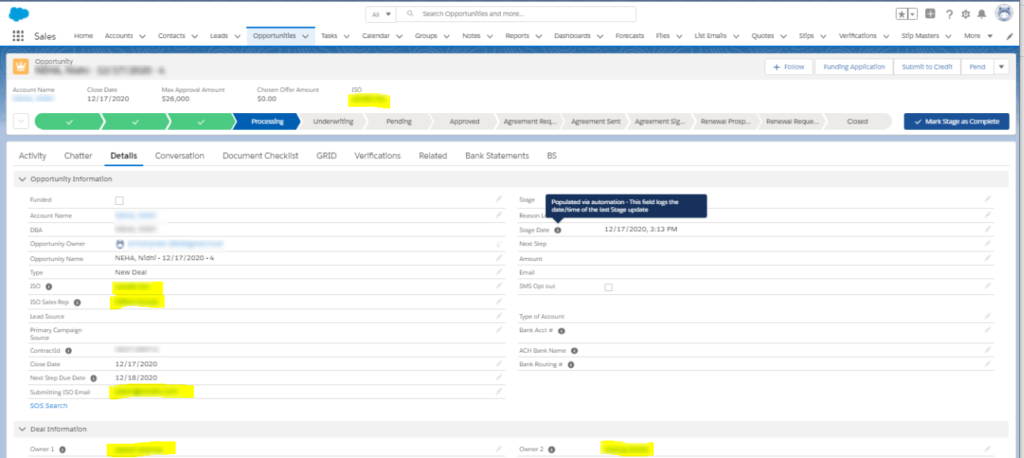
The primary owner for the opportunity can be identified in the field Owner 1, while the other owners would be categorized under Owner 2, Owner 3, and so on.
Under Opportunities, you can find the custom field Bank Statements which shows all the transactions of Bank Accounts created under a particular opportunity. Figure 4 shows the bank statements fetched from Lendio through mapping, with fields like the number of Deposits, NSFs, and $ Deposits in the particular Bank Account.
Figure 4
Bank Statements Captured under Opportunities
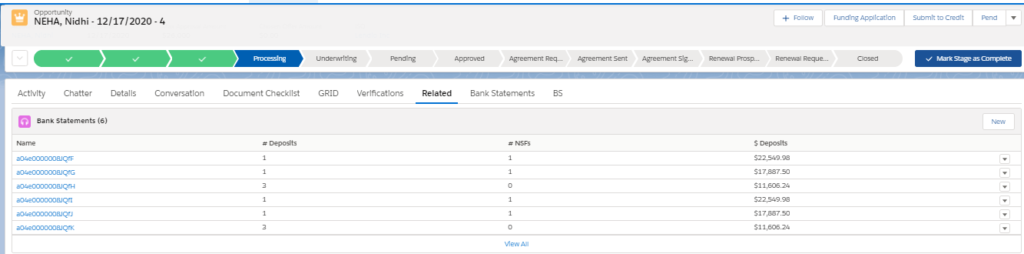
The bank statements are stored according to each month. This means that all the transactions related to a particular Bank Account in a particular month will be shown together.
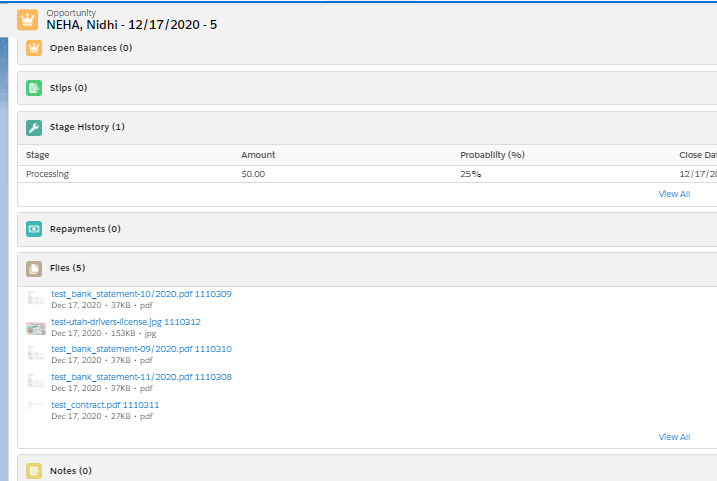
Opportunities also store all the documents acquired from Lendio through mapping. These could be personal or transactional documents of the leads associated with a particular record. Figure 5 shows the multiple documents which are captured under Opportunities.
Figure 5
Multiple Documents Captured under Opportunities
The Lendio- Salesforce integration we went over simplifies storage and management for records in Salesforce for banking and lending institutions. It lets loan officers synchronize loan records over Salesforce without duplicity or busywork. Sensitive information like bank transaction details and documents can be safely recorded with this integration.
That said, integrating your in-house system with Salesforce can bring a great deal of ease to data management. For more information on industry-specific Salesforce customizations, or to get your own legacy systems and processes integrated, connect with a team of professional Salesforce developers.
The way a sales representative interacts makes or breaks brand perception for a business. So, representatives fumbling over the phone with a valuable customer can be detrimental to your brand image and make your customers switch to another service provider. Integrating CTI with Salesforce can help mitigate this.
Integrating Salesforce with CTI or ‘Computer Telephony Integration’ systems has helped representatives manage customer interactions productively. Telephony over Salesforce gives the users an ‘open API’ enabling third-party CTI vendors to easily connect all their telephony channels to a shared Salesforce interface. To enhance customer experience, CTI integration with Salesforce enables automated call logging, ‘click-to-dial’ capability for softphones, a choice between local presence numbers or ‘Application Addresses’, Voicemails, and screen alerts for incoming calls.
Here’s how Salesforce-Telephony supports sales teams to conduct real-time communication with potential customers.
Shorter lead-response times
Manual dialing can be cumbersome, especially in a hefty workflow, and add the equivalent of many days wasted in ‘clicking time’ across the organization. Integrating Salesforce with telecalling operations gives sales teams a point-and-click dialer. The point-and-click Salesforce dialer, in turn, enables the click-to-call capability to eliminate manual dialing every time representatives need to call a lead.
Close more sales
Any solution for sales acceleration will promise more sales; CTI with Salesforce promises more sales calls. It allows the representatives to record call data, so they always have data available in real time. In this case, even if another rep spoke with an unfamiliar prospect, they’d benefit from the information logged by the previous representative.
Reach more prospects
There’s a high chance that your prospects won’t even pick up the phone the first time you call. It is quite normal for the sales calls to go straight to voicemail. Salesforce CTI integration helps in optimizing outbound calls, so the reps only connect when a live person picks up the call.
Another feature that boosts up the chances of prospects picking up the call is adding the local phone number. With CTI, sales representatives can simulate ‘Local Presence’, which allows them to use a phone number from the same region of the prospect you’re calling.
Create outbound sales cadence
‘The money is in the follow-up.’ Not ours, but wise words nonetheless.
With this integration, sales representatives can benefit the most by easily scheduling outbound calls, follow-up tasks, and emails. This allows them to follow up with prospects through calls and emails scheduled at the most suitable time. It also ensures that interested prospects don’t fall through the cracks.
Improved team performance
With higher adoption of these CRM features, sales managers can easily identify opportunities for training and improvement that can help the team to improve their work process. Concurrently, managers can use Salesforce dashboards best to review the tracked key performance indicators. These KPIs could be a range of indicative metrics like opportunities created, average call duration, dead-air time, number of calls made, and more.
Reduce costs
With Salesforce CTI integration, businesses can significantly reduce their costs related to service and sales operations, as manual processes would be replaced by automation. No more money and effort has to be spent on manually handling telephony operations and managing records. Such tasks can easily be automated with Salesforce CTI integration.
Integration of CTI with Salesforce makes work easier for the sales representatives, enabling them to achieve more leads while minimizing the manual workflow. All you need are professional Salesforce integration services to boost your CRM returns and help your company grow. The right service can smoothly integrate Salesforce with your existing systems to streamline information flows and add powerful, relevant indicators to your customer profiles.
App integration and synchronization have been a sworn-by mantra for maximizing productivity and cost control. Salesforce & Mailchimp integration is among the many ways that businesses now use to provide a seamless experience for customers.
Mailchimp Integration with Salesforce can be done in one of two ways – the app route or the API route. The first approach would need a simple installation and configuration of an app in Salesforce. For the second, you need custom code to interlink Salesforce & Mailchimp APIs. The app route can’t be considered as flexible as custom API based integration but can be convenient for accommodating most use cases.
Salesforce’s reputation as a cloud-based customer success platform rests primarily on its use by businesses to manage contacts and sales leads. On the other hand, Mailchimp helps companies design, send, and track email marketing campaigns. Integrating Mailchimp with Salesforce helps in managing the activities of subscribers, making it easy to synchronize campaigns, tags, and more. Here’s the low-down on what makes the integration tick.
The integration helps in conducting marketing automation campaigns so sales teams can get customized information that attracts and retains customers. Integrating Salesforce with Mailchimp often allows sales reps to track a customer’s purchase-intent and history. It also helps marketers re-strategize to create more leads.
Synchronization also opens the doors to field mapping to link and share data from email campaigns with inside teams meaningfully. The integration also allows scheduled synchronization so you can update your leads in the existing contact list easily.
Integrations are only effective when they enable shorter turnarounds and greater throughputs. Mailchimp-Salesforce integrations give subscribers a quick update across all platforms. With this, teams won’t have to labor over contacts individually, which will increase productivity while minimizing human data errors.
Mailchimp integration allows easier segmentation of the client database by specific criteria or interests. The contacts and leads are automatically grouped. Mailchimp can then push custom messages to clients in Salesforce through messages depending on the audience selected.
Email Personalization: You’ll have enough ease to personalize your messages so you can connect with your audience in a customized way. The integration allows you easy email personalization, without the need to dig deep into audience interests.
Measurable Results: Integration of Salesforce and Mailchimp will help you measure your campaign performance with better click-through and open rates.
Insightful and Actionable Email Reporting: The integration allows you to have insightful and actionable insights for real-time reporting. You’ll also be aware of the trends that should help you optimize your campaigns regularly.
Upselling and Cross-Selling Opportunities: You can easily browse customer buying and browsing behavior to identify suitable opportunities for upselling and cross-selling.
It’s already clear that Salesforce Mailchimp integration can transform marketing for your business. But to get these integrated, you’ll need the right Salesforce integration service to count on. You can count on us for smooth integration and migrate all your subscriber data in no time.



